
CAS BACnet Stack
Native BACnet for your devices and applications
A royalty-free C/C++ library with the source code included. Add BACnet server and client communication over BACnet/IP, BACnet MS/TP (Multidrop Serial Bus/Token Passing) and BACnet/SC (BACnet Secure Connect), from bare metal microcontrollers to embedded Linux or Windows.
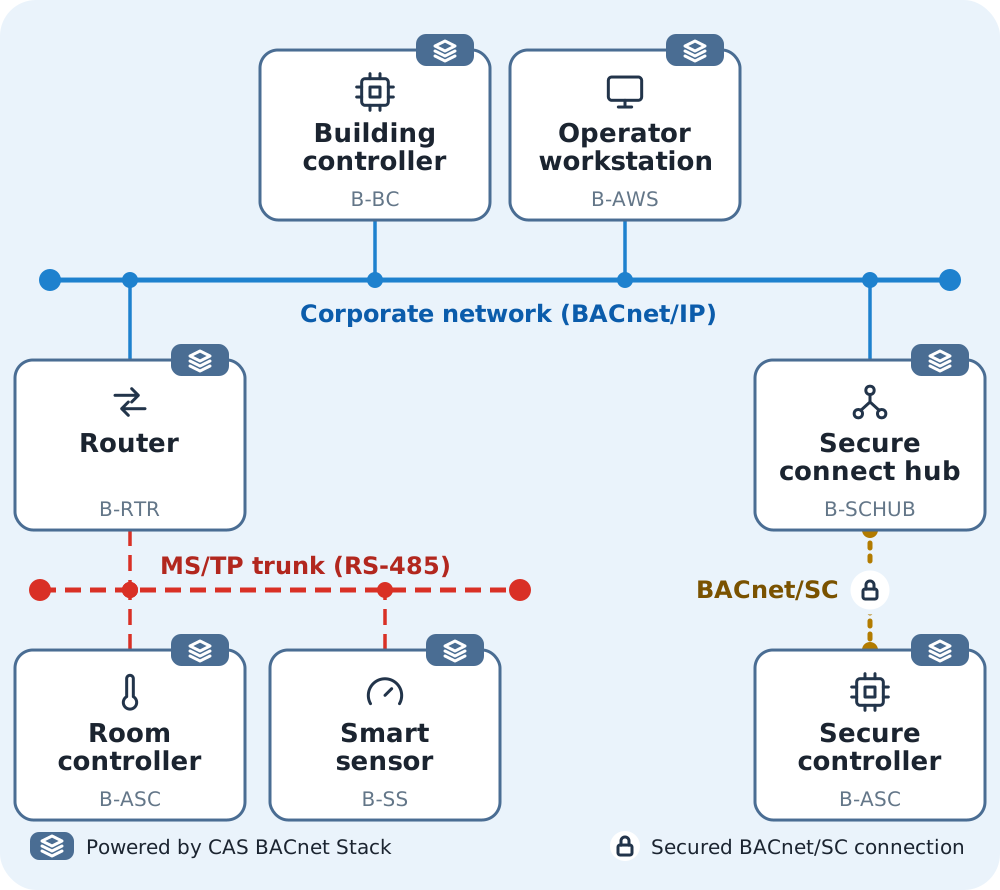
- device installations
- 1,000,000+
- of BACnet experience
- 25+ years
- BACnet device profiles
- 39
Who uses it
Used by the largest companies around the world
Manufacturers of building controls, HVAC equipment and industrial systems embed the stack in the products they ship.
- Schindler
- Honeywell
- Big Ass Fans
- Yaskawa
- WindowMaster
- Johnson Controls
What it is
What is the CAS BACnet Stack?
The CAS BACnet Stack is a royalty-free C/C++ library, with the source code included, that adds native BACnet server and client communication to your embedded device or your application.
BACnet without writing a protocol stack
Royalty-free, with the full C/C++ source code: no per-device fees, and nothing hidden from your engineers.
One library from microcontroller to server
The same stack runs in Zephyr firmware on an ESP32-S3, on embedded Linux and on Windows.
BACnet Secure Connect built in
BACnet/SC beside BACnet/IP and MS/TP, with Chipkin’s own hub and certificate authority for the sites that need them.
The device profile you need
39 device profiles with every required building block, each one published on this page.
What you get
- The full source code, with CMake presets for Windows, Linux and ARM
- Ready-built libraries for Windows x64 and Linux x64
- Adapters for C/C++, C#, Java, Python, Node.js, Go and Rust
- A Zephyr module for microcontroller firmware
- Great, thorough manual and API documentation. Every function, callback and constant
- An example project for each device profile, with Windows and Linux binaries
- The unit test suite, to build and run on your own machine
Which device are you building?
Start from the example project for your device profile. Each one is a working device you can run today.
- Smart sensorA room temperature or CO₂ sensorB-SS
- Smart actuatorA damper or valve actuatorB-SA
- Application specific controllerA VAV box or fan coil controllerB-ASC
- Building controllerA rooftop unit or chiller plant controllerB-BC
- GatewayA Modbus to BACnet gatewayB-GW
- Advanced elevator controllerAn elevator group controllerB-AEC
| Standard | ANSI/ASHRAE Standard 135-2024. A build reports Protocol Revision 30 by default, and can report any revision from 24, the lowest a build accepts. |
|---|---|
| Device profiles | 39 device profiles in Annex L of the standard have every required building block (BIBB) implemented, from the 160 BIBBs the stack implements. |
| Decoding | Decodes BACnet messages to JSON or XML, which suits logging and web-based tools. |
Every profile against every building blockHow the stack comparesDatasheet (PDF)
Chipkin has built BACnet software for 25+ years, and the stack is part of 1,000,000+ device installations.
It also powers Chipkin's own CAS BACnet Explorer, which thousands of people a day use to discover and interrogate their BACnet devices.
Fully featured
Everything a BACnet device needs, in one library
One library covers the roles, the data links and the objects a BACnet product needs, from a microcontroller to a server application.
Server and client
Answers requests as a BACnet server, the role of a field device, and sends them as a client, the role of an HMI or a data logger.
BACnet/IP, MS/TP and BACnet/SC
BACnet/IP with BBMD and foreign device registration, BACnet MS/TP, and BACnet Secure Connect, all from one library.
Objects from Analog Input to Trend Log
61 of the standard's object types supported in full and 3 in part, so a device presents the objects its type calls for.
Router, BBMD and hub roles
The same library builds a BACnet router, a broadcast management device and a BACnet/SC hub, each with a public example project.
C/C++, C#, Java, Python, Node.js, Go and Rust
Call the stack from the language your product already uses.
Fits a microcontroller
The embedded build target turns every object type, service and data link off until you enable the ones you use, and a Zephyr module runs the stack on an ESP32-S3 over BACnet/IP and MS/TP.
Hello world
BACnet in your language
- Register the callbacks
- Add a device and its objects
- Call the stack in a loop
C/C++
#include "CASBACnetStackAdapter.h"

const uint32_t DEVICE_INSTANCE = 389001;
const uint16_t OBJECT_TYPE_ANALOG_INPUT = 0;
const uint16_t OBJECT_TYPE_BINARY_OUTPUT = 4;
const uint16_t OBJECT_TYPE_MULTI_STATE_VALUE = 19;

// The stack calls this when a client reads a REAL property. Answer from your own data.
bool CallbackGetPropertyReal(const uint32_t deviceInstance, const uint16_t objectType, const uint32_t objectInstance, const uint32_t propertyIdentifier, float* value, const bool useArrayIndex, const uint32_t propertyArrayIndex, uint32_t* errorCode) {
	if (propertyIdentifier == BACnetPropertyIdentifier_presentValue && objectType == OBJECT_TYPE_ANALOG_INPUT && objectInstance == 101) {
		*value = 99.6f;
		return true;
	}
	return false;
}

// Your transport: copy one received UDP datagram into the buffer, or return 0 when none is waiting.
uint16_t CallbackReceiveMessage(...) {
	return 0; // ...
}
uint16_t CallbackSendMessage(...) {
	return 0; // ...
}
CASBACnetTime CallbackGetSystemTime() {
	return time(NULL);
}

int main() {
	LoadBACnetFunctions();
	BACnetStack_RegisterCallbackReceiveMessageForPort(CallbackReceiveMessage);
	BACnetStack_RegisterCallbackSendMessageForPort(CallbackSendMessage);
	BACnetStack_RegisterCallbackGetSystemTime(CallbackGetSystemTime);
	BACnetStack_RegisterCallbackGetPropertyReal(CallbackGetPropertyReal);

	BACnetStack_AddDevice(DEVICE_INSTANCE);
	BACnetStack_AddObject(DEVICE_INSTANCE, OBJECT_TYPE_ANALOG_INPUT, 101);
	BACnetStack_AddObject(DEVICE_INSTANCE, OBJECT_TYPE_BINARY_OUTPUT, 102);
	BACnetStack_AddObject(DEVICE_INSTANCE, OBJECT_TYPE_MULTI_STATE_VALUE, 103);

	for (;;) {
		BACnetStack_Tick();
	}
}C#
using System;
using CASBACnetStack;

unsafe class Hello
{
    const uint DeviceInstance = 389001;

    // The stack calls this when a client reads a REAL property. Answer from your own data.
    static bool GetPropertyReal(uint deviceInstance, ushort objectType, uint objectInstance, uint propertyIdentifier, float* value, bool useArrayIndex, uint propertyArrayIndex, uint* errorCode)
    {
        if (propertyIdentifier == (uint)BACnetPropertyIdentifier.presentValue && objectType == CASBACnetStackAdapter.OBJECT_TYPE_ANALOG_INPUT && objectInstance == 101)
        {
            *value = 99.6f;
            return true;
        }
        return false;
    }

    // Your transport: copy one received UDP datagram into the buffer, or return 0 when none is waiting.
    static ushort ReceiveMessage(...)
    {
        return 0; // ...
    }
    static ushort SendMessage(...)
    {
        return 0; // ...
    }
    static long GetSystemTime()
    {
        return DateTimeOffset.UtcNow.ToUnixTimeSeconds();
    }

    static void Main()
    {
        // Keep the delegates in fields or variables that live as long as the stack does.
        var receiveMessage = new CASBACnetStackAdapter.FPCallbackReceiveMessageForPort(ReceiveMessage);
        var sendMessage = new CASBACnetStackAdapter.FPCallbackSendMessageForPort(SendMessage);
        var getSystemTime = new CASBACnetStackAdapter.FPCallbackGetSystemTime(GetSystemTime);
        var getPropertyReal = new CASBACnetStackAdapter.FPCallbackGetPropertyReal(GetPropertyReal);
        CASBACnetStackAdapter.BACnetStack_RegisterCallbackReceiveMessageForPort(receiveMessage);
        CASBACnetStackAdapter.BACnetStack_RegisterCallbackSendMessageForPort(sendMessage);
        CASBACnetStackAdapter.BACnetStack_RegisterCallbackGetSystemTime(getSystemTime);
        CASBACnetStackAdapter.BACnetStack_RegisterCallbackGetPropertyReal(getPropertyReal);

        CASBACnetStackAdapter.BACnetStack_AddDevice(DeviceInstance);
        CASBACnetStackAdapter.BACnetStack_AddObject(DeviceInstance, CASBACnetStackAdapter.OBJECT_TYPE_ANALOG_INPUT, 101);
        CASBACnetStackAdapter.BACnetStack_AddObject(DeviceInstance, CASBACnetStackAdapter.OBJECT_TYPE_BINARY_OUTPUT, 102);
        CASBACnetStackAdapter.BACnetStack_AddObject(DeviceInstance, CASBACnetStackAdapter.OBJECT_TYPE_MULTI_STATE_VALUE, 103);

        for (;;)
        {
            CASBACnetStackAdapter.BACnetStack_Tick();
        }
    }
}Java
import com.chipkin.bacnet.BACnetConstants;
import com.chipkin.bacnet.CASBACnetStackAdapter;
import com.chipkin.bacnet.ICASBACnetStackLibrary;
import com.sun.jna.Pointer;

public class Hello {
    static final int DEVICE_INSTANCE = 389001;
    static final short OBJECT_TYPE_MULTI_STATE_VALUE = 19;

    public static void main(String[] args) throws Exception {
        ICASBACnetStackLibrary stack = new CASBACnetStackAdapter().getLibrary();

        // Your transport: copy one received UDP datagram into the buffer, or return 0 when none is waiting.
        // Keep each callback in a variable that lives as long as the stack does, or JNA may free it.
        ICASBACnetStackLibrary.FPCallbackReceiveMessageForPort receiveMessage = new ICASBACnetStackLibrary.FPCallbackReceiveMessageForPort() {
            public short callback(...) {
                return 0; // ...
            }
        };
        ICASBACnetStackLibrary.FPCallbackSendMessageForPort sendMessage = new ICASBACnetStackLibrary.FPCallbackSendMessageForPort() {
            public short callback(...) {
                return 0; // ...
            }
        };
        ICASBACnetStackLibrary.FPCallbackGetSystemTime getSystemTime = new ICASBACnetStackLibrary.FPCallbackGetSystemTime() {
            public long callback() {
                return System.currentTimeMillis() / 1000L;
            }
        };
        // The stack calls this when a client reads a REAL property. Answer from your own data.
        ICASBACnetStackLibrary.FPCallbackGetPropertyReal getPropertyReal = new ICASBACnetStackLibrary.FPCallbackGetPropertyReal() {
            public byte callback(int deviceInstance, short objectType, int objectInstance, int propertyIdentifier, Pointer value, byte useArrayIndex, int propertyArrayIndex, Pointer errorCode) {
                if (propertyIdentifier == ICASBACnetStackLibrary.BACnetPropertyIdentifier.presentValue && objectType == BACnetConstants.OBJECT_TYPE_ANALOG_INPUT && objectInstance == 101) {
                    value.setFloat(0, 99.6f);
                    return 1;
                }
                return 0;
            }
        };
        stack.BACnetStack_RegisterCallbackReceiveMessageForPort(receiveMessage);
        stack.BACnetStack_RegisterCallbackSendMessageForPort(sendMessage);
        stack.BACnetStack_RegisterCallbackGetSystemTime(getSystemTime);
        stack.BACnetStack_RegisterCallbackGetPropertyReal(getPropertyReal);

        stack.BACnetStack_AddDevice(DEVICE_INSTANCE);
        stack.BACnetStack_AddObject(DEVICE_INSTANCE, BACnetConstants.OBJECT_TYPE_ANALOG_INPUT, 101);
        stack.BACnetStack_AddObject(DEVICE_INSTANCE, BACnetConstants.OBJECT_TYPE_BINARY_OUTPUT, 102);
        stack.BACnetStack_AddObject(DEVICE_INSTANCE, OBJECT_TYPE_MULTI_STATE_VALUE, 103);

        for (;;) {
            stack.BACnetStack_Tick();
        }
    }
}Python
import ctypes
import time
from CASBACnetStackAdapter import libname, bacnet_objectType
import CASBACnetStackAdapterBindings as bacnet

DEVICE_INSTANCE = 389001

bacnet.bind(ctypes.CDLL(libname))


# The stack calls this when a client reads a REAL property. Answer from your own data.
@bacnet.FPCallbackGetPropertyReal
def get_property_real(device_instance, object_type, object_instance, property_identifier, value, use_array_index, property_array_index, error_code):
    if property_identifier == bacnet.BACnetPropertyIdentifier.presentValue and object_type == bacnet_objectType["analogInput"] and object_instance == 101:
        value[0] = 99.6
        return True
    return False


# Your transport: copy one received UDP datagram into the buffer, or return 0 when none is waiting.
@bacnet.FPCallbackReceiveMessageForPort
def receive_message(...):
    return 0  # ...


@bacnet.FPCallbackSendMessageForPort
def send_message(...):
    return 0  # ...


@bacnet.FPCallbackGetSystemTime
def get_system_time():
    return int(time.time())


bacnet.BACnetStack_RegisterCallbackReceiveMessageForPort(receive_message)
bacnet.BACnetStack_RegisterCallbackSendMessageForPort(send_message)
bacnet.BACnetStack_RegisterCallbackGetSystemTime(get_system_time)
bacnet.BACnetStack_RegisterCallbackGetPropertyReal(get_property_real)

bacnet.BACnetStack_AddDevice(DEVICE_INSTANCE)
bacnet.BACnetStack_AddObject(DEVICE_INSTANCE, bacnet_objectType["analogInput"], 101)
bacnet.BACnetStack_AddObject(DEVICE_INSTANCE, bacnet_objectType["binaryOutput"], 102)
bacnet.BACnetStack_AddObject(DEVICE_INSTANCE, bacnet_objectType["multiStateValue"], 103)

while True:
bacnet.BACnetStack_Tick()Node.js
const bacnet = require('@chipkin/cas-bacnet-stack');

const DEVICE_INSTANCE = 389001;
const OBJECT_TYPE_ANALOG_INPUT = 0;
const OBJECT_TYPE_BINARY_OUTPUT = 4;
const OBJECT_TYPE_MULTI_STATE_VALUE = 19;

// Your transport: copy one received UDP datagram into the buffer, or return 0 when none is waiting.
bacnet.BACnetStack_RegisterCallbackReceiveMessageForPort((...) => {
    return 0; // ...
});
bacnet.BACnetStack_RegisterCallbackSendMessageForPort((...) => {
    return 0; // ...
});
bacnet.BACnetStack_RegisterCallbackGetSystemTime(() => Math.floor(Date.now() / 1000));

// The stack calls this when a client reads a REAL property. Answer from your own data.
bacnet.BACnetStack_RegisterCallbackGetPropertyReal((deviceInstance, objectType, objectInstance, propertyIdentifier, value, useArrayIndex, propertyArrayIndex, errorCode) => {
    if (propertyIdentifier === bacnet.BACnetPropertyIdentifier.presentValue && objectType === OBJECT_TYPE_ANALOG_INPUT && objectInstance === 101) {
        value.writeFloatLE(99.6, 0);
        return true;
    }
    return false;
});

bacnet.BACnetStack_AddDevice(DEVICE_INSTANCE);
bacnet.BACnetStack_AddObject(DEVICE_INSTANCE, OBJECT_TYPE_ANALOG_INPUT, 101);
bacnet.BACnetStack_AddObject(DEVICE_INSTANCE, OBJECT_TYPE_BINARY_OUTPUT, 102);
bacnet.BACnetStack_AddObject(DEVICE_INSTANCE, OBJECT_TYPE_MULTI_STATE_VALUE, 103);

setInterval(() => bacnet.BACnetStack_Tick(), 10);Go
package main

/*
#include "CASBACnetStackDLL.h"
*/
import "C"

import (
	"time"

	casbacnetstack "github.com/chipkin/cas-bacnet-stack/adapters/golang"
)

const deviceInstance = 389001
const objectTypeAnalogInput = 0
const objectTypeBinaryOutput = 4
const objectTypeMultiStateValue = 19

// The stack calls this when a client reads a REAL property. Answer from your own data.
func getPropertyReal(deviceInstance uint32, objectType uint16, objectInstance uint32, propertyIdentifier uint32, value *float32, useArrayIndex bool, propertyArrayIndex uint32, errorCode *uint32) bool {
	if propertyIdentifier == C.BACnetPropertyIdentifier_presentValue && objectType == objectTypeAnalogInput && objectInstance == 101 {
		*value = 99.6
		return true
	}
	return false
}

// Your transport: copy one received UDP datagram into the buffer, or return 0 when none is waiting.
func receiveMessage(...) uint16 {
	return 0 // ...
}

func sendMessage(...) uint16 {
	return 0 // ...
}

func getSystemTime() int64 {
	return time.Now().Unix()
}

func main() {
	casbacnetstack.CallbackReceiveMessageForPort = receiveMessage
	casbacnetstack.CallbackSendMessageForPort = sendMessage
	casbacnetstack.CallbackGetSystemTime = getSystemTime
	casbacnetstack.CallbackGetPropertyReal = getPropertyReal
	casbacnetstack.RegisterBACnetStackCallbacks()

	C.BACnetStack_AddDevice(deviceInstance)
	C.BACnetStack_AddObject(deviceInstance, objectTypeAnalogInput, 101)
	C.BACnetStack_AddObject(deviceInstance, objectTypeBinaryOutput, 102)
	C.BACnetStack_AddObject(deviceInstance, objectTypeMultiStateValue, 103)

	for {
		C.BACnetStack_Tick()
		time.Sleep(10 * time.Millisecond)
	}
}Rust
use cas_bacnet_stack_adapters::*;
use std::time::{SystemTime, UNIX_EPOCH};

const DEVICE_INSTANCE: u32 = 389001;
const OBJECT_TYPE_ANALOG_INPUT: u16 = 0;
const OBJECT_TYPE_BINARY_OUTPUT: u16 = 4;
const OBJECT_TYPE_MULTI_STATE_VALUE: u16 = 19;

// The stack calls this when a client reads a REAL property. Answer from your own data.
extern "C" fn get_property_real(_device_instance: u32, object_type: u16, object_instance: u32, property_identifier: u32, value: *mut f32, _use_array_index: bool, _property_array_index: u32, _error_code: *mut u32) -> bool {
    if property_identifier == BACnetPropertyIdentifier::presentValue && object_type == OBJECT_TYPE_ANALOG_INPUT && object_instance == 101 {
        unsafe { *value = 99.6 };
        return true;
    }
    false
}

// Your transport: copy one received UDP datagram into the buffer, or return 0 when none is waiting.
extern "C" fn receive_message(...) -> u16 {
    0 // ...
}
extern "C" fn send_message(...) -> u16 {
    0 // ...
}
extern "C" fn get_system_time() -> i64 {
    SystemTime::now().duration_since(UNIX_EPOCH).map(|elapsed| elapsed.as_secs() as i64).unwrap_or(0)
}

fn main() -> BACnetResult<()> {
    load()?;
    BACnetStack_RegisterCallbackReceiveMessageForPort(Some(receive_message))?;
    BACnetStack_RegisterCallbackSendMessageForPort(Some(send_message))?;
    BACnetStack_RegisterCallbackGetSystemTime(Some(get_system_time))?;
    BACnetStack_RegisterCallbackGetPropertyReal(Some(get_property_real))?;

    BACnetStack_AddDevice(DEVICE_INSTANCE)?;
    BACnetStack_AddObject(DEVICE_INSTANCE, OBJECT_TYPE_ANALOG_INPUT, 101)?;
    BACnetStack_AddObject(DEVICE_INSTANCE, OBJECT_TYPE_BINARY_OUTPUT, 102)?;
    BACnetStack_AddObject(DEVICE_INSTANCE, OBJECT_TYPE_MULTI_STATE_VALUE, 103)?;

    loop {
        BACnetStack_Tick()?;
    }
}Zephyr
#include "cas_bacnet_zephyr.h"
#include "CASBACnetStackAdapter.h"

const uint32_t DEVICE_INSTANCE = 389001;
const uint16_t OBJECT_TYPE_ANALOG_INPUT = 0;

// The stack calls this when a client reads a REAL property. Answer from your own data.
bool CallbackGetPropertyReal(const uint32_t deviceInstance, const uint16_t objectType, const uint32_t objectInstance, const uint32_t propertyIdentifier, float* value, const bool useArrayIndex, const uint32_t propertyArrayIndex, uint32_t* errorCode) {
	if (propertyIdentifier == BACnetPropertyIdentifier_presentValue && objectType == OBJECT_TYPE_ANALOG_INPUT && objectInstance == 101) {
		*value = 99.6f;
		return true;
	}
	return false;
}

// Register the callback, add the device and its objects, then open the data link.
static bool Setup() {
	BACnetStack_RegisterCallbackGetPropertyReal(CallbackGetPropertyReal);
	BACnetStack_AddDevice(DEVICE_INSTANCE);
	BACnetStack_AddObject(DEVICE_INSTANCE, OBJECT_TYPE_ANALOG_INPUT, 101);

	// MS/TP over a UART with an RS-485 driver-enable pin, described in the devicetree.
	const cbz::mstp::Settings mstp = { 10, 38400, 127, 1 };
	return cbz::mstp::Open(1, mstp); // or, for BACnet/IP over Zephyr sockets: cbz::bip::Open(1, 47808)
}

int main() {
	cbz::Start(Setup, NULL);
	return 0;
}
Verified on an ESP32-S3 with Zephyr v4.4.2, over BACnet/IP and MS/TP.Ask about the Zephyr example
Real-world applications
What manufacturers build with it
These are anonymized examples of products that embed the CAS BACnet Stack, on embedded Linux, on microcontrollers and on custom industrial platforms.
HVAC controller: BACnet/IP in a commercial equipment controller
A large HVAC equipment manufacturer embeds the stack in its controller. Building automation systems monitor and control heating modes, fan speeds and setpoints over BACnet/IP, and the stack is part of the standard product line for commercial and industrial buildings.
Read the case study for HVAC controller: BACnet/IP in a commercial equipment controller
Ultra-low temperature freezers: a BACnet/IP server on a TI AM335x Linux controller
A maker of ultra-cold medical storage embeds the BACnet server in a Linux controller built on a TI AM335x processor, so research labs and hospitals can monitor the environment and report over BACnet/IP.
Fan coil units: a BACnet MS/TP server on an STM32 with an RTOS
An embedded developer runs a BACnet MS/TP server in a fan coil system on an STM32 microcontroller with an RTOS (real-time operating system). Central building management systems monitor and control every room.
Read the case study for Fan coil units: a BACnet MS/TP server on an STM32 with an RTOS
Lighting and shading control: a BACnet/IP server on a DIN-rail ESP32
A manufacturer of lighting and shading modules connects its proprietary bus to building automation. A DIN-rail ESP32 device runs the BACnet server as a bridge and exposes the data over BACnet/IP.
Read the case study for Lighting and shading control: a BACnet/IP server on a DIN-rail ESP32
Air curtain controller: BACnet/IP and BACnet MS/TP on embedded Linux
An air curtain manufacturer adds BACnet/IP and BACnet MS/TP to a new controller on embedded Linux, for temperature-based activation and monitoring from building management platforms.
Read the case study for Air curtain controller: BACnet/IP and BACnet MS/TP on embedded Linux
IoT air disinfection device: BACnet on an ESP32 with FreeRTOS
An IoT air purification maker reports sensor data such as temperature and occupancy to building management systems and to AWS IoT. The device is built on an ESP32 with FreeRTOS.
Read the case study for IoT air disinfection device: BACnet on an ESP32 with FreeRTOS
Compressor fleet management: BACnet/IP on a custom ARM controller
A compressor manufacturer embeds the stack in a custom ARM controller for monitoring and control over BACnet/IP. The controller connects to SCADA (supervisory control and data acquisition) platforms and exposes analog and digital I/O for configuration and status.
Read the case study for Compressor fleet management: BACnet/IP on a custom ARM controller
Digital twin for data centers: the BACnet API inside a software platform
A data center software company uses the BACnet API in its digital twin platform to collect live data from CRAC units, power systems and sensors, and compares it with simulated data for predictive analytics.
Read the case study for Digital twin for data centers: the BACnet API inside a software platform
On a real network
Whatever part your device plays
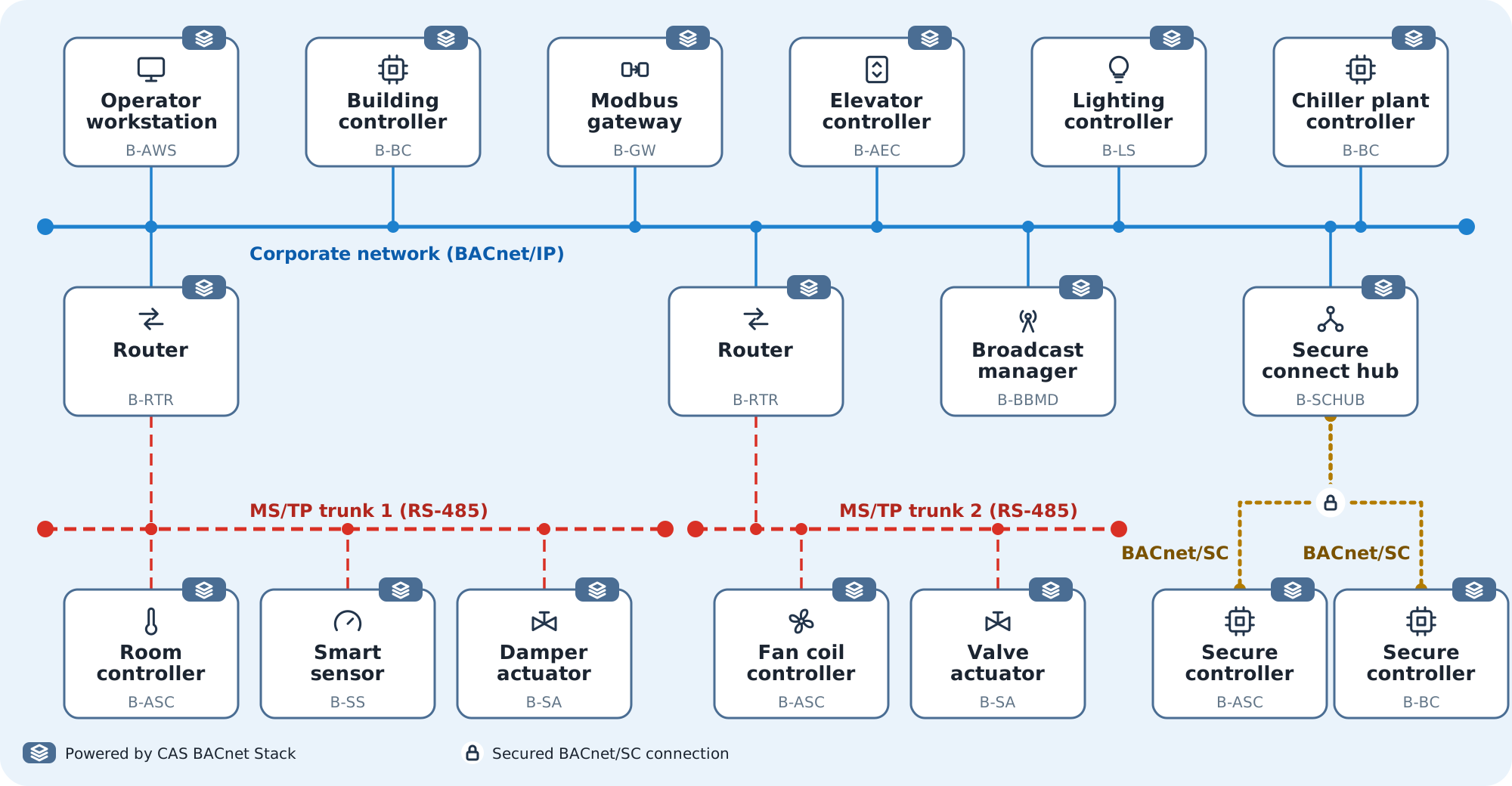
A whole building on one BACnet network. The corporate BACnet/IP network, drawn in blue, carries the operator workstation, building and plant controllers, a Modbus gateway, an elevator controller and a lighting controller. Routers join it to two MS/TP trunks, drawn in red, with room and fan coil controllers, a smart sensor and actuators. A secure connect hub joins it, over BACnet/SC connections drawn in gold, to two secure controllers. Every one of them can run the CAS BACnet Stack.
Performance
Measured on a Linux build
Chipkin measures a Linux build of the stack configured as a BACnet Building Controller (B-BC) with the objects of its B-BC example, over BACnet/IP, with no network in between: the time is from handing the stack a request to getting its reply.
- heap after setup, Linux 32-bit build
- 7.8 KiB
- static RAM, Linux 32-bit build
- 1.3 KiB
- median ReadProperty reply, Linux 64-bit build
- 9.7 µs
- median ReadPropertyMultiple reply (20 properties), Linux 64-bit build
- 46.8 µs
- in the unit suite, which runs 77.9% of the stack's source lines
- 13,185 tests
Measured for stack version 6.0.23
Professional support
Get professional support from the engineers who maintain the stack
The engineers who maintain the stack answer your questions. Pick the help that fits where your project is.
Consultation
Talk directly with BACnet specialists about your project before you write code.
Expert support
Remote desktop sessions, email and phone calls with Chipkin engineers, from your first build through troubleshooting.
Integration assistance
Help registering callbacks, adding objects and bringing your first device onto the network.
Custom development
A BACnet feature, object or platform port built to your requirements by the engineers who maintain the stack.
Long-term maintenance
Chipkin continuously adds features and maintains the stack, with new versions released regularly.
Manual and example projects
A manual that covers every function, callback and constant, a Quick Start that builds a working server, and public example projects on GitHub.
Tell Chipkin what you are building and which of these would help. An engineer replies with the next step.
Contact UsProducts and services
Everything around the stack that gets your device to market
Discover and test your device, run BACnet/SC with a hub and your own certificates, and have it tested before it goes to the test lab. The Explorer is free.
Discover it: CAS BACnet Explorer
Find your device on the network, test it and debug it. Built on the CAS BACnet Stack, and used by thousands of people a day. Free, with no licence key, and commercial use is allowed.
Cross subnets: CAS BACnet BBMD
Gets BACnet/IP broadcast messages across subnets, so a test lab with more than one subnet behaves like the site you are building for.
Connect securely: Chipkin BACnet SC Hub
The central connection point for BACnet/SC devices, relaying their encrypted traffic, on Windows or Linux.
Issue certificates: Chipkin BACnet SC Certificate Authority
Signs certificates for BACnet/SC hubs and devices, tracks the requests and manages revocation, offline, on Windows or Linux.
Test it: VeriBACnet
The test harness Chipkin uses to test the stack, pointed at your own device before you submit it for testing, after a firmware change or in your build pipeline.
Pre-test services: device testing service
Chipkin engineers run the standard test plans against your device and help with the documentation, so it arrives at the test lab ready.
Get started
Run an example, then build your own
Run an example
Every device profile example publishes a Windows and a Linux binary. Run one and a BACnet device is on your network before you write any code.
Download the B-SS exampleBuild the Quick Start
Build a working BACnet server device of your own, step by step.
Open the Quick StartLook it up
Every function, callback and constant of the interface, with its signature.
Open the API reference
Also in the manual:Object referenceData linksGuidesMoving from version 5C/C++ server and client example
Worked through the Quick Start and ready to plan your own product? Tell Chipkin what you are building and an engineer will help with the next step.
Contact UsDevice profiles
39 device profiles, every required building block implemented
Every device profile below has every BIBB it requires implemented in the stack. 21 of them have a public C++ example project you can download and run.
Controllerserver role
- Smart SensorB-SS, every required BIBB implementedExample project for B-SS, on GitHub
- Smart ActuatorB-SA, every required BIBB implementedExample project for B-SA, on GitHub
- Application Specific ControllerB-ASC, every required BIBB implementedExample project for B-ASC, on GitHub
- Advanced Application ControllerB-AAC, every required BIBB implementedExample project for B-AAC, on GitHub
- Building ControllerB-BC, every required BIBB implementedExample project for B-BC, on GitHub
Life Safety Controllerserver role
- Advanced Life Safety ControllerB-ALSC, every required BIBB implementedExample project for B-ALSC, on GitHub
- Life Safety ControllerB-LSC, every required BIBB implementedExample project for B-LSC, on GitHub
Access Control Controllerserver role
- Advanced Access Control ControllerB-AACC, every required BIBB implementedExample project for B-AACC, on GitHub
- Access Control ControllerB-ACC, every required BIBB implementedExample project for B-ACC, on GitHub
Miscellaneousserver role
- RouterB-RTR, every required BIBB implementedExample project for B-RTR, on GitHub
- GatewayB-GW, every required BIBB implementedExample project for B-GW, on GitHub
- Broadcast Management DeviceB-BBMD, every required BIBB implementedExample project for B-BBMD, on GitHub
- Access Control Door ControllerB-ACDC, every required BIBB implementedExample project for B-ACDC, on GitHub
- Access Control Credential ReaderB-ACCR, every required BIBB implementedExample project for B-ACCR, on GitHub
- Secure Connect HubB-SCHUB, every required BIBB implementedExample project for B-SCHUB, on GitHub
Lighting Controllerserver role
- Lighting SupervisorB-LS, every required BIBB implementedExample project for B-LS, on GitHub
- Lighting DeviceB-LD, every required BIBB implementedExample project for B-LD, on GitHub
Elevator Controllerserver role
- Advanced Elevator ControllerB-AEC, every required BIBB implementedExample project for B-AEC, on GitHub
- Elevator ControllerB-EC, every required BIBB implementedExample project for B-EC, on GitHub
- Elevator MonitorB-EM, every required BIBB implementedExample project for B-EM, on GitHub
Authentication & Authorizationserver role
- Authorization ServerB-AS, every required BIBB implementedExample project for B-AS, on GitHub
Operator Interfaceclient role
- Cross-Domain Advanced WorkstationB-XAWS, every required BIBB implemented
- Advanced Operator WorkstationB-AWS, every required BIBB implemented
- Operator WorkstationB-OWS, every required BIBB implemented
- Operator DisplayB-OD, every required BIBB implemented
Life Safety Operator Interfaceclient role
- Advanced Life Safety WorkstationB-ALSWS, every required BIBB implemented
- Life Safety WorkstationB-LSWS, every required BIBB implemented
- Life Safety Annunciator PanelB-LSAP, every required BIBB implemented
Access Control Operator Interfaceclient role
- Advanced Access Control WorkstationB-AACWS, every required BIBB implemented
- Access Control WorkstationB-ACWS, every required BIBB implemented
- Access Control Security DisplayB-ACSD, every required BIBB implemented
Generalserver role
- GeneralB-GENERAL, every required BIBB implemented
Lighting Operator Interfaceclient role
- Advanced Lighting WorkstationB-ALWS, every required BIBB implemented
- Lighting Operator DisplayB-LOD, every required BIBB implemented
Lighting Control Stationclient role
- Advanced Lighting Control StationB-ALCS, every required BIBB implemented
- Lighting Control StationB-LCS, every required BIBB implemented
Elevator Operator Interfaceclient role
- Advanced Elevator WorkstationB-AEWS, every required BIBB implemented
- Elevator WorkstationB-EWS, every required BIBB implemented
- Elevator DisplayB-ED, every required BIBB implemented
Objects
BACnet objects supported
The stack supports 61 of the standard's object types in full and 3 in part. A half circle marks a type that is partly supported. Not supported: Network Security, which the 2024 edition of the standard removed.
- Analog Input
- Analog Output
- Analog Value
- Binary Input
- Binary Output
- Binary Value
- Calendar
- Command
- Device
- File
- Group
- Loop
- Multi-state Input
- Multi-state Output
- Notification Class
- Program
- Schedule
- Averaging
- Multi-state Value
- Trend Log
- Life Safety Point
- Life Safety Zone
- Accumulator
- Pulse Converter
- Event Log
- Global Group
- Trend Log Multiple
- Load Control
- Structured View
- Access Door
- Timer
- Access Credential
- Access Point
- Access Rights
- Access User
- Access Zone
- Credential Data Input
- BitString Value
- CharacterString Value
- Date Pattern Value
- Date Value
- DateTime Pattern Value
- DateTime Value
- Integer Value
- Large Analog Value
- OctetString Value
- Positive Integer Value
- Time Pattern Value
- Time Value
- Notification Forwarder
- Alert Enrollment
- Channel
- Lighting Output
- Binary Lighting Output
- Network Port
- Elevator Group
- Escalator
- Lift
- Staging
- Color
- Color Temperature
- Event Enrollment (partly supported)
- Audit Log (partly supported)
- Audit Reporter (partly supported)
Contact us
Start your BACnet integration
Tell Chipkin your platform, whether your device is a BACnet server or a client, and the data link you need: BACnet/IP, BACnet MS/TP or BACnet/SC. A Chipkin engineer replies with how the stack fits that combination and where to start.
- Consultation: talk directly with BACnet specialists about your project.
- Integration assistance: get help bringing your first device onto the network.
- Support: remote desktop sessions, phone calls and email, with hands-on help when you need it.
- Custom development: a BACnet feature or port built to your requirements.