
Configuring a build: targets and profiles
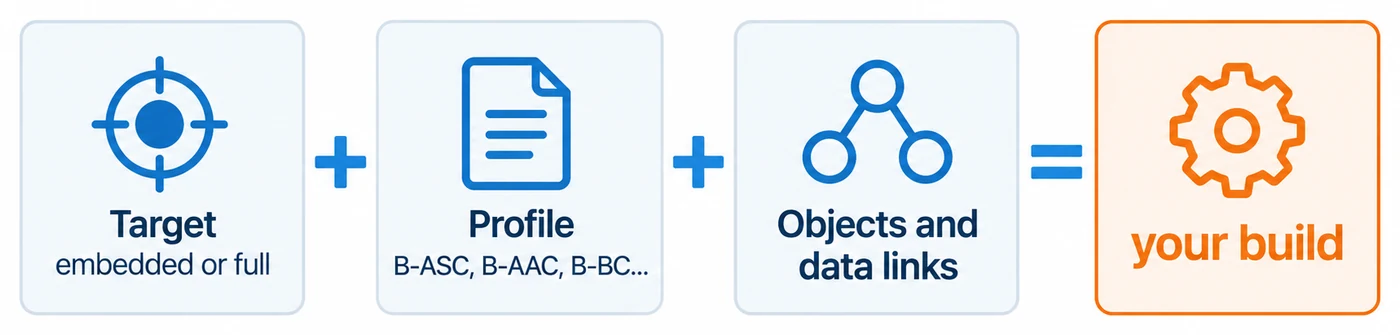
The CAS BACnet Stack is configured at compile time. Every object type, service and data link you leave out is code your product does not carry, which matters on a microcontroller and not at all on a PC. You describe a build with three choices:
- A target, which sets the starting point and the resource limits: everything, or nothing.
- A device profile, which turns on the services (BIBBs) a standard BACnet device of that kind supports.
- Your object types and data links, chosen one by one, because a profile does not say which objects a device has.
The prebuilt libraries in a release package are built with the full target, so if you link one of them you can skip this chapter. Read it when you build the stack from source for a constrained device.
Where the options go
Section titled “Where the options go”The options are C preprocessor macros, all named STACK_OPTION_*. Where you set them depends on how you
build the stack:
| How you build | Where the options go |
|---|---|
| You compile the stack’s source into your application: the C++ adapter’s default source mode, or your own build | source/CIBuildSettings.h, a file you write. CASBACnetStackOptions.h includes it when it exists; without it, source/CIBuildSettingsDefaults.h applies, which is the full target. |
You build the stack’s own library with its CMake presets (cmake --preset ...) |
CMake cache options. STACK_OPTION_TARGET_FULL, STACK_OPTION_STRING_LITERALS, STACK_OPTION_DECODE_AS_XML, STACK_OPTION_DECODE_AS_JSON and STACK_OPTION_API_DEBUG_LOGGING are options of their own, all on by default. STACK_OPTION_DISABLE_DATA_LINK_SC, STACK_OPTION_DISABLE_DATA_LINK_MSTP and STACK_OPTION_THREAD_SAFE are options of their own too, off by default. Pass any other macro in CASBACNET_EXTRA_OPTIONS, a ;-separated list of NAME or NAME=VALUE. This build reads neither settings file. |
| You link a prebuilt library from the release package | Nothing to set: it was built with the full target. |
When you compile the source into your application, put the options in CIBuildSettings.h rather than on the
compiler’s command line: the defaults file defines the full target, so a command-line
STACK_OPTION_TARGET_EMBEDDED alone would select both targets and stop the build.
source/CASBACnetStackOptions.h describes every option in its comments. An option you set yourself always
wins over the default a target or profile would give it.
Targets
Section titled “Targets”STACK_OPTION_TARGET_FULL |
STACK_OPTION_TARGET_EMBEDDED |
|
|---|---|---|
| For | PCs, gateways, Linux devices | Microcontrollers such as the ESP32 |
| Object types | All | Only those you turn on |
| Services (BIBBs) | All | The always-present core, plus your profile and the options you turn on |
| Data links | All (BACnet/IP, BACnet/IPv6, MS/TP, BACnet/SC) | Only those you turn on |
| Character and octet string size | 256 bytes | 64 bytes |
| COV subscriptions per object | 10 | 2 |
| Foreign device table entries | 128 | 16 |
| Broadcast distribution table entries | 512 | 32 |
| Outstanding confirmed requests per peer | 256 | 64 |
Choose one. Defining both stops the build with an error. Defining neither builds the full target, with a compiler warning to say so.
Every limit in the table is an option of its own, such as STACK_OPTION_MAX_CHARACTER_STRING_SIZE or
STACK_OPTION_MAX_SUBSCRIPTION_PER_OBJECT, so you can raise or lower one without changing target.
To leave BACnet/SC out of a full build, keep STACK_OPTION_TARGET_FULL and add
STACK_OPTION_DISABLE_DATA_LINK_SC. To leave MS/TP out of a full build, add STACK_OPTION_DISABLE_DATA_LINK_MSTP in the same
way; the MS/TP data link is then not built and BACnetStack_GetInfo reports dataLinkMSTP as disabled. Defining it together with
STACK_OPTION_DATA_LINK_LAYER_MSTP stops the build with an error. Physical routing between data links is in the full target too; leave it
out with STACK_OPTION_DISABLE_ROUTER_PHYSICAL.
Separate from the target
Section titled “Separate from the target”These are not part of either target, so choose them on their own. All but the last are on in the prebuilt libraries and in a default CMake build:
STACK_OPTION_STRING_LITERALS: the names of enumerations and errors, which the decoders need. It costs about 540 KB of flash.STACK_OPTION_DECODE_AS_XMLandSTACK_OPTION_DECODE_AS_JSON:BACnetStack_DecodeAs(), which renders a message as XML or JSON. Both need the string literals.STACK_OPTION_API_DEBUG_LOGGING: the explanation of every failed call, through the debug message callback. Keep it on while you develop. See Debug logging.STACK_OPTION_THREAD_SAFE: takes one lock in every export so that any thread may call any export. It is off by default and off in the prebuilt libraries. See Lifecycle.
Time on a 32-bit time_t platform
Section titled “Time on a 32-bit time_t platform”Times cross the stack’s interface as CASBACnetTime, a 64-bit integer on every platform, so the interface itself
has no year-2038 limit. Inside the stack, though, a build keeps time as the platform’s time_t. On a toolchain
where time_t is 32 bits, as it is on many 32-bit microcontroller and older 32-bit Linux toolchains, the stack
cannot hold a time after 2038-Jan-19 03:14:07 UTC: converting a later date fails, and a time-based deadline that
falls after it can wrap. Check sizeof(time_t) on your toolchain.
If it is 4 and your product will be in service after 2037, build with a C library that provides a 64-bit
time_t.
Device profiles
Section titled “Device profiles”A profile turns on the services a standard BACnet device of that kind must support, and the object types those services cannot work without, such as the Notification Class object that alarms need. Your application’s own objects you still list yourself.
Some services are compiled into every build and need no option: ReadProperty, ReadPropertyMultiple,
WriteProperty, WritePropertyMultiple, Who-Is and I-Am, and Who-Has and I-Have. At run time only ReadProperty,
Who-Is and Who-Has are enabled automatically; turn on the others your device offers with
BACnetStack_SetServiceEnabled(). A device that needs nothing more (the B-GENERAL profile) needs no profile
option.
Choose at most one profile from the controller, life safety, access control, elevator, lighting and authorization families. A profile from the miscellaneous family can be added to it.
| Family | Option | Profile | Adds to the core |
|---|---|---|---|
| Controllers | STACK_OPTION_PROFILE_B_SS |
Smart Sensor | Nothing |
STACK_OPTION_PROFILE_B_SA |
Smart Actuator | Nothing | |
STACK_OPTION_PROFILE_B_ASC |
Application Specific Controller | DeviceCommunicationControl | |
STACK_OPTION_PROFILE_B_AAC |
Advanced Application Controller | DeviceCommunicationControl, ReinitializeDevice, time synchronization, alarms and events; Notification Class and Schedule objects | |
STACK_OPTION_PROFILE_B_BC |
Building Controller | B-AAC, plus backup and restore and trending; File and Trend Log objects | |
| Life safety | STACK_OPTION_PROFILE_B_LSC |
Life Safety Controller | COV, alarms and events, DeviceCommunicationControl, ReinitializeDevice, time synchronization; Life Safety Point and Zone objects |
STACK_OPTION_PROFILE_B_ALSC |
Advanced Life Safety Controller | B-LSC, plus Event Log and Schedule objects | |
| Access control | STACK_OPTION_PROFILE_B_ACC |
Access Control Controller | COV, alarms and events, DeviceCommunicationControl, ReinitializeDevice, backup and restore, time synchronization; Schedule, Event Log and the access control objects |
STACK_OPTION_PROFILE_B_AACC |
Advanced Access Control Controller | B-ACC, plus the Access Door object | |
| Elevator | STACK_OPTION_PROFILE_B_EM |
Elevator Monitor | COV and COV multiple, alarms and events, DeviceCommunicationControl; Elevator Group, Lift and Escalator objects |
STACK_OPTION_PROFILE_B_EC |
Elevator Controller | B-EM, plus time synchronization and ReinitializeDevice | |
STACK_OPTION_PROFILE_B_AEC |
Advanced Elevator Controller | B-EC, plus object creation and deletion and backup and restore; Event Log and Schedule objects | |
| Lighting | STACK_OPTION_PROFILE_B_LD |
Lighting Device | DeviceCommunicationControl, time synchronization; Lighting Output and Binary Lighting Output objects |
STACK_OPTION_PROFILE_B_LS |
Lighting Supervisor | DeviceCommunicationControl, time synchronization, WriteGroup; Channel and Schedule objects | |
| Authorization | STACK_OPTION_PROFILE_B_AS |
Authorization Server | Not available: defining it stops the build with an error. |
| Miscellaneous | STACK_OPTION_PROFILE_B_RTR |
Router | Router configuration and list manipulation |
STACK_OPTION_PROFILE_B_GW |
Gateway | DeviceCommunicationControl and virtual networks | |
STACK_OPTION_PROFILE_B_BBMD |
BBMD | DeviceCommunicationControl and BBMD configuration; the Network Port object. Needs BACnet/IP. | |
STACK_OPTION_PROFILE_B_ACDC |
Access Door Controller | The Access Door object | |
STACK_OPTION_PROFILE_B_ACCR |
Access Credential Reader | COV, alarms and events; the Credential Data Input object | |
STACK_OPTION_PROFILE_B_SCHUB |
BACnet/SC Hub | DeviceCommunicationControl. Needs BACnet/SC. |
B-BBMD without STACK_OPTION_DATA_LINK_LAYER_IPV4, and B-SCHUB without STACK_OPTION_DATA_LINK_LAYER_SC, stop
the build with an error that says so.
The B-DAP profile (a router that proxies device addresses) has no preset. A device proxies while its physical router is enabled, and no function yet lets the application keep the table over a restart. There are no presets for the operator workstation profiles, such as B-OWS and B-AWS; a device that also sends requests to others uses the client functions in Acting as a client.
Object types and data links
Section titled “Object types and data links”With the embedded target, turn on each object type your device has, with STACK_OPTION_OBJECT_TYPE_ and the
type’s name: STACK_OPTION_OBJECT_TYPE_ANALOG_INPUT, STACK_OPTION_OBJECT_TYPE_BINARY_OUTPUT,
STACK_OPTION_OBJECT_TYPE_SCHEDULE and so on. The Device object is always present.
STACK_OPTION_ENABLE_ALL_OBJECT_TYPES turns them all on.
Turn on each data link with STACK_OPTION_DATA_LINK_LAYER_IPV4, STACK_OPTION_DATA_LINK_LAYER_IPV6,
STACK_OPTION_DATA_LINK_LAYER_MSTP or STACK_OPTION_DATA_LINK_LAYER_SC. Each data link needs a Network Port object: turn on
STACK_OPTION_OBJECT_TYPE_NETWORK_PORT for BACnet/IP and MS/TP. BACnet/SC turns it on by itself, and currently
needs BACnet/IP compiled in as well. The Data links chapters list what each one
needs.
Services one by one
Section titled “Services one by one”A profile is the usual way to choose services, but each service family has its own option, for a device that needs one service beyond its profile. The ones most often added:
| Option | Services |
|---|---|
STACK_OPTION_DS_COV_SUBSCRIBE_COV |
SubscribeCOV (DS-COV) |
STACK_OPTION_DS_COVP_SUBSCRIBE_COV_PROPERTY |
SubscribeCOVProperty (DS-COVP) |
STACK_OPTION_ALARMS_AND_EVENTS |
Alarms and events, with acknowledgement and event information (AE-N, AE-ACK, AE-INFO) |
STACK_OPTION_TIME_SYNCHRONIZATION |
TimeSynchronization and UTCTimeSynchronization (DM-TS, DM-UTC) |
STACK_OPTION_DM_DCC_DEVICE_COMMUNICATION_CONTROL |
DeviceCommunicationControl (DM-DCC) |
STACK_OPTION_DM_RD_REINITIALIZE_DEVICE |
ReinitializeDevice (DM-RD) |
STACK_OPTION_DM_BR_BACKUP_AND_RESTORE |
Backup and restore (DM-BR), with file access and ReinitializeDevice |
STACK_OPTION_DM_OCD_OBJECT_CREATION_AND_DELETION |
CreateObject and DeleteObject (DM-OCD) |
STACK_OPTION_DM_LM_LIST_MANIPULATION |
AddListElement and RemoveListElement (DM-LM) |
STACK_OPTION_T_VMT_TRENDING_VIEWING_AND_MODIFYING_TRENDS |
Trend logs and ReadRange (T-VMT) |
STACK_OPTION_NM_BBMDC |
BBMD configuration (NM-BBMDC) |
STACK_OPTION_GW_VN_B |
Virtual networks, for gateways (GW-VN) |
STACK_OPTION_ENABLE_ALL_BIBBS turns every service on. CASBACnetStackOptions.h lists the rest.
Examples
Section titled “Examples”A B-ASC controller with one analog input on MS/TP, with CMake:
cmake --preset linux-arm7-release -D STACK_OPTION_TARGET_FULL=OFF -D STACK_OPTION_STRING_LITERALS=OFF -D STACK_OPTION_DECODE_AS_XML=OFF -D STACK_OPTION_DECODE_AS_JSON=OFF -D "CASBACNET_EXTRA_OPTIONS=STACK_OPTION_TARGET_EMBEDDED;STACK_OPTION_PROFILE_B_ASC;STACK_OPTION_OBJECT_TYPE_ANALOG_INPUT;STACK_OPTION_OBJECT_TYPE_NETWORK_PORT;STACK_OPTION_DATA_LINK_LAYER_MSTP"The same build compiled from source into your application, in source/CIBuildSettings.h:
#define STACK_OPTION_TARGET_EMBEDDED#define STACK_OPTION_PROFILE_B_ASC#define STACK_OPTION_OBJECT_TYPE_ANALOG_INPUT#define STACK_OPTION_OBJECT_TYPE_NETWORK_PORT#define STACK_OPTION_DATA_LINK_LAYER_MSTP#define STACK_OPTION_API_DEBUG_LOGGING /* while you develop */A gateway on a PC with everything except BACnet/SC:
cmake --preset linux-x64-release -D STACK_OPTION_DISABLE_DATA_LINK_SC=ONIf a call your application makes needs an option the build left out, the call returns false. With debug
logging on, the debug message callback says why.