
Stack lifecycle
This guide covers the life of the stack inside your application: what to call at startup and in what order, how to drive it once it is running, how it reports failures, and how to tear it down. It assumes you have already worked through Quick Start. For complete, working programs, see the example projects on Chipkin’s GitHub.
Before your first call
Section titled “Before your first call”There is one stack per process. It is a global singleton, and every function operates on it implicitly, so there is no handle to create or pass around.
There is no Init function either. The stack is constructed during static initialization, and the
order of static initialization across translation units is unspecified. Do not call any
BACnetStack_* function from your own static initializer. Make your first call from main() or
later.
By default the stack is single-threaded. Make every call, BACnetStack_Tick() included, from the
same thread. The default build contains no locks, so calling it from two threads at once is undefined
behavior. If more than one of your threads needs the stack, route them all through one serialized call
path. There are two exceptions:
BACnetStack_LoopMSTP(), which drives the MS/TP engine in byte mode, may run on its own thread alongsideBACnetStack_Tick(). See byte and packet mode.- A build with
STACK_OPTION_THREAD_SAFE(off by default) takes one lock in every export, so any thread may call any export. Its rules for callbacks are in API conventions.
The stack creates no threads of its own. Every callback you register runs on the thread that called into the stack.
Startup order
Section titled “Startup order”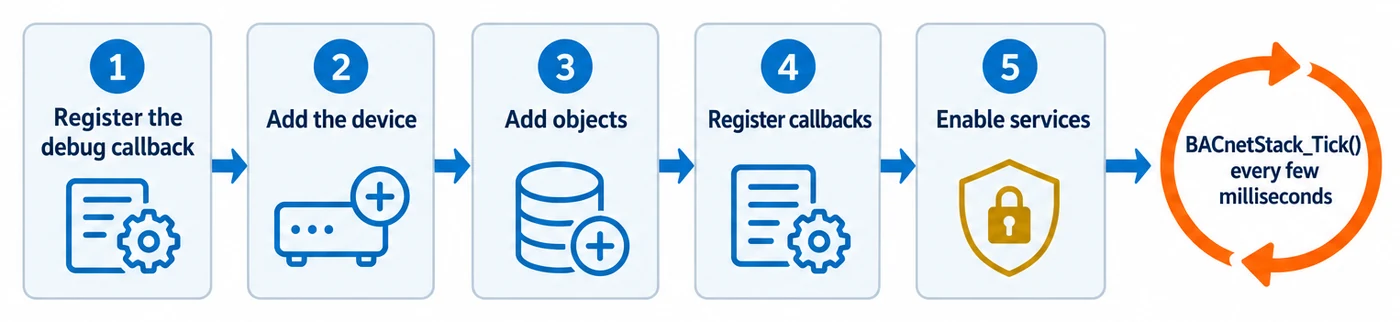
Configure the stack in this order. Each step depends on the one before it.
1. Register the debug message callback
Section titled “1. Register the debug message callback”Register your logger with BACnetStack_RegisterCallbackLogDebugMessage() before anything else.
The stack logs only in a build with STACK_OPTION_API_DEBUG_LOGGING. The prebuilt libraries in a
release, the npm package and the stack’s default build settings (CIBuildSettingsDefaults.h, and
CMake’s default options) all define it;
if you build with your own option set, define it yourself. In such a build, every function that fails reports the reason through
this callback, including the configuration calls that follow. If you never register it, that build
prints every log line to stdout; to silence it, register a callback that does nothing. In a build
without the option the callback is never called, so turn the option on while you develop.
The messageType argument is 0 for an error, 1 for information and 2 for debug output. The message
buffer belongs to the stack and is only valid during the call.
2. Add the device
Section titled “2. Add the device”Call BACnetStack_AddDevice() exactly once, with the device instance to assign. This must be your
first configuration call, because objects, properties and services all attach to this device. A
second call is rejected and returns false. To model further logical devices behind a virtual
router, use BACnetStack_AddDeviceToVirtualNetwork() instead.
3. Add objects
Section titled “3. Add objects”Add each object with BACnetStack_AddObject(), after the device exists. It refuses a standard
object type that your build does not include (turn on its STACK_OPTION_OBJECT_TYPE_* option) or
that the standard no longer has, such as Network Security; proprietary types (128 to 1023) are
always accepted. Some object types need more than this and have their own constructor. Use those
for them:
- Notification Class, Trend Log, Trend Log Multiple, Event Log, File, Network Port, Elevator Group,
Lift and Escalator objects each have a dedicated add function, for example
BACnetStack_AddTrendLogObject(),BACnetStack_AddFileObject(),BACnetStack_AddNetworkPortObject()andBACnetStack_AddLiftOrEscalatorObject(). If you create one of these withBACnetStack_AddObject()alone, it has no engine behind it. - For Channel, Group and Schedule objects, call
BACnetStack_AddObject()first and then the configuration function:BACnetStack_AddChannelObject(),BACnetStack_AddGroupObject()orBACnetStack_AddScheduleObject(). - For a Calendar object,
BACnetStack_AddCalendarObject()is optional. Call it afterBACnetStack_AddObject()to have the stack hold the Date_List and derive Present_Value. Without it, your callbacks serve them.
4. Register callbacks
Section titled “4. Register callbacks”Register BACnetStack_RegisterCallbackReceiveMessageForPort() and
BACnetStack_RegisterCallbackSendMessageForPort() before the first tick. Neither is optional in
practice:
- Without the receive callback, the stack reads nothing and reports no error. Your device is silently deaf.
- Without the send callback, the stack can answer nothing. Each attempt to send is logged and the frame is dropped.
Next, register the property callbacks for the data your application serves. The
Serving property values guide explains which ones you need. Register them before you send anything:
the BACnetStack_Send* functions can call your Get-property callbacks while they build a message,
and BACnetStack_SendIAm() is one of them.
Three rules apply to every BACnetStack_RegisterCallback* function:
- Registering a second time replaces the first callback. Callbacks do not chain.
- Registering
NULLclears the callback. There is no separate unregister function. - Never call back into the stack from inside a callback. In particular, do not add or remove
objects, send a service or call
BACnetStack_Reset()from a callback. Queue that work and do it afterBACnetStack_Tick()returns.
5. Enable services and properties
Section titled “5. Enable services and properties”ReadProperty, Who-Has and Who-Is are enabled automatically, so the device answers Who-Has with an
I-Have without further setup. Enable each other service your device supports with
BACnetStack_SetServiceEnabled(). Enabling I-Have does not affect Who-Has: it makes the stack
process the I-Have messages your device receives, and pass them to your I-Have hook.
Properties are configured per object, and the object must already exist:
BACnetStack_SetPropertyEnabled()turns on an optional property.BACnetStack_SetPropertyWritable()lets clients write a property.BACnetStack_SetPropertySubscribable()lets clients subscribe to a property. The property must already be enabled. Enable the subscribe service separately withBACnetStack_SetServiceEnabled(); this function enables no service.
Each of these has a per-object-type variant, such as BACnetStack_SetPropertyByObjectTypeEnabled().
That variant sets the default for the whole type, including the template used for objects that
clients create with the CreateObject service.
Putting it together
Section titled “Putting it together”BACnetStack_RegisterCallbackLogDebugMessage(LogDebugMessage);
if (!BACnetStack_AddDevice(389001)) { /* With STACK_OPTION_API_DEBUG_LOGGING, the reason went to LogDebugMessage. */}BACnetStack_AddObject(389001, 2 /* analogValue */, 1);
BACnetStack_RegisterCallbackReceiveMessageForPort(ReceiveMessage);BACnetStack_RegisterCallbackSendMessageForPort(SendMessage);BACnetStack_RegisterCallbackGetPropertyReal(GetPropertyReal);
BACnetStack_SetServiceEnabled(389001, 14 /* ReadPropertyMultiple */, true);
for (;;) { BACnetStack_Tick(); /* Wait 10-100 ms before the next tick. */}Running: the Tick loop
Section titled “Running: the Tick loop”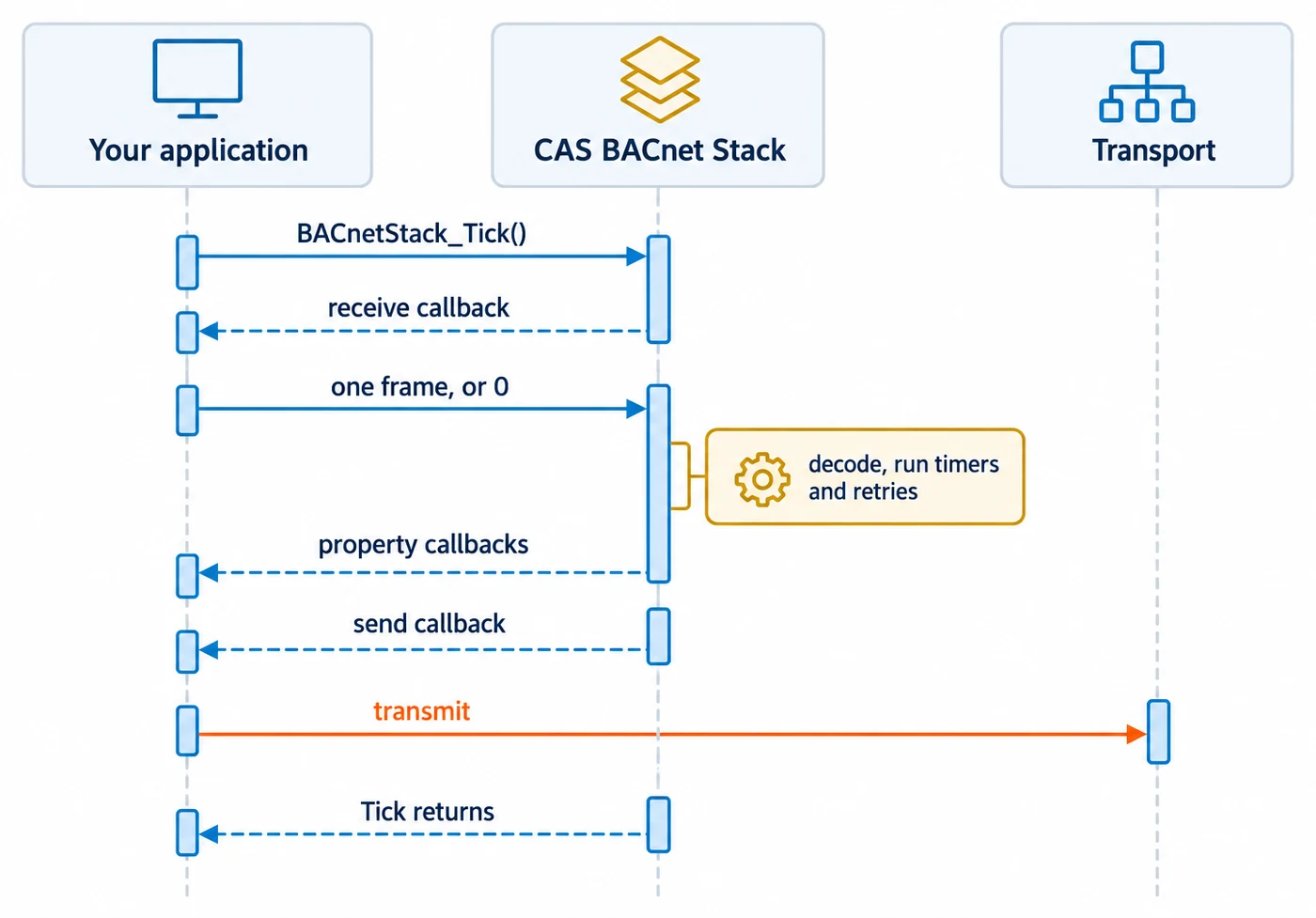
Call BACnetStack_Tick() repeatedly, from the same thread, for as long as the stack runs. Nothing
is received between calls. BACnetStack_Tick() is the only place where the stack:
- receives and processes inbound frames (it calls your receive callback exactly once per tick),
- runs the data link and BBMD loops,
- retries confirmed requests and times them out,
- logs polled trend logs, expires COV subscriptions whose lifetime has passed, and makes the alarm transitions that wait for a time delay.
The rest of the value-driven work runs from BACnetStack_UpdateValue(), synchronously, before it
returns: the alarm algorithms, COV notifications and COV trend logging for the value that changed.
See COV, alarms and events, and trend logs.
There is no fixed cadence. Aim for one tick every 10 to 100 ms for a typical device, and tick faster if you need tighter response or timer latency. A slow tick delays all of the above: peers see late responses, timeouts fire late, and inbound frames are dropped once your socket buffer fills.
BACnetStack_Tick() returns true if it did work on that call, such as processing an incoming
message or sending one, and false otherwise.
Your receive callback must not block. Return 0 when no message is waiting; that is the normal idle case, not an error.
Callbacks do not only fire during a tick. Every BACnetStack_Send* function calls your send
callback synchronously before it returns. Your send callback must return exactly messageLength
when it accepted the whole frame, and 0 when it did not. Any other value counts as a failed send.
How failures are reported
Section titled “How failures are reported”Setup and configuration functions return bool. A false return means the call did not succeed,
for example because of a bad parameter, a missing device or object, a feature that was not
compiled in, or lack of space. The return value never carries the reason. In a build with
STACK_OPTION_API_DEBUG_LOGGING (on in the prebuilt libraries and the npm package), the reason goes to your debug message callback.
Some functions fail only because the stack was built without a feature. Their documentation names
the STACK_OPTION_* setting they need. For example, BACnetStack_AddVirtualNetwork() returns
false in a build without STACK_OPTION_VIRTUAL_ROUTER (which STACK_OPTION_GW_VN_B turns on).
To see what your build of the stack includes, call BACnetStack_GetInfo(). It reports a summary of
the capabilities your build includes, and which of a fixed list of feature macros are enabled. It
does not cover every option (object types, for example, are not listed), so check a specific option
in your own build settings.
A false return does not always mean nothing changed. Read the function’s own documentation:
BACnetStack_AddVirtualNetwork()is not atomic. It can returnfalseafter the virtual network is already registered. Recover withBACnetStack_Reset()and configure again.BACnetStack_AddFileObject()can returnfalsewith the File object already in the device’s object list but unusable. Remove the object or restart configuration.
Repeat calls to Add functions
Section titled “Repeat calls to Add functions”Most BACnetStack_Add*Object() functions are idempotent on the object’s identity only. Adding an
object that already exists returns true and does not apply the other arguments, so a second call
with a different configuration silently changes nothing. true means “this object exists now”,
not “this call created it”. To tell the two apart, call BACnetStack_ObjectExists() first.
These functions do not follow that rule:
BACnetStack_AddDevice()returnsfalseon a second call.BACnetStack_AddFileObject()re-applies its arguments on a repeat call.BACnetStack_AddChannelObject()re-appliespresentValueDatatypeon a repeat call.
To remove a single object, use BACnetStack_RemoveObject(). It returns false only when the
device does not exist or the object type or instance is out of range. Removing an object that does
not exist returns true, so check with BACnetStack_ObjectExists() if you need to know whether the
object was there.
Teardown: BACnetStack_Reset()
Section titled “Teardown: BACnetStack_Reset()”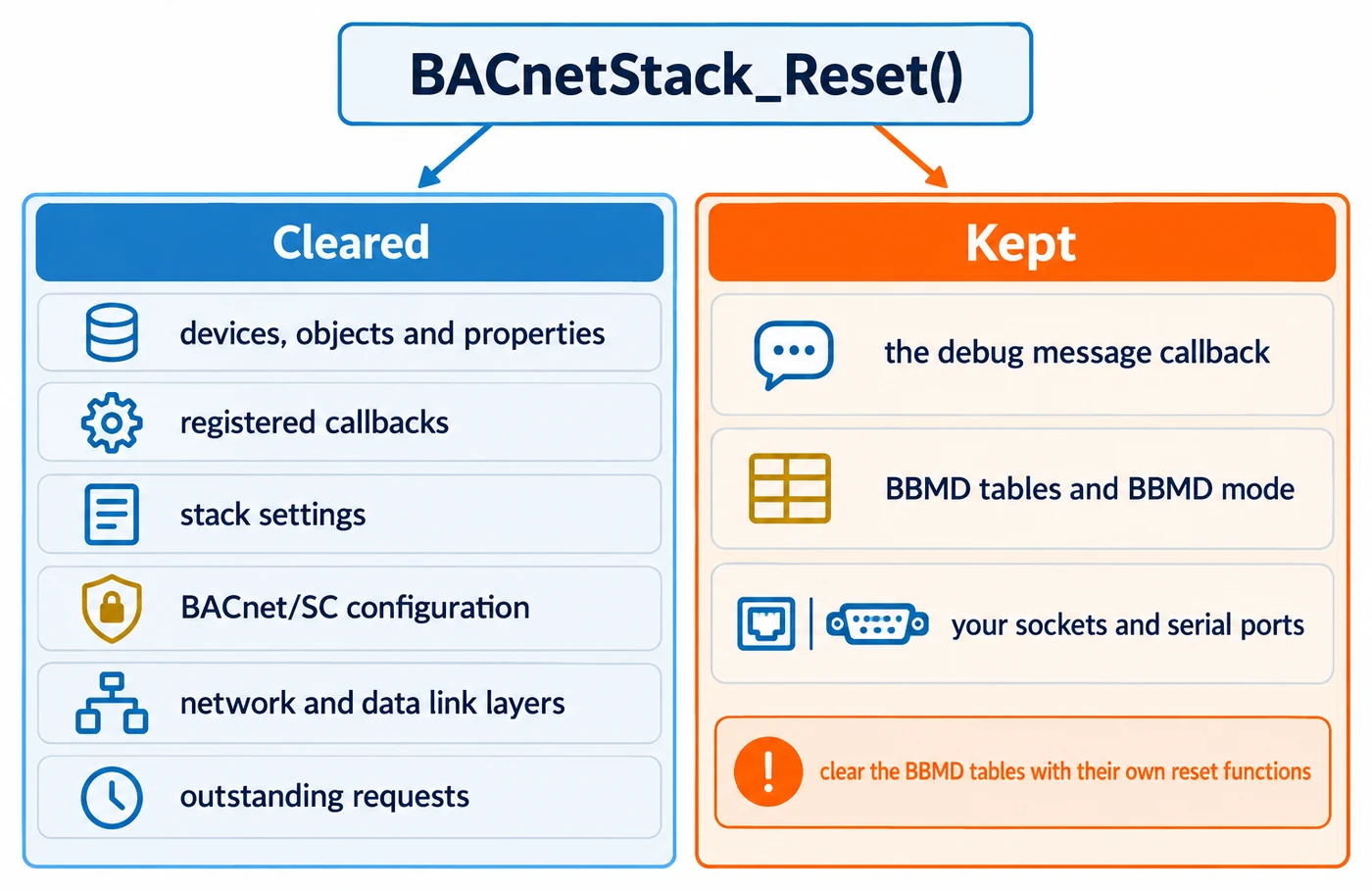
BACnetStack_Reset() tears the whole stack down and returns it to its default state. It clears
every device, object and property, every registered callback, all stack settings, all BACnet/SC
configuration, the network and data link layers, and all outstanding confirmed requests. No
timeout fires for a request that was in flight.
It does not clear:
- the BBMD broadcast distribution table and foreign device table. Clear those with
BACnetStack_ResetBroadcastDistributionTable()andBACnetStack_ResetForeignDeviceTable(); - BBMD mode. A stack put into BBMD mode with
BACnetStack_SetBBMD()stays in it; - the debug message callback, which is stored separately. Register
NULLto clear it; - anything your application owns, such as its sockets or serial ports.
After a reset the stack neither sends nor receives. Run the startup order again: register at least
the send and receive callbacks, and add your device and objects. Never call BACnetStack_Reset()
from inside a callback.