
Quick Start
This chapter takes you from an empty project to a BACnet/IP device that a BACnet client can discover with Who-Is and read with ReadProperty. It covers the parts every integration has: linking the stack, connecting it to your network socket, adding a device and its objects, serving property values from your application, and running the stack. If devices, objects, properties and services are new to you, read BACnet in ten minutes first.
The program built here is a cut-down version of the BACnetProfileExample-B-SS-CPP example on Chipkin’s GitHub, a complete BACnet Smart Sensor that builds with CMake. Keep it open beside this chapter: it is a working program, and it has the platform code (sockets, keyboard, finding the local IP address) that this chapter leaves out.
- Language: C++ (the stack’s interface is plain C, so the same calls work from C)
- Data link: BACnet/IPv4. MS/TP and BACnet/SC use the same program shape with a different transport; see Where to go next.
What you need
Section titled “What you need”- A C++ compiler: Visual Studio 2019 or later on Windows, or GCC or Clang on Linux. CMake 3.15 or later if you use the CMake adapter target. Building the stack itself from its CMake presets needs CMake 3.25 or later (4.2 or later for the Visual Studio 2026 presets) and Visual Studio 2022 or 2026.
- The CAS BACnet Stack release package.
- A BACnet client to test with, such as YABE (Yet Another BACnet Explorer), VTS or the CAS BACnet Explorer, on a second computer on the same subnet.
What is in the release package
Section titled “What is in the release package”| Folder | Contents |
|---|---|
source/ |
The stack’s source code. CASBACnetStackDLL.h is the customer interface: every BACnetStack_* function your application calls. BACnetCallbackInterface.h has the signatures of the callbacks you implement. CASBACnetStackOptions.h and CIBuildSettings.h hold the build options. |
adapters/cpp/ |
The C++ adapter (CASBACnetStackAdapter.h) and its CMake target, which link your program to the stack. |
bin/ |
Prebuilt libraries: a Windows x64 DLL, and Linux shared (.so) and static (.a) libraries. |
CMakeLists.txt, CMakePresets.json, cmake/ |
The CMake build, for building the stack yourself: presets for the Windows x64 static library and DLL (Visual Studio 2026, or 2022) and for the Linux x64, x86, ARMv7 and ARM64 libraries, for example cmake --preset linux-x64-release then cmake --build --preset linux-x64-release. |
docs/ |
This manual (docs/manual/index.html), including the API Reference. |
Each release comes in two packages: one with BACnet/SC and one without (NoSC). This chapter works with either.
Build options
Section titled “Build options”The stack is configured at compile time. source/CASBACnetStackOptions.h describes every option;
source/CIBuildSettings.h, which it includes, is where a build sets them. A release package ships the
one its prebuilt libraries were built with; without that file, source/CIBuildSettingsDefaults.h
applies. That is how the C++ adapter’s default source mode builds it. Building the stack’s own library
with its CMake presets is different: it reads neither file and takes the options as CMake cache options.
Configuration presets has the details. The two presets are:
STACK_OPTION_TARGET_FULL: every object type, service and data link. This is the default when no preset is chosen. The prebuilt libraries inbin/are built with it (the NoSC package’s without BACnet/SC).STACK_OPTION_TARGET_EMBEDDED: nothing enabled by default, with smaller buffers, for a constrained device. You then turn on each object type, service and data link you need.
The prebuilt libraries also define STACK_OPTION_API_DEBUG_LOGGING, which makes the stack explain
every failure through the debug message callback, and the XML and JSON decoders
(STACK_OPTION_DECODE_AS_XML, STACK_OPTION_DECODE_AS_JSON). Keep debug logging on while you
develop. Configuration presets explains how to cut a build down.
Step 1: link the stack
Section titled “Step 1: link the stack”Add adapters/cpp/ and source/ to your project. The adapter gives you every BACnetStack_*
function under its own name in three link modes, so the rest of your code is the same whichever you
choose:
| Mode | What it does | Defines |
|---|---|---|
| Source | Compiles the stack’s source/*.cpp into your program. Nothing to ship beside the executable; the first build compiles the whole stack. |
CAS_BACNET_STACK_USE_SOURCE |
| Static | Links a prebuilt .lib or .a. |
CAS_BACNET_STACK_LIB_TYPE_LIB |
| DLL | Loads the .dll or .so at run time. |
CAS_BACNET_STACK_LIB_TYPE_DLL |
With CMake, add the adapter’s target and pick the mode with CAS_BACNET_STACK_LINK (SOURCE, the
default, STATIC or DLL). The target sets the define for you:
add_subdirectory(path/to/cas-bacnet-stack/adapters/cpp cas-bacnet-stack-adapter)target_link_libraries(MyDevice PRIVATE CASBACnetStack::Adapter)cmake -B build -S . -DCAS_BACNET_STACK_LINK=DLLcmake --build build --config ReleaseWith your own makefile or Visual Studio project, add adapters/cpp/CASBACnetStackAdapter.cpp to
your sources (and CASBACnetStackAdapterDynamic.cpp in DLL mode), put adapters/cpp/ and
source/ on the include path, and define one of the macros in the table, for example
-DCAS_BACNET_STACK_LIB_TYPE_LIB. In DLL mode on Linux, also link -ldl. In DLL mode the adapter
loads the library by a default file name: on Windows a bare name, such as
CASBACnetStack_x64_Release.dll, from the DLL search path; on Linux a name such as
./libCASBACnetStack_x64_Release.so, from the working directory only. Define BACNET_LIB_FILE to load
it from an absolute path instead.
Call LoadBACnetFunctions() once at startup, before any other BACnetStack_* call, in every mode.
In DLL mode it binds the functions; in every mode it checks that the stack’s version matches the
adapter. Then print the version, to confirm the stack is linked:
#include "CASBACnetStackAdapter.h"#include <stdio.h>
int main(){  if (!LoadBACnetFunctions()) {    fprintf(stderr, "Cannot load the CAS BACnet Stack: %s\n", CASBACnetStackAdapter_LastError());    return 1;  }  printf("CAS BACnet Stack %u.%u.%u.%u\n", BACnetStack_GetAPIMajorVersion(),    BACnetStack_GetAPIMinorVersion(), BACnetStack_GetAPIPatchVersion(),    BACnetStack_GetAPIBuildVersion());  return 0;}
Build and run this before going further. If it prints a version, the stack is linked.
How the program fits together
Section titled “How the program fits together”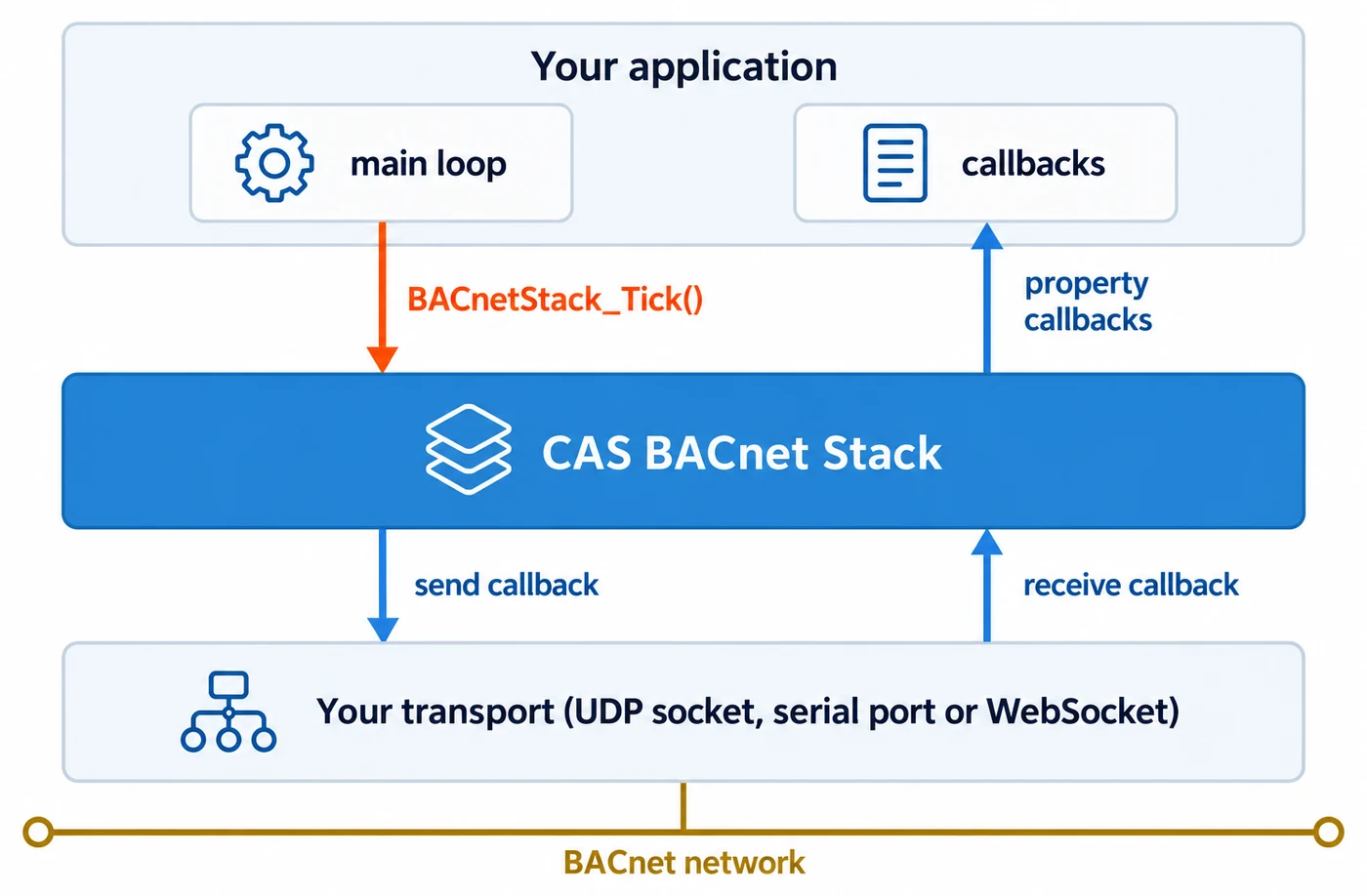
The stack is a library your program drives. It opens no sockets and creates no threads:
- Your program owns the network. It opens the UDP socket. The stack pulls each received frame from your receive callback, and hands each frame to send to your send callback.
- Your program owns the data. When a client reads a property, the stack calls one of your property callbacks for the value. The stack serves only what it can work out itself, such as Object_Identifier, Object_Type and Object_List.
- Your program runs the stack. Nothing happens between calls to
BACnetStack_Tick(), which you call in a loop.
There is one stack per process and no initialization function. Make your first call from main()
or later, never from a static initializer. By default the stack is single-threaded: make every
BACnetStack_* call, BACnetStack_Tick() included, from the same thread. The exceptions are in
Stack lifecycle.
The rest of this chapter builds one program. The snippets share these definitions:
#include "CASBACnetStackAdapter.h"#include <stdio.h>#include <string.h>#include <time.h>#if defined(_WIN32)#include <windows.h>#else#include <unistd.h>#endif
static const uint32_t DEVICE_INSTANCE = 389001;static const uint32_t NETWORK_PORT_INSTANCE = 1;static const uint32_t ANALOG_INPUT_INSTANCE = 1;
/* BACnet enumeration values. The API Reference's Enumerations section lists them all. */static const uint16_t OBJECT_TYPE_ANALOG_INPUT = 0;static const uint16_t OBJECT_TYPE_DEVICE = 8;static const uint16_t OBJECT_TYPE_NETWORK_PORT = 56;static const uint32_t PROPERTY_MODEL_NAME = 70;static const uint32_t PROPERTY_OBJECT_NAME = 77;static const uint32_t PROPERTY_PRESENT_VALUE = 85;static const uint32_t PROPERTY_UNITS = 117;static const uint32_t PROPERTY_VENDOR_IDENTIFIER = 120;static const uint32_t PROPERTY_VENDOR_NAME = 121;static const uint32_t PROPERTY_IP_ADDRESS = 400;static const uint32_t PROPERTY_IP_DEFAULT_GATEWAY = 401;static const uint32_t PROPERTY_IP_SUBNET_MASK = 411;static const uint32_t PROPERTY_BACNET_IP_UDP_PORT = 412;static const uint32_t UNITS_DEGREES_CELSIUS = 62;
/* The host's BACnet/IP settings, filled in at startup. */static uint8_t g_ipAddress[4];static uint8_t g_ipSubnetMask[4];static uint8_t g_ipDefaultGateway[4];static uint16_t g_udpPort = 47808;
/* The application's data: one temperature sensor. */static float g_roomTemperature = 21.5f;
/* Your socket layer, not part of the stack. Neither function may block. */bool UdpOpen(uint16_t port, uint8_t ipAddress[4], uint8_t subnetMask[4]);uint16_t UdpReceive(uint8_t* buffer, uint16_t bufferLength, uint8_t fromAddress[4], uint16_t* fromPort);uint16_t UdpSend(const uint8_t toAddress[4], uint16_t toPort, const uint8_t* data, uint16_t length);
The three Udp* functions stand for your platform’s socket code. UdpOpen() binds a non-blocking
UDP socket with broadcast enabled to the port, and reports the host’s IP address and subnet mask.
UdpReceive() returns 0 at once when no datagram is waiting, and never writes more than
bufferLength bytes. The B-SS example’s common/SimpleUDP.cpp and common/CASExampleHelper.cpp
are one implementation for Windows and Linux.
In source and static mode, CASBACnetStackDLL.h also names every property identifier, such as
BACnetPropertyIdentifier_presentValue. The constants above work in DLL mode too.
Step 2: write the message callbacks
Section titled “Step 2: write the message callbacks”The stack talks to the network through two callbacks. Both carry a networkPortInstance: the
instance of the Network Port object that the frame belongs to, which you add in
step 5. A BACnet/IPv4 address travels as a 6-byte
connection string: four octets of IP address, then the UDP port as two octets, high byte first.
0xC0, 0xA8, 0x01, 0x05, 0xBA, 0xC0 is 192.168.1.5:47808.
Receive
Section titled “Receive”The stack calls the receive callback exactly once per BACnetStack_Tick(). Read one datagram if
one is waiting, fill in who sent it and which port it arrived on, and return its length. Return 0
when nothing is waiting; that is the normal idle case. Never wait for data here.
uint16_t ReceiveMessage(uint8_t* message, const uint16_t maxMessageLength,  uint8_t* sourceConnectionString, uint8_t* sourceConnectionStringLength,  uint8_t* destinationConnectionString, uint8_t* destinationConnectionStringLength,  const uint8_t maxConnectionStringLength, uint32_t* networkPortInstance){  (void)destinationConnectionString;  if (maxConnectionStringLength < 6) {    return 0;  }
  uint8_t fromAddress[4];  uint16_t fromPort = 0;  const uint16_t bytesRead = UdpReceive(message, maxMessageLength, fromAddress, &fromPort);  if (bytesRead == 0) {    return 0; /* Nothing waiting. */  }
  memcpy(sourceConnectionString, fromAddress, 4);  sourceConnectionString[4] = (uint8_t)(fromPort >> 8);  sourceConnectionString[5] = (uint8_t)(fromPort & 0xFF);  *sourceConnectionStringLength = 6;  *destinationConnectionStringLength = 0; /* Fill it in if your socket API reports the destination. */  *networkPortInstance = NETWORK_PORT_INSTANCE;  return bytesRead;}
The stack discards the frame if the length you return is larger than maxMessageLength. All four
buffers belong to the stack and are valid only during the call.
The stack calls the send callback from inside BACnetStack_Tick(), and also from every
BACnetStack_Send* function before that function returns. Transmit the frame, or queue it, without
blocking.
uint16_t SendMessage(const uint8_t* message, const uint16_t messageLength,  const uint8_t* connectionString, const uint8_t connectionStringLength,  const uint32_t networkPortInstance, bool broadcast){  if (networkPortInstance != NETWORK_PORT_INSTANCE) {    return 0; /* Not a port this program owns. */  }
  uint8_t toAddress[4];  uint16_t toPort = g_udpPort;  if (connectionStringLength == 6) {    /* Send to the address given: a device, or a broadcast address this program asked for. */    memcpy(toAddress, connectionString, 4);    toPort = (uint16_t)((connectionString[4] << 8) | connectionString[5]);  } else if (broadcast) {    /* A broadcast the stack chose itself: send it to this subnet's broadcast address. */    for (int octetIndex = 0; octetIndex < 4; octetIndex++) {      toAddress[octetIndex] = (uint8_t)(g_ipAddress[octetIndex] | ~g_ipSubnetMask[octetIndex]);    }  } else {    return 0;  }
  const uint16_t bytesSent = UdpSend(toAddress, toPort, message, messageLength);  return bytesSent == messageLength ? messageLength : 0;}
Return exactly messageLength when the whole frame was accepted, and 0 when it was not. Any other
value, including 1, counts as a failed send. When there is a connection string, send the frame to it:
it is a device, or, with broadcast true, a broadcast address your own program passed to a
BACnetStack_Send* call (Step 6 does this for its I-Am). When broadcast is true and there is no
connection string, the stack chose the broadcast itself (an I-Am answering a broadcast Who-Is, for
example): send it to your subnet’s broadcast address.
BACnet/IP lists every case.
Step 3: write the system callbacks
Section titled “Step 3: write the system callbacks”The stack asks your program for the time, for COV subscription lifetimes, foreign-device
registration, trend logs and other timed work. Return seconds since the UNIX epoch, as a
CASBACnetTime (a 64-bit integer):
CASBACnetTime GetSystemTime(){ return (CASBACnetTime)time(NULL);}If your device should accept TimeSynchronization from a client, also register a set-time callback
with BACnetStack_RegisterCallbackSetSystemTime() and enable the service. Its year argument is
yearMinus1900: 2026 arrives as 126.
The debug message callback receives the stack’s log. messageType is 0 for an error, 1 for
information and 2 for debug output. The message already ends with a newline, and is valid only
during the call. It is NUL-terminated, but messageLength is the bound to rely on:
void LogDebugMessage(const char* message, const uint16_t messageLength, const uint8_t messageType){ fprintf(messageType == 0 ? stderr : stdout, "%.*s", (int)messageLength, message);}A failed BACnetStack_* call returns false and gives no reason; the reason goes to this callback.
If you never register it, a build with debug logging prints every log line to stdout. See
Debug logging.
Step 4: write the property callbacks
Section titled “Step 4: write the property callbacks”When a client reads a property the stack does not hold, the stack calls the Get callback for that
property’s datatype. Each callback receives the device, object and property being read. Write the
value through the out-parameter and return true; return false for anything you do not serve.
This device needs five datatypes:
| Datatype | Properties served here | Register with |
|---|---|---|
| CharacterString | Object_Name of every object; the Device’s Vendor_Name and Model_Name | BACnetStack_RegisterCallbackGetPropertyCharacterString() |
| Real | Present_Value of the Analog Input | BACnetStack_RegisterCallbackGetPropertyReal() |
| Enumerated | Units of the Analog Input | BACnetStack_RegisterCallbackGetPropertyEnumerated() |
| Unsigned | The Device’s Vendor_Identifier; the Network Port’s BACnet_IP_UDP_Port | BACnetStack_RegisterCallbackGetPropertyUnsignedInteger() |
| OctetString | The Network Port’s IP_Address, IP_Subnet_Mask and IP_Default_Gateway | BACnetStack_RegisterCallbackGetPropertyOctetString() |
Names: CharacterString
Section titled “Names: CharacterString”Every object needs a name that is unique within the device. Write at most maxElementCount
characters, set valueElementCount to the number written, and set encodingType (0 is UTF-8):
static bool ReturnText(const char* text, char* value, uint32_t* valueElementCount,  const uint32_t maxElementCount, uint8_t* encodingType){  uint32_t textLength = (uint32_t)strlen(text);  if (textLength > maxElementCount) {    textLength = maxElementCount;  }  memcpy(value, text, textLength);  *valueElementCount = textLength;  *encodingType = 0; /* UTF-8 */  return true;}
bool GetPropertyCharacterString(const uint32_t deviceInstance, const uint16_t objectType,  const uint32_t objectInstance, const uint32_t propertyIdentifier, char* value,  uint32_t* valueElementCount, const uint32_t maxElementCount, uint8_t* encodingType,  const bool useArrayIndex, const uint32_t propertyArrayIndex, uint32_t* errorCode){  (void)deviceInstance; (void)useArrayIndex; (void)propertyArrayIndex; (void)errorCode;  if (objectType == OBJECT_TYPE_DEVICE) {    switch (propertyIdentifier) {      case PROPERTY_OBJECT_NAME: return ReturnText("My First Device", value, valueElementCount, maxElementCount, encodingType);      case PROPERTY_VENDOR_NAME: return ReturnText("Example Company", value, valueElementCount, maxElementCount, encodingType);      case PROPERTY_MODEL_NAME: return ReturnText("Example Sensor", value, valueElementCount, maxElementCount, encodingType);      default: return false;    }  }  if (propertyIdentifier == PROPERTY_OBJECT_NAME) {    if (objectType == OBJECT_TYPE_ANALOG_INPUT && objectInstance == ANALOG_INPUT_INSTANCE) {      return ReturnText("Room Temperature", value, valueElementCount, maxElementCount, encodingType);    }    if (objectType == OBJECT_TYPE_NETWORK_PORT && objectInstance == NETWORK_PORT_INSTANCE) {      return ReturnText("BACnet/IP Port", value, valueElementCount, maxElementCount, encodingType);    }  }  return false;}
Values: Real and Enumerated
Section titled “Values: Real and Enumerated”bool GetPropertyReal(const uint32_t deviceInstance, const uint16_t objectType, const uint32_t objectInstance, const uint32_t propertyIdentifier, float* value, const bool useArrayIndex, const uint32_t propertyArrayIndex, uint32_t* errorCode){ (void)deviceInstance; (void)useArrayIndex; (void)propertyArrayIndex; (void)errorCode; if (objectType == OBJECT_TYPE_ANALOG_INPUT && objectInstance == ANALOG_INPUT_INSTANCE && propertyIdentifier == PROPERTY_PRESENT_VALUE) { *value = g_roomTemperature; return true; } return false;}
bool GetPropertyEnumerated(const uint32_t deviceInstance, const uint16_t objectType, const uint32_t objectInstance, const uint32_t propertyIdentifier, uint32_t* value, const bool useArrayIndex, const uint32_t propertyArrayIndex, uint32_t* errorCode){ (void)deviceInstance; (void)useArrayIndex; (void)propertyArrayIndex; (void)errorCode; if (objectType == OBJECT_TYPE_ANALOG_INPUT && objectInstance == ANALOG_INPUT_INSTANCE && propertyIdentifier == PROPERTY_UNITS) { *value = UNITS_DEGREES_CELSIUS; return true; } return false;}Return a cached value. These callbacks run on the thread that calls BACnetStack_Tick(), so
reading slow hardware here delays all BACnet traffic. Sample the sensor elsewhere and store the
latest reading, as g_roomTemperature is here.
Identity and addressing: Unsigned and OctetString
Section titled “Identity and addressing: Unsigned and OctetString”The Network Port object reports the host’s BACnet/IP settings, which only your program knows. The stack derives the port’s MAC_Address from IP_Address and BACnet_IP_UDP_Port, and generates APDU_Length itself.
bool GetPropertyUnsignedInteger(const uint32_t deviceInstance, const uint16_t objectType,  const uint32_t objectInstance, const uint32_t propertyIdentifier, uint32_t* value,  const bool useArrayIndex, const uint32_t propertyArrayIndex, uint32_t* errorCode){  (void)deviceInstance; (void)useArrayIndex; (void)propertyArrayIndex; (void)errorCode;  if (objectType == OBJECT_TYPE_DEVICE && propertyIdentifier == PROPERTY_VENDOR_IDENTIFIER) {    *value = 389; /* Replace with your own ASHRAE vendor identifier. */    return true;  }  if (objectType == OBJECT_TYPE_NETWORK_PORT && objectInstance == NETWORK_PORT_INSTANCE &&    propertyIdentifier == PROPERTY_BACNET_IP_UDP_PORT) {    *value = g_udpPort;    return true;  }  return false;}
bool GetPropertyOctetString(const uint32_t deviceInstance, const uint16_t objectType,  const uint32_t objectInstance, const uint32_t propertyIdentifier, uint8_t* value,  uint32_t* valueElementCount, const uint32_t maxElementCount, const bool useArrayIndex,  const uint32_t propertyArrayIndex, uint32_t* errorCode){  (void)deviceInstance; (void)useArrayIndex; (void)propertyArrayIndex; (void)errorCode;  if (objectType != OBJECT_TYPE_NETWORK_PORT || objectInstance != NETWORK_PORT_INSTANCE ||    maxElementCount < 4) {    return false;  }  const uint8_t* octets = NULL;  switch (propertyIdentifier) {    case PROPERTY_IP_ADDRESS: octets = g_ipAddress; break;    case PROPERTY_IP_SUBNET_MASK: octets = g_ipSubnetMask; break;    case PROPERTY_IP_DEFAULT_GATEWAY: octets = g_ipDefaultGateway; break;    default: return false;  }  memcpy(value, octets, 4);  *valueElementCount = 4;  return true;}
Vendor identifiers are assigned by ASHRAE. 389 is Chipkin’s; use your company’s before you ship.
When a callback returns false
Section titled “When a callback returns false”Every Get callback ends in uint32_t* errorCode. Returning false and leaving errorCode alone
means “not from me”: the stack falls back to its own value for the property, or a default. Returning
false after setting errorCode to a BACnet error code sends the client that error.
The fallback is silent, so check what a client reads back. An object without a name reads as
Object <type>,<instance>, such as Object 0,1; Units falls back to no-units; most other properties
fall back to a zero value. A few properties, Present_Value among them, have no fallback, and a
declined read is answered with an error. Set errorCode only where you know a read is wrong, such
as an array index past the end of an array you serve; ending every callback with an error code
breaks the required properties that rely on the fallback.
Step 5: add the device and its objects
Section titled “Step 5: add the device and its objects”Put the pieces together in main(). Configure the stack in this order:
- Register the debug message callback, so the calls after it can report failures.
- Add the device with
BACnetStack_AddDevice(), exactly once. Objects, properties and services all attach to it. - Add the objects. The Network Port object has its own function,
BACnetStack_AddNetworkPortObject(); most other object types useBACnetStack_AddObject(). - Register the message, time and property callbacks.
- Enable services and optional properties.
int main(){  if (!LoadBACnetFunctions()) {    fprintf(stderr, "Cannot load the CAS BACnet Stack: %s\n", CASBACnetStackAdapter_LastError());    return 1;  }  BACnetStack_RegisterCallbackLogDebugMessage(LogDebugMessage);
  if (!UdpOpen(g_udpPort, g_ipAddress, g_ipSubnetMask)) {    return 1;  }
  if (!BACnetStack_AddDevice(DEVICE_INSTANCE)) {    return 1;  }  if (!BACnetStack_AddNetworkPortObject(DEVICE_INSTANCE, NETWORK_PORT_INSTANCE,      5,         /* networkType: ipv4 */      2,         /* protocolLevel: bacnetApplication */      0,         /* networkNumber: not configured */      0,         /* networkNumberQuality: unknown */      4194303)) { /* referencePort: none, this is the lowest layer */    return 1;  }  if (!BACnetStack_AddObject(DEVICE_INSTANCE, OBJECT_TYPE_ANALOG_INPUT, ANALOG_INPUT_INSTANCE)) {    return 1;  }
  BACnetStack_RegisterCallbackReceiveMessageForPort(ReceiveMessage);  BACnetStack_RegisterCallbackSendMessageForPort(SendMessage);  BACnetStack_RegisterCallbackGetSystemTime(GetSystemTime);  BACnetStack_RegisterCallbackGetPropertyCharacterString(GetPropertyCharacterString);  BACnetStack_RegisterCallbackGetPropertyReal(GetPropertyReal);  BACnetStack_RegisterCallbackGetPropertyEnumerated(GetPropertyEnumerated);  BACnetStack_RegisterCallbackGetPropertyUnsignedInteger(GetPropertyUnsignedInteger);  BACnetStack_RegisterCallbackGetPropertyOctetString(GetPropertyOctetString);
  /* ReadProperty, Who-Is and Who-Has are on already. Add the services your device supports. */  if (!BACnetStack_SetServiceEnabled(DEVICE_INSTANCE, 14 /* ReadPropertyMultiple */, true)) {    return 1;  }
  /* Steps 6 and 7 continue here. */}
Check every return value. Each setup function returns false on failure, and the debug message
callback says why.
A few points about these calls:
- The device instance must be unique on the BACnet internetwork, from 0 to 4194302. A real product lets the installer configure it.
- Every device needs a Network Port object. Its instance is the
networkPortInstanceyour message callbacks use. For an IPv4 port at the application level, the stack serves Network_Type, Protocol_Level, Network_Number, BACnet_IP_Mode and the other configuration properties, and calls your callbacks for the addressing. - Objects get their required properties when you add them. To serve an optional property, turn
it on with
BACnetStack_SetPropertyEnabled()as well as serving it in a callback. The stack checks whether a property is enabled before it calls your callback, so a callback branch for a property that is not enabled never runs, and the client is told the property does not exist. - Services:
BACnetStack_SetServiceEnabled()takes the service’s bit number in Protocol_Services_Supported: 12 is ReadProperty, 14 ReadPropertyMultiple, 15 WriteProperty, 34 Who-Is. The B-SS example also enables I-Am (26) and I-Have (27), so that the device’s Protocol_Services_Supported lists them. Answering Who-Has needs only Who-Has (33), which is on by default. - Callbacks replace each other: registering a second time replaces the first, and registering
NULLclears it. Never call aBACnetStack_*function from inside a callback; queue the work and do it afterBACnetStack_Tick()returns.
Step 6: announce the device
Section titled “Step 6: announce the device”A device announces itself with an I-Am when it starts. After that, the stack answers each Who-Is with an I-Am by itself. Send the start-up I-Am to the local subnet’s broadcast address:
  uint8_t broadcastConnectionString[6];  for (int octetIndex = 0; octetIndex < 4; octetIndex++) {    broadcastConnectionString[octetIndex] = (uint8_t)(g_ipAddress[octetIndex] | ~g_ipSubnetMask[octetIndex]);  }  broadcastConnectionString[4] = (uint8_t)(g_udpPort >> 8);  broadcastConnectionString[5] = (uint8_t)(g_udpPort & 0xFF);
  BACnetStack_SendIAm(DEVICE_INSTANCE, broadcastConnectionString, 6, NETWORK_PORT_INSTANCE,    true,   /* broadcast */    0,      /* destinationNetwork: the local network */    NULL, 0 /* destinationAddress: none */);
BACnetStack_SendIAm() calls your send callback before it returns, and calls your property
callbacks to build the message, which is why the callbacks are registered first. To reach devices
beyond a BACnet router, pass 65535 as destinationNetwork for a global broadcast.
Step 7: run the stack
Section titled “Step 7: run the stack”Call BACnetStack_Tick() in a loop for as long as the device runs. Each call receives at most one
frame through your receive callback, processes it, and runs the stack’s timers: confirmed-request
retries and timeouts, COV subscription expiry and the data link’s own work.
  for (;;) {    BACnetStack_Tick();
    /* Your application's own work goes here: read sensors, update g_roomTemperature. */
#if defined(_WIN32)    Sleep(10);#else    usleep(10 * 1000);#endif  }  return 0;}
There is no fixed cadence; aim for a tick every 10 to 100 milliseconds. A slow loop delays every
response, makes timeouts fire late, and loses frames once the socket’s receive buffer fills.
BACnetStack_Tick() returns true when it did work, so a busy device can tick again at once
instead of sleeping.
The complete program
Section titled “The complete program”The steps above, put together, are one program you can build and run:
quick-start.cpp: every code block in this chapter, in order.udp.cpp: the socket layer,UdpOpen,UdpReceiveandUdpSend, for Windows and POSIX. It is not part of the stack; replace it with your own on a product.
udp.cpp finds this computer’s IPv4 address itself and assumes a 255.255.255.0 subnet mask. On a computer with
more than one network interface, or a different mask, set them in the environment before you run the program:
BACNET_IP_ADDRESS=192.168.1.5 and BACNET_IP_SUBNET_MASK=255.255.252.0.
Build both files with the adapter, as in Step 1. With CMake:
cmake_minimum_required(VERSION 3.15)project(QuickStart CXX)add_subdirectory(path/to/cas-bacnet-stack/adapters/cpp cas-bacnet-stack-adapter)add_executable(QuickStart quick-start.cpp udp.cpp)target_link_libraries(QuickStart PRIVATE CASBACnetStack::Adapter)if(WIN32) target_link_libraries(QuickStart PRIVATE ws2_32)endif()Test with a BACnet client
Section titled “Test with a BACnet client”Run the program on one computer and the BACnet client on another computer on the same subnet. Two programs on one computer usually cannot both bind UDP port 47808, so a client on the same computer needs a different port.
- In the client, send a Who-Is (in YABE, add a BACnet/IP network on the interface for your subnet). Device 389001 appears, named “My First Device”.
- Expand the device. The client reads the Object_List and shows the Device object, Analog Input 1 (“Room Temperature”) and Network Port 1 (“BACnet/IP Port”).
- Read the Analog Input’s Present_Value. It reads 21.5, in degrees Celsius.
If the device does not appear, check the debug log first. Then check that the program reports the
right IP address and subnet mask, that a firewall allows UDP port 47808 in both directions, and that
your send callback returns messageLength. A packet capture with Wireshark, which decodes BACnet,
shows whether the Who-Is arrives and whether an I-Am leaves.
Where to go next
Section titled “Where to go next”- Make properties writable. Enable the WriteProperty service (15), make the property writable
with
BACnetStack_SetPropertyWritable(), and register the matching Set callback, such asBACnetStack_RegisterCallbackSetPropertyReal(). The B-SA example on Chipkin’s GitHub adds writable, commandable outputs to this program. - Commandable objects and priority arrays, the error codes your callbacks can return, and array properties: Serving property values.
- Change of value. When your data changes, call
BACnetStack_UpdateValue()so that COV subscribers, alarms and trend logs see the change. See COV, alarms and events, and trend logs. - Startup order, the tick loop and teardown in full: Stack lifecycle.
- Acting as a client (sending Who-Is, ReadProperty and WriteProperty to other devices): Acting as a client.
- Other data links: start with the Data links overview, then BACnet/IP, BBMD and foreign devices, MS/TP and BACnet/SC.
- Smaller builds: Configuration presets.
- Reading the stack’s traffic:
BACnetStack_DecodeAs()renders a frame as XML or JSON; see XML and JSON payloads.