
BACnet/SC certificates
16. Step 9 - Wire Up Certificates (File Objects + CSR)
Section titled “16. Step 9 - Wire Up Certificates (File Objects + CSR)”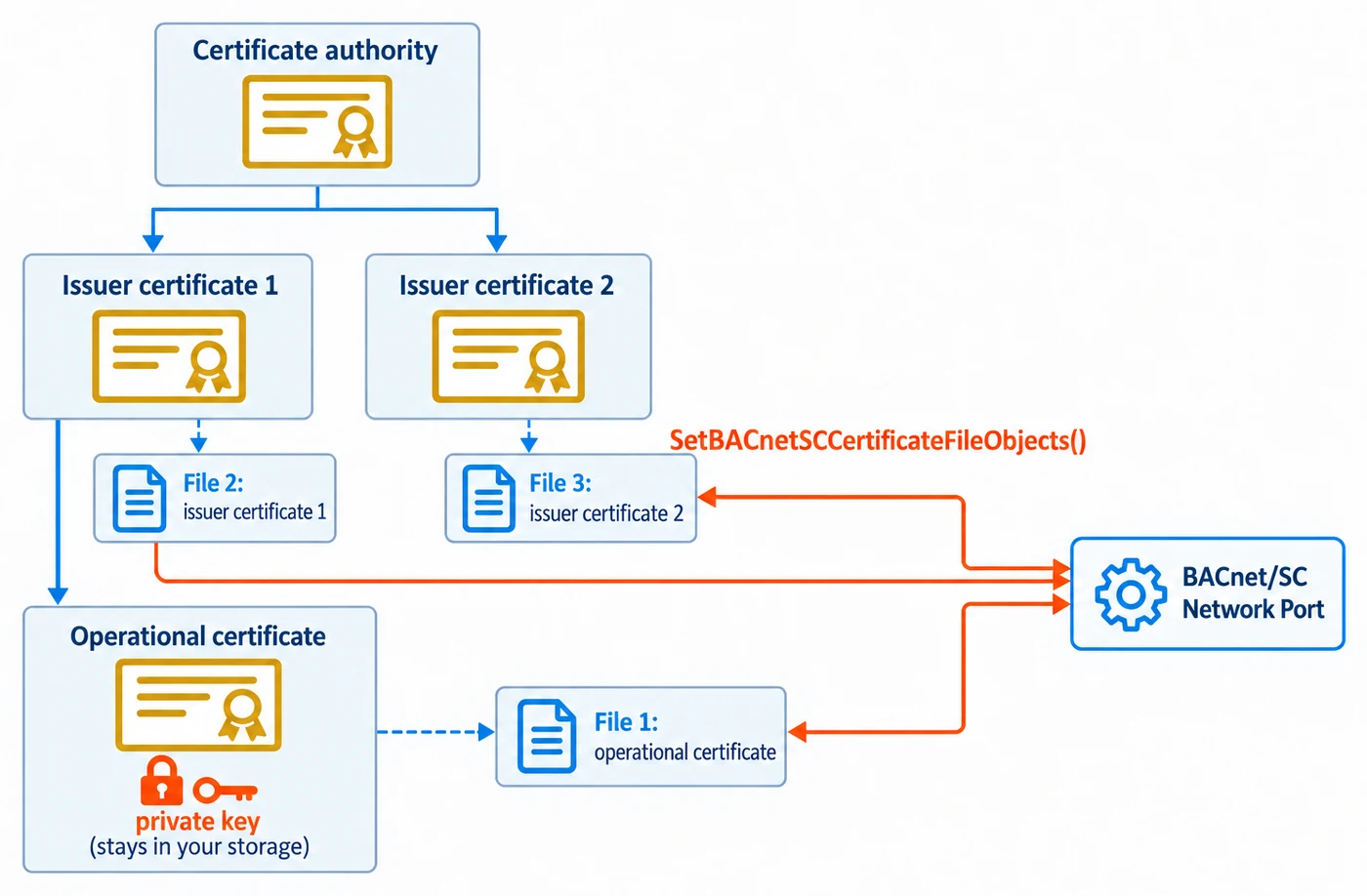
BACnet/SC moves certificate management into the BACnet object model. Each certificate (operational and issuer) is exposed as a File object. The Network Port references those File objects through three properties:
Operational_Certificate_File- exactly one File object reference.Issuer_Certificate_Files- an array that must hold two File object references (cl. 12.56.101).Certificate_Signing_Request_File- exactly one File object reference.
The certificate bytes themselves live in your application, not in the stack. A BACnet client (or operator tool) can still send new PEM bytes with AtomicWriteFile into the operational or issuer File objects (your RegisterCallbackWriteFile receives them), then issue a ReinitializeDevice with WARMSTART or ACTIVATE_CHANGES to swap them in. The stack handles this entire flow as long as your application provides:
- The File objects for the certificates, created with
BACnetStack_AddFileObject. RegisterCallbackReadFile/RegisterCallbackWriteFileimplementations that serve/accept the bytes your application already holds.
If the customer wants the device to be able to produce a CSR on demand, generating the keypair and CSR is
your application’s own responsibility (§16.4). Register BACnetStack_RegisterCallbackNetworkPortCommand
(§16.6) and the stack calls it when a client writes GENERATE_CSR_FILE to the port’s Command; your
application then writes the resulting CSR PEM into the CSR File object it serves through item 2.
The stack performs no certificate validation of its own before activating a pending change - activation unconditionally copies the pending File-object contents to the active configuration. Certificate validation is entirely the host’s TLS library’s responsibility, applied when it actually terminates a connection - see the security note in §16.3.
16.1 Create File objects for the certs
Section titled “16.1 Create File objects for the certs”Add three certificate File objects (operational, issuer 1, issuer 2), plus a fourth for the certificate signing request (CSR), to the device with BACnetStack_AddFileObject (source/CASBACnetStackDLL.h) - not
the generic BACnetStack_AddObject. AddFileObject is the only call that also stores File_Access_Method
and File_Read_Only. A File object added through the generic path is treated as a stream file, has no
File_Read_Only for an AtomicWriteFile to check; a request the stack cannot check is answered Error(SERVICES, OPTIONAL_FUNCTIONALITY_NOT_SUPPORTED). Object instance numbers are arbitrary - pick distinct values.
const uint32_t kFileInstanceOperationalCert   = 0;const uint32_t kFileInstanceIssuerCert1       = 1;const uint32_t kFileInstanceIssuerCert2       = 2;const uint32_t kFileInstanceCsr               = 3;
// isWritable=true so a BACnet client can AtomicWriteFile new PEM bytes;// isConfigurationFile=false; fileAccessMethod=1 (stream access - the PROPERTY enum, where// streamAccess=1 and recordAccess=0; this is the INVERSE of the wire-request choice used by// AtomicReadFile/AtomicWriteFile, where stream=0 and record=1; do not mix the two up).BACnetStack_AddFileObject(kDeviceInstance, kFileInstanceOperationalCert, true, false, 1);BACnetStack_AddFileObject(kDeviceInstance, kFileInstanceIssuerCert1,     true, false, 1);BACnetStack_AddFileObject(kDeviceInstance, kFileInstanceIssuerCert2,     true, false, 1);// The CSR file holds the certificate signing request your application generates: on the// GENERATE_CSR_FILE command (see 16.6) it makes a new key pair and stores the CSR PEM that this File// object serves through your read callback. A client// should not normally write to it, but this stack does not special-case CSR files, so isWritable is// a product decision. false (as shown) rejects a direct AtomicWriteFile (or File_Size write) against it,// which is the common choice.BACnetStack_AddFileObject(kDeviceInstance, kFileInstanceCsr,             false, false, 1);
16.2 Serve the PEM bytes from your own storage
Section titled “16.2 Serve the PEM bytes from your own storage”The stack keeps no copy of the certificate bytes. Hold them yourself and serve slices of them from
RegisterCallbackReadFile; accept or reject writes from RegisterCallbackWriteFile. Every stream-access File
object, the certificate files and any added with AddFileObject included, also needs File_Size from your
unsigned-integer property callback, or every read of it is refused.
// Application-owned storage: the stack keeps no copy of these bytes.static uint8_t  g_opCertBytes[CERT_MAX];static uint32_t g_opCertLength;// ... similarly for the two issuer certs and the CSR file, keyed by file instance.
static bool LoadFile(const char* path, uint8_t* out, uint32_t* outLen, uint32_t maxLen){    FILE* f = fopen(path, "rb");    if (!f) return false;    fseek(f, 0, SEEK_END);    long n = ftell(f);    fseek(f, 0, SEEK_SET);    if ((uint32_t)n > maxLen) { fclose(f); return false; }    *outLen = (uint32_t)fread(out, 1, (size_t)n, f);    fclose(f);    return true;}
// Called once at startup to populate the in-memory buffers this callback serves from.LoadFile("device.crt", g_opCertBytes, &g_opCertLength, sizeof(g_opCertBytes));
// The stack calls this for every AtomicReadFile against ANY File object - dispatch on fileInstance.bool CallbackReadFile(const uint32_t deviceInstance, const uint32_t fileInstance,                      const uint32_t fileStart, const uint32_t requestedCount,                      uint8_t* fileData, uint32_t* fileDataLength,                      const uint32_t maxFileDataLength, bool* endOfFile, uint32_t* errorCode){    uint8_t* bytes; uint32_t length;    if (!ResolveCertFile(fileInstance, &bytes, &length)) { return false; }
    if (fileStart > length) { *errorCode = 11 /* invalid-file-start-position */; return false; }
    uint32_t available = length - fileStart;    uint32_t toCopy     = requestedCount < available ? requestedCount : available;    if (toCopy > maxFileDataLength) { toCopy = maxFileDataLength; }
    memcpy(fileData, bytes + fileStart, toCopy);    *fileDataLength = toCopy;    // Mandatory on the success path - the stack initializes this false. Forgetting to set it true    // at end-of-file makes a client believe more data is coming and it will poll forever.    *endOfFile = (fileStart + toCopy) >= length;    return true;}BACnetStack_RegisterCallbackReadFile(CallbackReadFile);
// The stack calls this for every AtomicWriteFile against a WRITABLE File object (a File object// created with isWritable=false in 16.1 never reaches this callback - the stack answers// Error(services, file-access-denied) from File_Read_Only before this would run).bool CallbackWriteFile(const uint32_t deviceInstance, const uint32_t fileInstance,                       const int32_t fileStart, const uint8_t* fileData,                       const uint32_t fileDataLength, int32_t* ackFileStart, uint32_t* errorCode){    uint8_t* bytes; uint32_t* length; uint32_t maxLen;    if (!ResolveWritableCertFile(fileInstance, &bytes, &length, &maxLen)) { return false; }
    // fileStart is signed: -1 means append, and must be resolved to the real position,    // which is reported back in ackFileStart (the stack copies it into the ACK).    uint32_t start = (fileStart == -1) ? *length : (uint32_t)fileStart;    if (start + fileDataLength > maxLen) { *errorCode = 128 /* file-full */; return false; }
    memcpy(bytes + start, fileData, fileDataLength);    *length = start + fileDataLength;    *ackFileStart = (int32_t)start;    return true;}BACnetStack_RegisterCallbackWriteFile(CallbackWriteFile);
// Serve File_Size (property 42) from the stored length. The stack reads it on every stream// AtomicReadFile to check the start position, and refuses the read with// Error(services, optional-functionality-not-supported) when this callback does not answer it.// Because it reads the current length, File_Size follows a successful CallbackWriteFile.// Put this inside your existing unsigned-integer callback: only one can be registered.bool CallbackGetPropertyUnsignedInteger(const uint32_t deviceInstance, const uint16_t objectType,                                        const uint32_t objectInstance, const uint32_t propertyIdentifier,                                        uint32_t* value, const bool useArrayIndex,                                        const uint32_t propertyArrayIndex, uint32_t* errorCode){    uint8_t* bytes; uint32_t length;    if (objectType == 10 /* file */ && propertyIdentifier == 42 /* File_Size */ &&        ResolveCertFile(objectInstance, &bytes, &length)) {        *value = length;        return true;    }    return false;}BACnetStack_RegisterCallbackGetPropertyUnsignedInteger(CallbackGetPropertyUnsignedInteger);
Typical fileType conventions are "PEM" for the certificate files and "PKCS10-PEM" for the CSR file -
report this through the File object’s File_Type property via your CallbackGetPropertyCharacterString
implementation; the read/write file callbacks above deal only in raw bytes.
RegisterCallbackReadFileRecord / RegisterCallbackWriteFileRecord exist for File objects whose
File_Access_Method is record access (source/CASBACnetStackDLL.h); BACnet/SC certificate files use
stream access, so they are not needed for this section.
16.3 Bind the File objects to the SC Network Port
Section titled “16.3 Bind the File objects to the SC Network Port”const uint32_t kIssuerFiles[2] = { kFileInstanceIssuerCert1, kFileInstanceIssuerCert2};
BACnetStack_SetBACnetSCCertificateFileObjects( kDeviceInstance, kSCNetworkPortInstance, /*hasOperationalCertificateFile =*/ true, /*operationalCertificateFileInst =*/ kFileInstanceOperationalCert, /*hasCertificateSigningRequestFile = */ true, /*certificateSigningRequestFileInst = */ kFileInstanceCsr, /*issuerCertificateFileInstances = */ kIssuerFiles, /*issuerCertificateFileCount = */ 2);This call stages the bindings as pending: the port’s Changes_Pending reads TRUE, and the active configuration (which
Current_Health describes, if your application has enabled that property with BACnetStack_SetPropertyEnabled) is
still empty at start-up. Once the start-up configuration is done, activate
it from your code:
// Activate the pending start-up configuration of the BACnet/SC Network Port.// Pass 4194303 as the port instance to activate every Network Port of the device.BACnetStack_ActivateNetworkPortPendingChanges(kDeviceInstance, kSCNetworkPortInstance);This runs the same activation as a ReinitializeDevice ACTIVATE_CHANGES, without the password check and without calling your ReinitializeDevice callback. After it, BACnet clients can read the cert references on the Network Port and write new PEM bytes into the File objects.
Bind two different File objects to the two Issuer_Certificate_Files entries (cl. 12.56.101). A client that replaces or clears an issuer file (cl. 19.8.3) needs the two entries to be distinct, and the stack’s own certificate-management client stops with an invalid-response failure when a target reports the same File object twice.
Keep the issuer Files apart from the other two as well. BACnetStack_SetBACnetSCCertificateFileObjects returns false, and changes nothing, when an issuer entry names the operational certificate File or the CSR File (cl. 12.56.100, 12.56.101). If an issuer slot shared the operational certificate’s File, an issuer rollover would overwrite the device’s own certificate.
Before this call, a reference that is not bound reads as File object instance 4194303 (cl. 12.1.1), and Current_Health (if your application has enabled that property with BACnetStack_SetPropertyEnabled) reports the missing configuration. Issuer_Certificate_Files always reads as two elements; a slot with no File bound reads as 4194303 too. Bind both slots so the device meets cl. 12.56.101.
Security note. The stack itself performs no certificate validation and has no call site that could - it never sees a peer certificate and never terminates a TLS session (TLS is delegated entirely to the host, per §16.4 below). The host’s own TLS library, configured with its CA chain, mutual-authentication policy, and hostname/SAN checks, is the device’s entire certificate policy. CSR generation and certificate issuance are likewise entirely your application’s responsibility, using whatever key-generation and CA workflow you choose - the stack only stores and serves the resulting bytes through the File objects wired up above.
16.4 Where the private key lives
Section titled “16.4 Where the private key lives”The CAS BACnet Stack never sees the private key. The key is loaded by your TLS layer when it presents the operational certificate during the WebSocket TLS handshake. Generating a new keypair and CSR (when you want the device to obtain a new certificate) is entirely your application’s own responsibility, outside the stack - on demand when a client writes GENERATE_CSR_FILE (§16.6), typically persisting the private half in a TPM, secure element, or encrypted blob in flash, then storing the resulting CSR PEM in your own storage. The stack calls your CallbackWriteFile only for a peer’s AtomicWriteFile, and never for a File object created read-only as the CSR File is in §16.1: it serves the CSR to readers through your CallbackReadFile (§16.2), and the project CA signs it.
Certificate Security Guidelines
Section titled “Certificate Security Guidelines”Certificates are also the BACnet/SC network’s flood-control boundary: the hub function forwards every accepted peer’s traffic without a rate limit (cl. AB.5.1), so revoking a misbehaving device’s certificate is how you remove it (enforced by your TLS layer: the stack does no CRL/OCSP checking, so reject the revoked certificate there and close that device’s open connections). See Appendix C.2.
| Rule | Reason |
|---|---|
Store private keys with OS-level access restrictions (chmod 600 on Linux) |
Prevents other processes from reading the key |
| Never commit private keys to version control | Keys in git history are permanently compromised |
| On embedded devices, use secure flash or a hardware security module (HSM) | Physical tamper resistance |
| Rotate certificates annually (or per your security policy) | Limits exposure if a certificate is compromised |
| Use a separate CA key that is kept offline | Compromising the CA key compromises all devices |
Set certificate NotAfter to a reasonable horizon (1–3 years) |
Prevents expired-cert lockout during an outage |
| Include the device UUID as a Subject Alternative Name (SAN) | Allows the hub to validate UUID matches the certificate |
16.5 Changes_Pending and certificate/direct-connect activation
Section titled “16.5 Changes_Pending and certificate/direct-connect activation”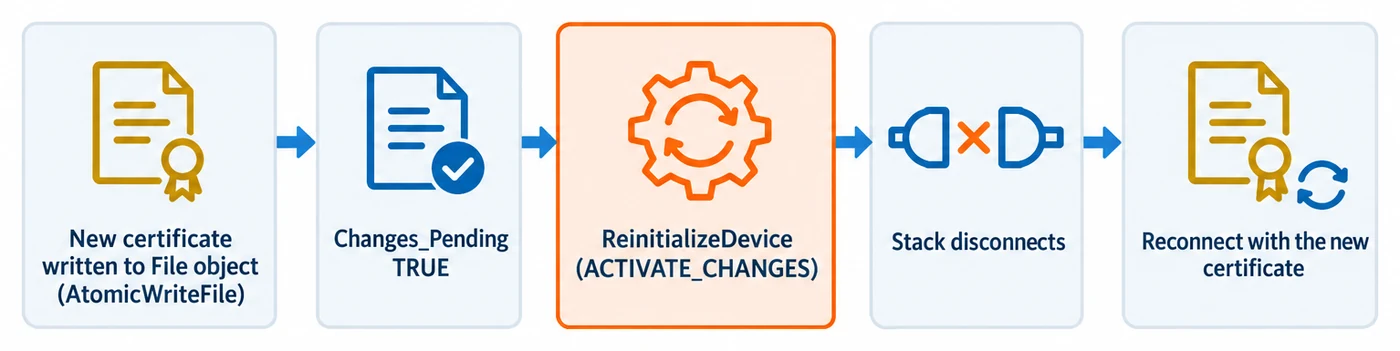
Several BACnet/SC Network Port writes do not take effect immediately. They set Changes_Pending = TRUE and
become active only after a ReinitializeDevice with ACTIVATE_CHANGES or WARMSTART, or after your own code
calls BACnetStack_ActivateNetworkPortPendingChanges() (§16.3).
Which writes are pending
- Writing new bytes into a certificate File object that is already bound. Rotating a certificate by
AtomicWriteFile(or by writingFile_Size) with new PEM bytes into the File object thatOperational_Certificate_File,Certificate_Signing_Request_Fileor an entry ofIssuer_Certificate_Filesalready references raisesChanges_Pendingon that SC Network Port, even though the File object reference did not change. A content-only rewrite that is never activated is not used by the TLS layer. - Writing
SC_Direct_Connect_Initiate_EnableorSC_Direct_Connect_Accept_Enable. Both properties are writable. A successfulWritePropertysetsChanges_Pending = TRUEand the property reads back the pending value. See §22 for the property table entry. - Writing the hub URIs and the timeouts. These follow the same rule. The certificate file bindings are not
writable over BACnet at all (a client gets WRITE_ACCESS_DENIED);
BACnetStack_SetBACnetSCCertificateFileObjectsstages them as pending from your code.
Only a successful write sets Changes_Pending (cl. 12.56.80). A WriteProperty that the stack refuses, for
example because of a wrong datatype or a value out of range, answers Result(-) and leaves Changes_Pending as
it was.
What activation does
- The stack activates the pending values without validating them (see the security note in §16.3). Your application has nothing extra to implement for this.
- When the rewritten file is the
Operational_Certificate_Fileor anIssuer_Certificate_Fileselement, activation also restarts the port: its hub and direct connections drop and are made again, so your TLS layer presents and checks the new certificate. Reload the certificate in your TLS layer when the connection is made, not once at start-up. ACertificate_Signing_Request_Filerewrite setsChanges_Pendingbut does not restart the port. - A pending direct-connect enable is applied to the BACnet/SC data link as if you had called
BACnetStack_SetBACnetSCDirectConnectConfig()with the new values, so disabling either one closes the direct connection or stops listening. An activation that leaves both values unchanged does not touch an open connection. DISCARD_CHANGESforgets the pending restart. Reverting the file bytes themselves is your application’s job, in theDISCARD_CHANGESNetwork Port Command callback (§16.6).
What is not covered
The startup configuration call
BACnetStack_SetBACnetSCDirectConnectConfig(Appendix C.2) sets the initiate/accept-enable values directly and immediately, with noChanges_Pendingor activation step, because it runs before the device is on the network. Once the device is live, change these two properties withWritePropertyfollowed byReinitializeDevice, as described above.
16.6 Network Port Command: DISCARD_CHANGES and GENERATE_CSR_FILE
Section titled “16.6 Network Port Command: DISCARD_CHANGES and GENERATE_CSR_FILE”Because the certificate bytes live in your application, two values of the Network Port Command property (135-2024
cl. 12.56.16) need your application’s help. Register one callback for both:
bool MyNetworkPortCommand(const uint32_t deviceInstance, const uint32_t networkPortInstance, const uint32_t command, uint32_t* errorCode);BACnetStack_RegisterCallbackNetworkPortCommand(MyNetworkPortCommand);The stack calls it for exactly two commands, from inside the WriteProperty service and after its own checks:
DISCARD_CHANGES(1) - on every Network Port type, before the stack reverts anything. Cl. 12.56.101 (and 12.56.100 for the operational certificate file) expects the referenced File objects to return to their state at the last pointChanges_Pendingwas FALSE. Drop the certificate bytes you staged since the last activation and returntrue; the stack then reverts the pending bindings of that port only andChanges_Pendingreads FALSE. Returnfalsewith a BACnet error code in*errorCodeto refuse: the write fails with that error and the port keeps its pending changes. Without the callback the stack reverts its own pending state.GENERATE_CSR_FILE(9) - on a BACnet/SC port whoseChanges_Pendingis FALSE (with changes pending the write answersINVALID_VALUE_IN_THIS_STATEand you are not called). Generate a new key pair (§16.4), store the new CSR PEM where your read callback serves the File object bound toCertificate_Signing_Request_File, and only then returntrue. The client gets Result(+) andCommandreadsIDLEagain;Changes_Pendingis not touched. Without the callback the write answersOPTIONAL_FUNCTIONALITY_NOT_SUPPORTED.
The call is synchronous, so keep key generation short enough for the client’s APDU timeout. See the doc block of
BACnetStack_RegisterCallbackNetworkPortCommand in source/CASBACnetStackDLL.h for the error-code mapping.
Appendix A - Generating Self-Signed Test Certificates with OpenSSL
Section titled “Appendix A - Generating Self-Signed Test Certificates with OpenSSL”These steps create a private CA and a device leaf certificate suitable for lab testing only. Production deployments must use a real CA.
Certificate Hierarchy Models
Section titled “Certificate Hierarchy Models”Two models are common in BACnet/SC deployments:
Self-Signed CA (Development / Lab) — A single CA signs all device and hub certificates. All devices trust the same CA.
[Site CA (self-signed)] | +-- [Hub certificate] | +-- [Device A certificate] | +-- [Device B certificate]Enterprise PKI (Production) — An intermediate CA under a corporate root CA signs device certificates. Devices hold the full chain in their issuer File Objects.
[Corporate Root CA] | +-- [Building Automation Intermediate CA] | +-- [Hub certificate] | +-- [Device certificates]For Annex AB compliance, each BACnet/SC device holds exactly two issuer File Objects (see Section 16.3). In a lab environment both slots can hold the same self-signed CA certificate. In production the two slots typically hold the intermediate CA and the root CA.
A.1 Create a CA
Section titled “A.1 Create a CA”# Use ECDSA P-256; TLS 1.3 supports both ECDSA and RSA, but ECDSA is smaller.openssl genpkey -algorithm EC \ -pkeyopt ec_paramgen_curve:prime256v1 \ -out ca.key
openssl req -new -x509 -key ca.key -out ca.crt -days 3650 \ -subj "/CN=Lab BACnet/SC CA/O=Acme Engineering"A.2 Create a device key and CSR
Section titled “A.2 Create a device key and CSR”openssl genpkey -algorithm EC \ -pkeyopt ec_paramgen_curve:prime256v1 \ -out device.key
openssl req -new -key device.key -out device.csr \ -subj "/CN=device-389001/O=Acme Engineering"A.3 Sign the device certificate
Section titled “A.3 Sign the device certificate”openssl x509 -req -in device.csr \ -CA ca.crt -CAkey ca.key -CAcreateserial \ -out device.crt -days 365 \ -extfile <(printf "extendedKeyUsage = clientAuth, serverAuth\n")extendedKeyUsage includes both clientAuth (for the node’s outbound TLS) and serverAuth (in case the same cert is used by hub function or direct-connect-accept).
A.4 Verify the Certificate Chain
Section titled “A.4 Verify the Certificate Chain”Before loading certs into the device, confirm the chain is valid:
openssl verify -CAfile ca.crt device.crt# Expected output: device.crt: OK
# Inspect validity datesopenssl x509 -noout -dates -in device.crt
A failed openssl verify at this step means the TLS handshake will fail at runtime with no obvious error on the BACnet side.
A.5 Files to load into the device
Section titled “A.5 Files to load into the device”| File | Use |
|---|---|
device.crt |
Operational certificate File object (served by your CallbackReadFile - see §16.2) |
ca.crt |
Both issuer File objects (Annex AB requires two; for lab, you can serve the same CA cert twice or split a real chain) |
device.key |
Loaded by your TLS library, never exposed through a BACnet File object |
For a lab where the same ca.crt plays both issuer roles, load all three files into your application’s own
buffers at startup (before registering CallbackReadFile, per §16.2):
LoadFile("device.crt", g_opCertBytes, &g_opCertLength, sizeof(g_opCertBytes));LoadFile("ca.crt", g_issuerCert1Bytes, &g_issuerCert1Length, sizeof(g_issuerCert1Bytes));LoadFile("ca.crt", g_issuerCert2Bytes, &g_issuerCert2Length, sizeof(g_issuerCert2Bytes));A.6 TLS library configuration
Section titled “A.6 TLS library configuration”Configure your WebSocket/TLS library to:
- Present
device.crt+device.keyduring the TLS handshake (client side). - Trust
ca.crtas a root. - Require TLS 1.3 (disable 1.2 and earlier).
- Verify peer certificates (mutual TLS).
Pseudocode (OpenSSL-style):
SSL_CTX* ctx = SSL_CTX_new(TLS_client_method());SSL_CTX_set_min_proto_version(ctx, TLS1_3_VERSION);SSL_CTX_set_max_proto_version(ctx, TLS1_3_VERSION);SSL_CTX_use_certificate_file (ctx, "device.crt", SSL_FILETYPE_PEM);SSL_CTX_use_PrivateKey_file (ctx, "device.key", SSL_FILETYPE_PEM);SSL_CTX_load_verify_locations(ctx, "ca.crt", NULL);SSL_CTX_set_verify(ctx, SSL_VERIFY_PEER, NULL);A.7 BACnet/SC URI conventions
Section titled “A.7 BACnet/SC URI conventions”Lab setups commonly use:
| URI | Role |
|---|---|
wss://127.0.0.1:4443/bacnet-sc |
Local hub for benchtop testing |
wss://hub.lab.example.com:4443/bacnet-sc |
LAN hub |
wss://0.0.0.0:4443/bacnet-sc |
Listening URI when this device is the hub |
The path component (/bacnet-sc) is conventional but not standardised; configure your WebSocket library to accept any path on the listening side and match the path on the connecting side.