
BACnet/SC integration guide
Ten steps take a device built on the CAS BACnet Stack to a working BACnet/SC node. Read the overview first for what BACnet/SC is (§2) and where the stack ends and your code begins (§4).
5. Prerequisites
Section titled “5. Prerequisites”Before starting, you should have:
- A working build of your application that already compiles against the CAS BACnet Stack DLL (see the Quick Start for the minimum BACnet/IP example).
- A WebSocket client library that supports:
- TLS 1.3 with mutual authentication.
- Configurable client certificate / private key.
- Configurable trust anchors (CA bundle).
- Binary WebSocket frames (RFC 6455 opcode 0x2). Text frames are a protocol violation for BACnet/SC.
- A reachable BACnet/SC hub for testing (the BACnet stack reference Java implementation, or a peer Chipkin product, or any compliant hub).
- Test certificates: a private CA, an operational certificate for this device, and the CA chain. Appendix A walks through generating these with OpenSSL.
The stack supports Windows (x86/x64) and Linux (x86/x64, ARM). The build presets cover each of them; see Build presets.
6. Compile-Time Configuration
Section titled “6. Compile-Time Configuration”BACnet/SC is feature-gated at compile time so it can be excluded from devices that do not need it. The master flag is STACK_OPTION_DATA_LINK_LAYER_SC.
In source/CIBuildSettings.h, or as CMake options (see Build presets for where
the options go; do not edit CASBACnetStackOptions.h itself):
// Master switch for BACnet/SC support#define STACK_OPTION_DATA_LINK_LAYER_SC
// The Network Port object is turned on automatically with SC; defining it is harmless.#define STACK_OPTION_OBJECT_TYPE_NETWORK_PORT// Needed for the File objects that hold the certificates.#define STACK_OPTION_OBJECT_TYPE_FILE// Needed to serve those File objects (AddFileObject, the read and write file callbacks):// NM-SCCM-A turns on the AtomicReadFile/AtomicWriteFile support. ENABLE_ALL_BIBBS below// also turns it on.#define STACK_OPTION_NM_SCCM_A
// Currently required alongside SC (shared utility code depends on it; it does not// require an active IPv4 network - see the #error guard in CASBACnetStackOptions.h).#define STACK_OPTION_DATA_LINK_LAYER_IPV4
When STACK_OPTION_DATA_LINK_LAYER_SC is not defined:
- The
BACnetStack_*BACnetSC*andBACnetStack_RegisterCallbackSC*functions are still exported, so the same header and bindings work with either build. Each one does nothing: it returnsfalse(or is a no-op for thevoidregistration functions) and reports through the debug-message callback that the feature was not compiled in, naming the option it needs. - The BACnet/SC implementation is compiled out. The release also offers a package built without BACnet/SC.
- The
secure-connect (11)Network_Typeenumeration value is still defined. A build without SC simply has no BACnet/SC network port to report it. - Flash usage is reduced (see Appendix B).
A node-only SC build selects the embedded target and defines these options in your build settings (see Build presets for where they go). Without a target the stack falls back to the full target, which turns on every data link:
#define STACK_OPTION_TARGET_EMBEDDED#define STACK_OPTION_DATA_LINK_LAYER_SC#define STACK_OPTION_DATA_LINK_LAYER_IPV4 // currently required#define STACK_OPTION_OBJECT_TYPE_NETWORK_PORT#define STACK_OPTION_OBJECT_TYPE_FILE#define STACK_OPTION_ENABLE_ALL_OBJECT_TYPES#define STACK_OPTION_NM_SCCM_A // required for the certificate File objects#define STACK_OPTION_STRING_LITERALS // also turns on the XML decoderWith CMake, set the same configuration as cache options:
cmake -S . -B build -DSTACK_OPTION_TARGET_FULL=OFF -DSTACK_OPTION_DECODE_AS_JSON=OFF \ -DSTACK_OPTION_API_DEBUG_LOGGING=OFF \ "-DCASBACNET_EXTRA_OPTIONS=STACK_OPTION_TARGET_EMBEDDED;STACK_OPTION_DATA_LINK_LAYER_SC;STACK_OPTION_DATA_LINK_LAYER_IPV4;STACK_OPTION_OBJECT_TYPE_NETWORK_PORT;STACK_OPTION_OBJECT_TYPE_FILE;STACK_OPTION_ENABLE_ALL_OBJECT_TYPES;STACK_OPTION_NM_SCCM_A"STACK_OPTION_STRING_LITERALS is on by default in CMake, and it turns the XML decoder on, so this build has XML
decoding as the #define list does.
STACK_OPTION_DATA_LINK_LAYER_SCstill requiresSTACK_OPTION_DATA_LINK_LAYER_IPV4to be defined alongside it (CASBACnetStackOptions.henforces this with an#error). This dependency exists only for shared utility code; it does not require an active IPv4 network.
See Appendix B for size estimates per configuration.
7. Integration Overview (10-Step Map)
Section titled “7. Integration Overview (10-Step Map)”This is the full integration path. Each step is one section of this manual.
1. Load the CAS BACnet Stack DLL ............. Section 82. Define persistent identity (UUID + VMAC) .. Section 93. Register standard BACnet callbacks ........ Section 104. Register BACnet/SC transport callbacks .... Section 115. Add device + application objects .......... Section 126. Add the SC Network Port object ............ Section 137. Configure UUID + Hub Connector ............ Section 148. Configure timing + buffer sizes ........... Section 159. Wire up certificates ...................... Section 1610. Run the main loop calling Tick() .......... Section 17Steps 1–6 are largely the same as a standard BACnet/IP integration. Steps 7–9 are specific to BACnet/SC.
8. Step 1 - Load the CAS BACnet Stack
Section titled “8. Step 1 - Load the CAS BACnet Stack”Identical to other CAS BACnet Stack integrations. The code below applies when you load the DLL or shared object through the C++ adapter (CASBACnetStackAdapter.h): call LoadBACnetFunctions() once at startup. If you link the stack from source or as a static library, you do not call LoadBACnetFunctions() and need no adapter header; skip the loading code and follow Quick Start, step 1 for your link mode.
This manual uses the export names (e.g., BACnetStack_AddDevice), which every link mode provides.
#include "CASBACnetStackAdapter.h"
if (!LoadBACnetFunctions()) {    fprintf(stderr, "Failed to load CAS BACnet Stack\n");    return -1;}
printf("CAS BACnet Stack version %u.%u.%u.%u\n",       BACnetStack_GetAPIMajorVersion(),       BACnetStack_GetAPIMinorVersion(),       BACnetStack_GetAPIPatchVersion(),       BACnetStack_GetAPIBuildVersion());
9. Step 2 - Define Persistent Identity (UUID and VMAC)
Section titled “9. Step 2 - Define Persistent Identity (UUID and VMAC)”Generate the UUID once per physical device and store it in non-volatile memory. The simplest implementation is to generate a UUIDv4 the first time the device boots, persist the 16 bytes, and reuse them on every subsequent boot.
#include <stdint.h>
// 16-byte persistent device identity (RFC 4122 layout)// Replace this hard-coded value with a value loaded from NV storage.static const uint8_t kDeviceUuid[16] = {    0x12, 0x34, 0x56, 0x78,   // time-low    0x9A, 0xBC,               // time-mid    0x4D, 0xEF,               // time-hi-and-version (0x4XXX = v4)    0x80, 0x12,               // clock-seq (0x8XXX, RFC 4122 variant)    0x11, 0x22, 0x33, 0x44, 0x55, 0x66};
// 6-byte VMAC. NULL (length 0) uses the default: the UUID's last six// octets in Random-48 form, the same on every boot. Pass your own six// bytes only if you need a particular VMAC; all-zero and all-0xFF are// refused.static const uint8_t* g_vmac = NULL;static const uint8_t g_vmacLength = 0;
Production rule: the UUID MUST survive a factory reset of application settings (so the device’s identity is stable to the BACnet network), but MUST be cleared by a hardware-level “decommission” or “rekey” procedure if your security model requires it. ASHRAE Annex AB does not specify either policy; choose one consistent with your product’s security posture.
10. Step 3 - Register the Standard Callbacks
Section titled “10. Step 3 - Register the Standard Callbacks”These are the same callbacks any BACnet integration uses. The bare minimum for a server device:
// Transport (UDP for BACnet/IP; here used as the inbound/outbound byte path// for BACnet/SC as well - see Section 18 for SC-specific behavior).BACnetStack_RegisterCallbackReceiveMessageForPort(CallbackReceiveMessage);BACnetStack_RegisterCallbackSendMessageForPort(CallbackSendMessage);
// System time (used by the stack for timeouts, heartbeats, timestamps).BACnetStack_RegisterCallbackGetSystemTime(CallbackGetSystemTime);
// Property accessors.BACnetStack_RegisterCallbackGetPropertyReal(CallbackGetPropertyReal);BACnetStack_RegisterCallbackGetPropertyEnumerated(CallbackGetPropertyEnum);BACnetStack_RegisterCallbackGetPropertyCharacterString(CallbackGetPropertyCharString);BACnetStack_RegisterCallbackGetPropertyOctetString(CallbackGetPropertyOctetString);BACnetStack_RegisterCallbackGetPropertyUnsignedInteger(CallbackGetPropertyUInt);BACnetStack_RegisterCallbackGetPropertyDate(CallbackGetPropertyDate);BACnetStack_RegisterCallbackGetPropertyTime(CallbackGetPropertyTime);
// Optional but strongly recommended for development.BACnetStack_RegisterCallbackLogDebugMessage(CallbackLogDebugMessage);
Section 18 shows the implementations of CallbackReceiveMessage / CallbackSendMessage for BACnet/SC.
11. Step 4 - Register the BACnet/SC Transport Callbacks
Section titled “11. Step 4 - Register the BACnet/SC Transport Callbacks”These five callbacks are the BACnet/SC-specific contract between the stack and your application. With the send and receive message callbacks from Step 3, they are the callbacks sections 18 and 20 of Transport callbacks describe:
// Stack asks the application to OPEN an outbound WebSocket to a URI.// Required for: BACnet/SC Node (connects to a Hub or initiates a Direct Connection).// Optional for: BACnet/SC Hub (only needed if the Hub also connects to another Hub).BACnetStack_RegisterCallbackInitiateWebsocket(CallbackInitiateWebsocket);
// Stack asks the application to CLOSE a WebSocket, outbound or accepted.// Required for: every role. The hub function and direct-connect accept use it to close// accepted connections (the <acceptUri>|client=<token> strings of section 18.3.1).BACnetStack_RegisterCallbackDisconnectWebsocket(CallbackDisconnectWebsocket);
// Stack asks the application to START LISTENING on a URI for inbound connections.// Required for: BACnet/SC Hub, and any Node configured to Accept Direct Connections.// Not required for: Node-only devices that do not accept Direct Connections.BACnetStack_RegisterCallbackSCStartListening(CallbackSCStartListening);
// Stack asks the application to STOP LISTENING on a URI.// Required for: BACnet/SC Hub, and any Node configured to Accept Direct Connections.// Not required for: Node-only devices that do not accept Direct Connections.BACnetStack_RegisterCallbackSCStopListening(CallbackSCStopListening);
// Stack reports BACnet/SC state-machine transitions.// Used for debug logging and observability; not required for correct operation.BACnetStack_RegisterCallbackBACnetSCStateChange(CallbackSCStateChange);
Their signatures are documented in Section 18.
12. Step 5 - Add the Device and Application Objects
Section titled “12. Step 5 - Add the Device and Application Objects”const uint32_t kDeviceInstance = 389001;const uint32_t kAnalogInputInstance = 0;const uint32_t kSCNetworkPortInstance = 56001;
// 1. Add the device.if (!BACnetStack_AddDevice(kDeviceInstance)) { fprintf(stderr, "AddDevice failed\n"); return -1;}
// 2. Add an Analog Input (or whatever the product needs).if (!BACnetStack_AddObject(kDeviceInstance, OBJECT_TYPE_ANALOG_INPUT, // 0 kAnalogInputInstance)) { fprintf(stderr, "AddObject(AnalogInput) failed\n"); return -1;}
// Optional: enable units, description, reliability properties on the AI.BACnetStack_SetPropertyEnabled(kDeviceInstance, OBJECT_TYPE_ANALOG_INPUT, kAnalogInputInstance, PROPERTY_IDENTIFIER_UNITS, true);BACnetStack_SetPropertyEnabled(kDeviceInstance, OBJECT_TYPE_ANALOG_INPUT, kAnalogInputInstance, PROPERTY_IDENTIFIER_DESCRIPTION, true);Define the OBJECT_TYPE_* and PROPERTY_IDENTIFIER_* constants yourself, with the values of the
BACnetObjectType and BACnetPropertyIdentifier enumerations listed in the
Enumerations reference.
Do not add the certificate File objects with
BACnetStack_AddObject. Section 16.1 usesBACnetStack_AddFileObjectinstead - a plainAddObject(..., OBJECT_TYPE_FILE, ...)object has noFile_Access_Method/File_Read_Only, which breaksAtomicReadFile/AtomicWriteFileagainst it.
13. Step 6 - Add the BACnet/SC Network Port Object
Section titled “13. Step 6 - Add the BACnet/SC Network Port Object”The Network Port object with Network_Type = secure-connect (11) is mandatory for BACnet/SC. All SC configuration properties - hub URIs, timeouts, certificate file references, connection state - live on this object.
BACnetStack_AddNetworkPortObject requires a network number and network-number quality for every
Network Port it creates (source/CASBACnetStackDLL.h); there is no number-less overload. Pass
networkNumber = 0 and networkNumberQuality = 0 (unknown) if you are not assigning network numbers:
// Define these yourself (BACnetNetworkType and BACnetProtocolLevel values)://   NETWORK_TYPE_SECURE_CONNECT                = 11//   PROTOCOL_LEVEL_BACNET_APPLICATION          = 2//   NETWORK_PORT_LOWEST_PROTOCOL_LAYER         = 4194303
if (!BACnetStack_AddNetworkPortObject(        kDeviceInstance,        kSCNetworkPortInstance,        NETWORK_TYPE_SECURE_CONNECT,           // 11        PROTOCOL_LEVEL_BACNET_APPLICATION,     // 2        0,                                      // networkNumber (0 = not assigned)        0,                                      // networkNumberQuality (0 = unknown)        NETWORK_PORT_LOWEST_PROTOCOL_LAYER))   // 4194303 = referencePort{    fprintf(stderr, "AddNetworkPortObject(SC) failed\n");    return -1;}
The stack will automatically populate the SC-specific properties on this object (SC_Primary_Hub_URI, SC_Hub_Connector_State, Operational_Certificate_File, etc.). Your application reads/writes those properties via the CallbackGetProperty* / CallbackSetProperty* callbacks just like any other BACnet property - but most callers will not need to read or write them directly because the SC API does it for them.
Pitfall:
Network_Type = 11 (secure-connect)is the value passed toAddNetworkPortObjectand stored on the Network Port. The send and receive callbacks do not carry a network type: they carry the Network Port object instance (networkPortInstance, herekSCNetworkPortInstance) - see Section 18.
14. Step 7 - Configure the Device UUID and Hub Connector
Section titled “14. Step 7 - Configure the Device UUID and Hub Connector”// 1. Tell the stack about the device's UUID. The UUID is the persistent// identity used in Connect-Request messages and TLS validation.if (!BACnetStack_SetBACnetSCUuid(kDeviceUuid, sizeof(kDeviceUuid))) { fprintf(stderr, "SetBACnetSCUuid failed\n"); return -1;}
// 2. Configure the hub connector: VMAC + primary URI + (optional) failover URI.const char* primaryHub = "wss://hub.example.com:4443/bacnet-sc";const char* failoverHub = "wss://failover.example.com:4443/bacnet-sc";
if (!BACnetStack_SetBACnetSCHubConnector( g_vmac, g_vmacLength, primaryHub, (uint16_t)strlen(primaryHub), failoverHub, (uint16_t)strlen(failoverHub))){ fprintf(stderr, "SetBACnetSCHubConnector failed\n"); return -1;}After this call, on the next BACnetStack_Tick() the stack will:
- Call your
CallbackInitiateWebsocket(primaryHub). - Wait for the application to call
BACnetStack_SetBACnetSCWebSocketStatus(primaryHub, ..., kStatusConnected, 0). - Send the BACnet/SC
Connect-Request. - On
Connect-Accept, transition to operational and start the heartbeat timer.
If the primary fails (TLS error, timeout, BVLC NAK), the stack repeats the sequence for the failover URI. See Section 23.
No failover hub? Pass
NULL, 0for the last two arguments. The stack will treat the primary as the only hub.
15. Step 8 - Tune Timing and Buffer Sizes
Section titled “15. Step 8 - Tune Timing and Buffer Sizes”// All timeouts are in seconds.// All buffer sizes are in octets.//// The stack's defaults are shown - only call this if you need to override them.// The BVLC default is 6144 in a STACK_OPTION_TARGET_FULL build (the prebuilt// libraries) and 1600 otherwise; use the value that matches your build.const uint16_t kMaximumBVLCLength = 6144; // 1600 in a build without TARGET_FULLconst uint16_t kMaximumNPDULength = 1497; // the Annex AB minimumconst uint16_t kConnectTimeoutSec = 10; // BACnet/SC Connect-Request timeoutconst uint16_t kWsConnectTimeoutSec = 10; // WebSocket open timeoutconst uint16_t kWsReconnectTimeoutSec = 10; // Delay before the first reconnect attemptconst uint16_t kHeartbeatTimeoutSec = 300; // Heartbeat interval
if (!BACnetStack_SetBACnetSCSettings( kMaximumBVLCLength, kMaximumNPDULength, kConnectTimeoutSec, kWsConnectTimeoutSec, kWsReconnectTimeoutSec, kHeartbeatTimeoutSec)){ fprintf(stderr, "SetBACnetSCSettings failed\n"); return -1;}Guidance:
- Buffer sizes: the stack’s own minimum is 1600 octets for BVLC (the default is 6144 in a
STACK_OPTION_TARGET_FULLbuild) and 1497 for NPDU, the Annex AB figure; a smaller value is refused. The stack’s receive buffer sets the ceilings: a BVLC length above 6144 is stored as 6144, and an NPDU length above 6128 is stored as 6128 (the call still succeeds and logs the change). The two must agree: the NPDU length plus 16 must not exceed the BVLC length, or the call is refused and nothing changes. - Heartbeat timeout: shorter values detect dead connections faster but consume more bandwidth and CPU. The default, 300 s, is also the largest value accepted (the range is 3 to 300 s).
- Reconnect timeout: the first reconnect attempt waits this long. Later attempts wait longer, in steps, up to SC_Maximum_Reconnect_Time (600 s by default). The accepted range is 2 to 300 s; a low value can hammer a hub that is briefly unreachable.
15.1 Hello capabilities (optional)
Section titled “15.1 Hello capabilities (optional)”The stack advertises a Hello capabilities byte in the Hello destination option of Connect-Request and Connect-Accept. Bit 0 (0x01) is “identity relay”; bits 1 to 7 are reserved and must be 0. The stack sends the byte as given and does not act on the identity-relay bit itself. Pass 0 unless a hub or peer requires otherwise.
// Bit 0 (0x01): identity relay. Bits 1-7: reserved, must be 0.BACnetStack_SetBACnetSCHelloCapabilities(0);Changing the value drops connections: if the new value differs from the current one, every accepted hub-function peer and the direct-connect peer are disconnected (through your disconnect callback) so the new Hello is exchanged when they reconnect. Setting the value it already has disconnects nothing. The setting applies to every BACnet/SC data link of the device.
16. Step 9 - Wire Up Certificates (File Objects + CSR)
Section titled “16. Step 9 - Wire Up Certificates (File Objects + CSR)”Step 9 has its own page, Certificates. It creates the File objects for the certificates, serves their bytes from your storage, binds them to the BACnet/SC Network Port, and handles certificate changes and CSR requests.
Binding the certificate files leaves the Network Port’s Changes_Pending TRUE. Once your start-up configuration is
done, activate it with one call, before you enter the main loop:
// Make the pending start-up configuration (the certificate File bindings) active.// 4194303 instead of the port instance activates every Network Port of the device.if (!BACnetStack_ActivateNetworkPortPendingChanges(kDeviceInstance, kSCNetworkPortInstance)) { fprintf(stderr, "ActivateNetworkPortPendingChanges failed\n"); return -1;}Without it, the device boots reporting Changes_Pending TRUE, and, if your application has enabled Current_Health with
BACnetStack_SetPropertyEnabled (the stack does not enable it on an SC port), that property describes the empty
active configuration, until a BACnet client sends ReinitializeDevice ACTIVATE_CHANGES. See
Section 16.3.
17. Step 10 - Run the Main Loop
Section titled “17. Step 10 - Run the Main Loop”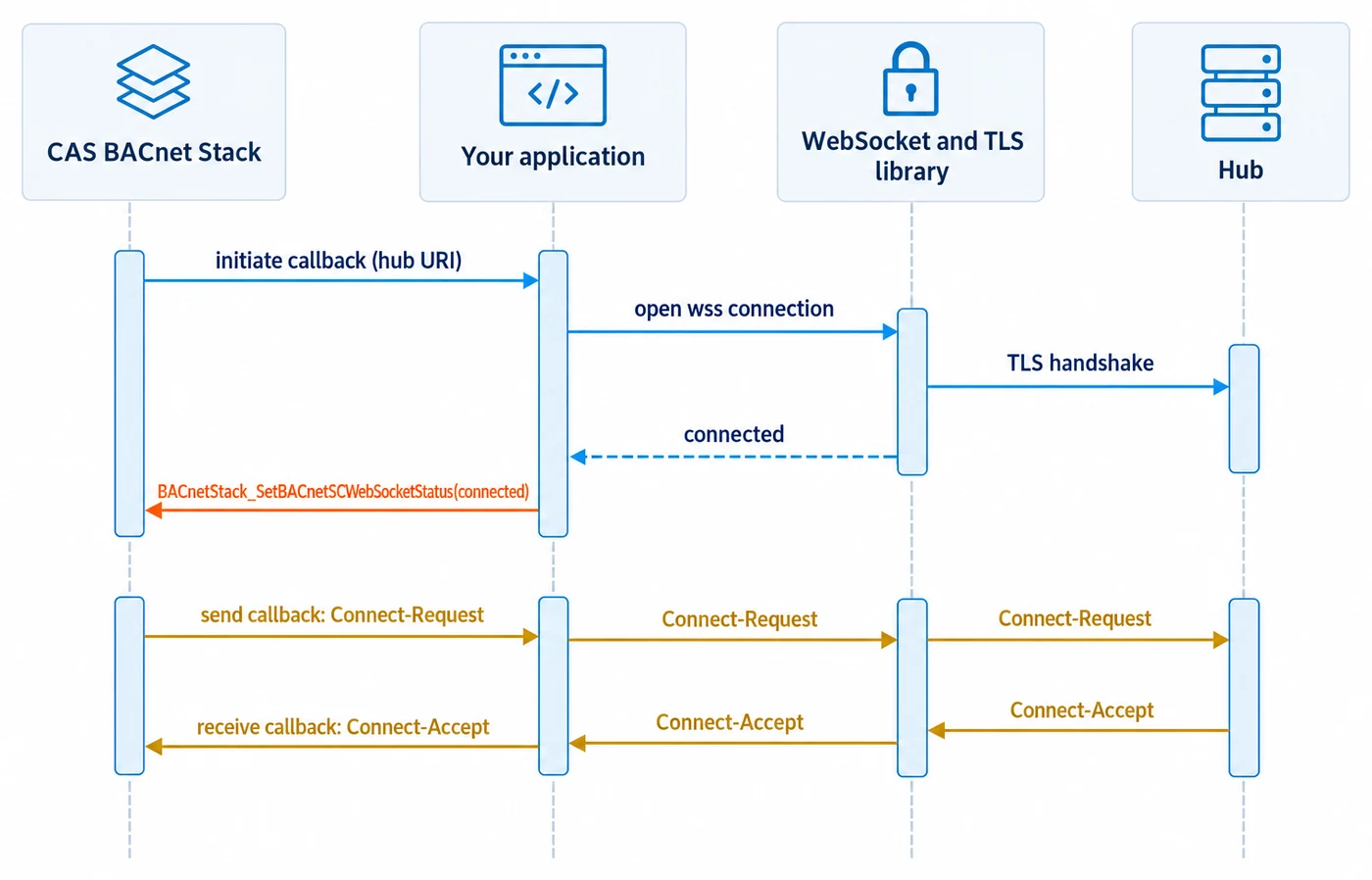
BACnetStack_Tick() drives every internal timer: heartbeats, reconnect backoff, segmentation timeouts, COV resends, and BACnet/SC state-machine progression. Call it frequently:
while (g_running) {    BACnetStack_Tick();
    // If your WebSocket library uses an event loop (libwebsockets,    // Boost.Beast, etc.), pump it here so received frames flow into    // the application's receive queue before the next Tick.    MyWebSocketLib_Poll();
    SleepMilliseconds(1);   // 1–5 ms is reasonable for most devices}
Tick() returns true while BACnet/SC startup or connection-state work is actively progressing, in addition to its existing semantics. You can use this as a hint to skip the sleep when the stack still has more work to do, although a simple fixed 1 ms cadence is normally fine.
BACnetStack_Tick() takes no arguments (source/CASBACnetStackDLL.h).