
Data links overview
This chapter covers what every data link has in common: the two message callbacks your application implements, the Network Port object each port needs, and the address format of each data link. Each data link then has a chapter of its own, listed below. It assumes you have finished Quick Start and have a device answering on one port.
What your application owns
Section titled “What your application owns”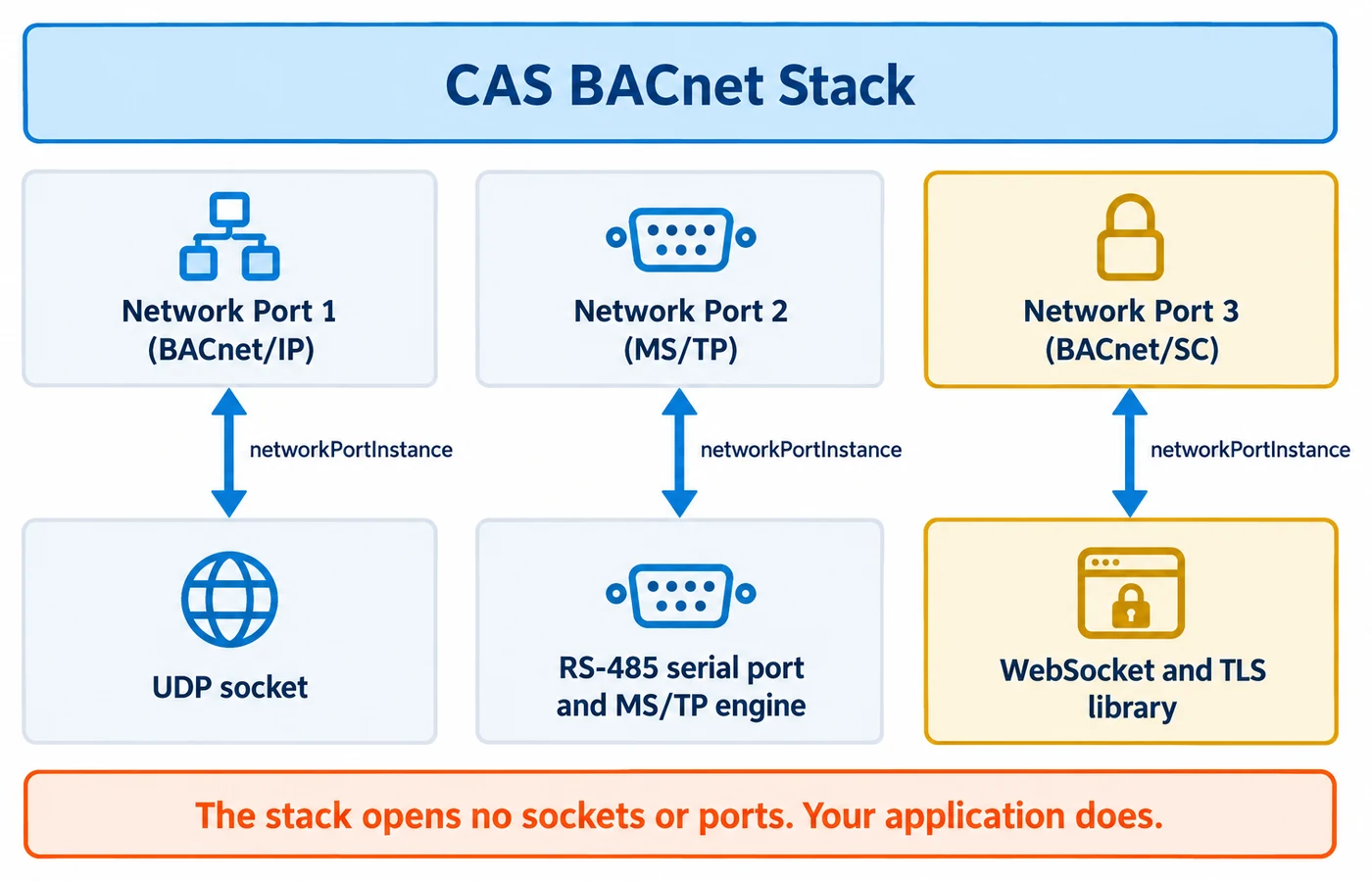
The stack opens no sockets, serial ports or WebSockets. Your application owns the transport. The stack
hands you each outbound frame through the send callback, and pulls each inbound frame through the
receive callback. Both are registered once, before the first BACnetStack_Tick():
BACnetStack_RegisterCallbackSendMessageForPort()registers anFPCallbackSendMessageForPort.BACnetStack_RegisterCallbackReceiveMessageForPort()registers anFPCallbackReceiveMessageForPort.
Receive. The stack calls your receive callback exactly once per BACnetStack_Tick(), and from
nowhere else. It must not block. Return 0 when nothing is waiting; that is the normal idle case. Write
the frame into message, the sender’s address into sourceConnectionString, and the address the frame
was sent to into destinationConnectionString. If the byte count you return exceeds
maxMessageLength, or either connection-string length exceeds maxConnectionStringLength, the stack
discards the whole message and logs it. It does not clamp. The buffers belong to the stack and are
valid only during the call.
Send. The send callback fires from inside BACnetStack_Tick() and also synchronously from every
BACnetStack_Send* function before that function returns. Return exactly messageLength when the
whole frame was accepted for transmission, and 0 when it was not. Any other value, including 1, is
treated as a failed send. Accepted does not mean delivered: the stack has no later failure channel, so
a lost confirmed request is recovered by the stack’s own timeout and retry, and lost unconfirmed
traffic is simply gone. A NULL connection string with length 0 means broadcast on that data link.
uint16_t CallbackSendMessageForPort(const uint8_t* message, const uint16_t messageLength, const uint8_t* connectionString, const uint8_t connectionStringLength, const uint32_t networkPortInstance, bool broadcast){ /* Pick your transport by networkPortInstance, then transmit or queue without blocking. */ /* Return messageLength if the whole frame was accepted, otherwise 0. */ return 0;}If the receive callback is never registered, the device is silently deaf. If the send callback is never registered, every send is dropped and logged with “CallbackSendMessageForPort does not exist”.
Network Port objects and networkPortInstance
Section titled “Network Port objects and networkPortInstance”Both message callbacks carry a networkPortInstance: the instance of the Network Port object the
frame belongs to. You create one per port with BACnetStack_AddNetworkPortObject(). Its networkType
takes a BACnetNetworkType value (mstp = 2, ipv4 = 5, virtualNetwork = 7, secureConnect = 11), and
its protocolLevel takes a BACnetProtocolLevel value (bacnetApplication = 2 for a BACnet data link).
Pass 4194303 as referencePort for the lowest protocol layer.
BACNET_NETWORK_PORT_DEFAULT (4194303) means “the default port for this transport”. It is only
unambiguous when exactly one data-link transport is compiled into the build. In a build with more than
one, you must report a real Network Port instance from the receive callback and pass one to each
BACnetStack_Send* call; the stack logs an error and drops the frame rather than guess.
STACK_OPTION_TARGET_FULL enables all data links, so a full build is always multi-transport.
Some configuration is staged as pending rather than applied. Once your start-up configuration is done,
call BACnetStack_ActivateNetworkPortPendingChanges() so the device does not boot reporting
Changes_Pending for changes nobody made over the network. For writable Network Port properties and
ReinitializeDevice, read Network Port objects and ReinitializeDevice.
Connection strings by data link
Section titled “Connection strings by data link”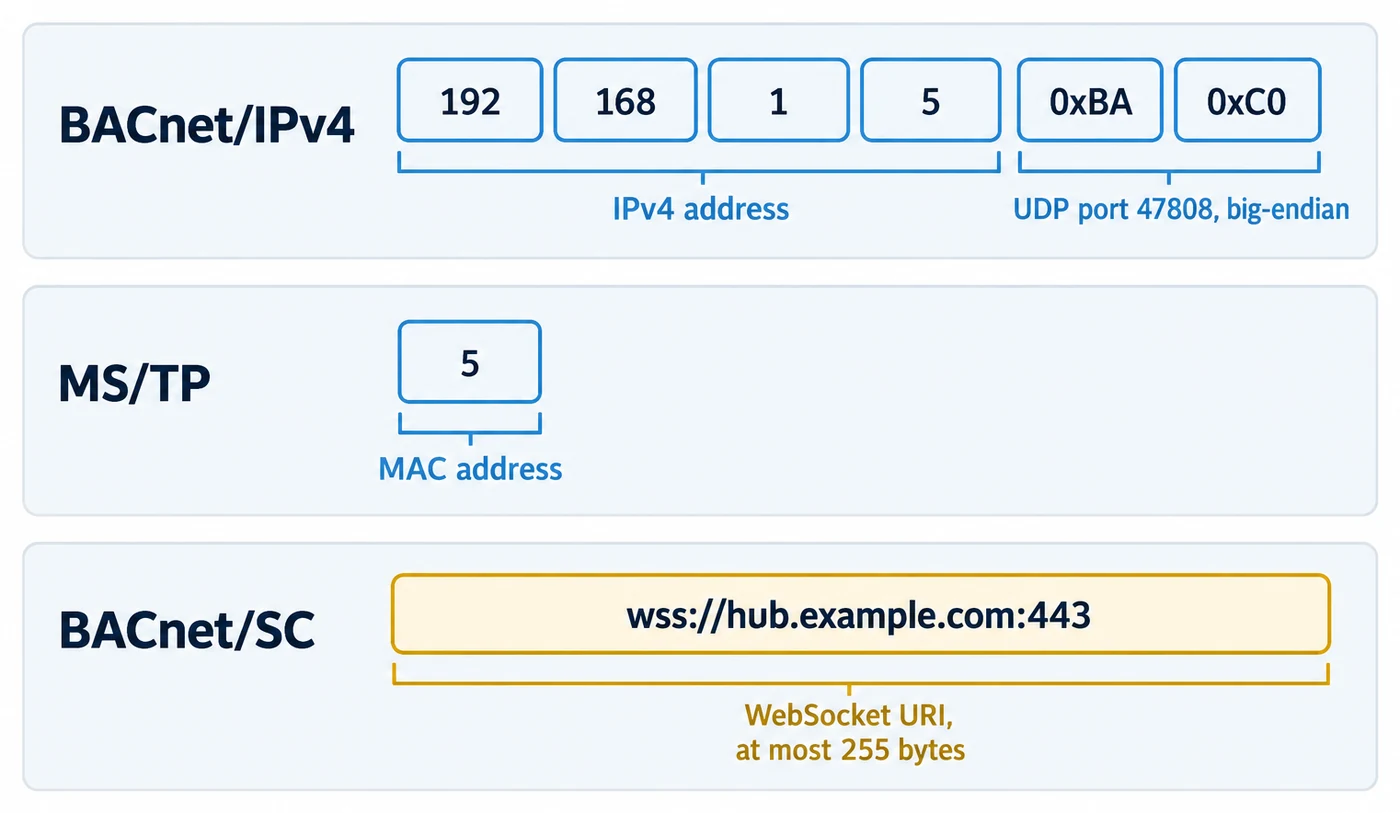
The connection string is the data-link address of the peer. Its layout depends on the port:
- BACnet/IPv4: 6 bytes. Four octets of IPv4 address, then a 2-octet UDP port in big-endian order.
0xC0, 0xA8, 0x01, 0x05, 0xBA, 0xC0is 192.168.1.5:47808. This order is fixed, whatever your host. - BACnet/IPv6: 18 bytes. Sixteen octets of IPv6 address, then the 2-octet UDP port in big-endian order. A broadcast is sent with no connection string; your application sends it to the BACnet/IPv6 multicast group.
- MS/TP: 1 byte, the MS/TP MAC address.
- BACnet/SC: the WebSocket URI as bytes, at most 255. For a peer that connected to one of your
accept URIs, the per-socket string
<acceptUri>|client=<token>, which BACnet/SC describes.
Which chapter covers each data link
Section titled “Which chapter covers each data link”Each data link has its own chapter with the build options, the callbacks, a link to an example on GitHub and its failure modes. The points below are the ones integrations most often miss.
- BACnet/IP. Build with
STACK_OPTION_DATA_LINK_LAYER_IPV4. Your application owns the UDP socket, and every source address it reports must be the 6-byte form above; any other length is rejected and logged. - BBMD and foreign devices. A foreign device must re-register before its
time-to-live passes: the stack does not do it for you, and a time-to-live of 0 expires on the next
tick. A BBMD needs its own entry in the broadcast distribution table before
BACnetStack_SetBBMD()succeeds. - BACnet/IPv6. Build with
STACK_OPTION_DATA_LINK_LAYER_IPV6and add one Network Port object of type ipv6 (9). The stack resolves each peer’s three-octet virtual address itself, and needsCallbackGetSystemTimeto do it. The port can be a foreign device, or a BBMD in a build that also hasSTACK_OPTION_BVLL_BBMD(which needs BACnet/IP; without it the BBMD properties are absent and the BBMD mode is refused): a client writes the port’s BACnet_IPv6_Mode and its BBMD or FD properties, and they take effect at a ReinitializeDevice ACTIVATE_CHANGES or WARMSTART. There is noBACnetStack_*function for this yet. Unlike BACnet/IP, a BACnet/IPv6 foreign device registers again by itself, at half its time-to-live. A BDT entry or BBMD address given as a host name is refused: give the IPv6 address. A host that runs a BBMD must pass each received datagram’s destination address (18 octets, or the 16-octet IPv6 address) to the receive call: the multicast group it arrived on, or this node’s unicast address it was sent to, never the socket’s bound address. The BBMD passes a peer BBMD’s broadcast on to its link and foreign devices only when it knows that broadcast arrived by unicast, so no forwarding loop can form. Without a destination the BBMD still forwards its own link’s broadcasts to its peers and foreign devices, but does not pass its peers’ broadcasts on. Passing the socket’s bound address for every datagram makes every arrival look unicast, and the BBMD then forwards nothing from its own link: pass the real destination, or nothing. - BACnet MS/TP. Build with
STACK_OPTION_DATA_LINK_LAYER_MSTP. Token passing runs in the stack’s own MS/TP engine: register the byte-level callbacks and callBACnetStack_LoopMSTPat least every 20 milliseconds (every 1 to 5 if you can), or stay in packet mode with your own framing and the stack’s message callbacks. - BACnet/SC. Build with
STACK_OPTION_DATA_LINK_LAYER_SCandSTACK_OPTION_DATA_LINK_LAYER_IPV4. Your application owns the WebSocket and TLS libraries and the certificate bytes. If you never report “connected” withBACnetStack_SetBACnetSCWebSocketStatus(), the connection never starts and the device appears hung. The BACnet/SC overview covers the case for it. - Virtual devices and gateways. Build with
STACK_OPTION_GW_VN_B. The main device becomes a virtual router for further logical devices on virtual networks. - Network Port objects and ReinitializeDevice. Writable Network Port properties, pending changes and the ReinitializeDevice service, for every data link.
Routing between physical ports
Section titled “Routing between physical ports”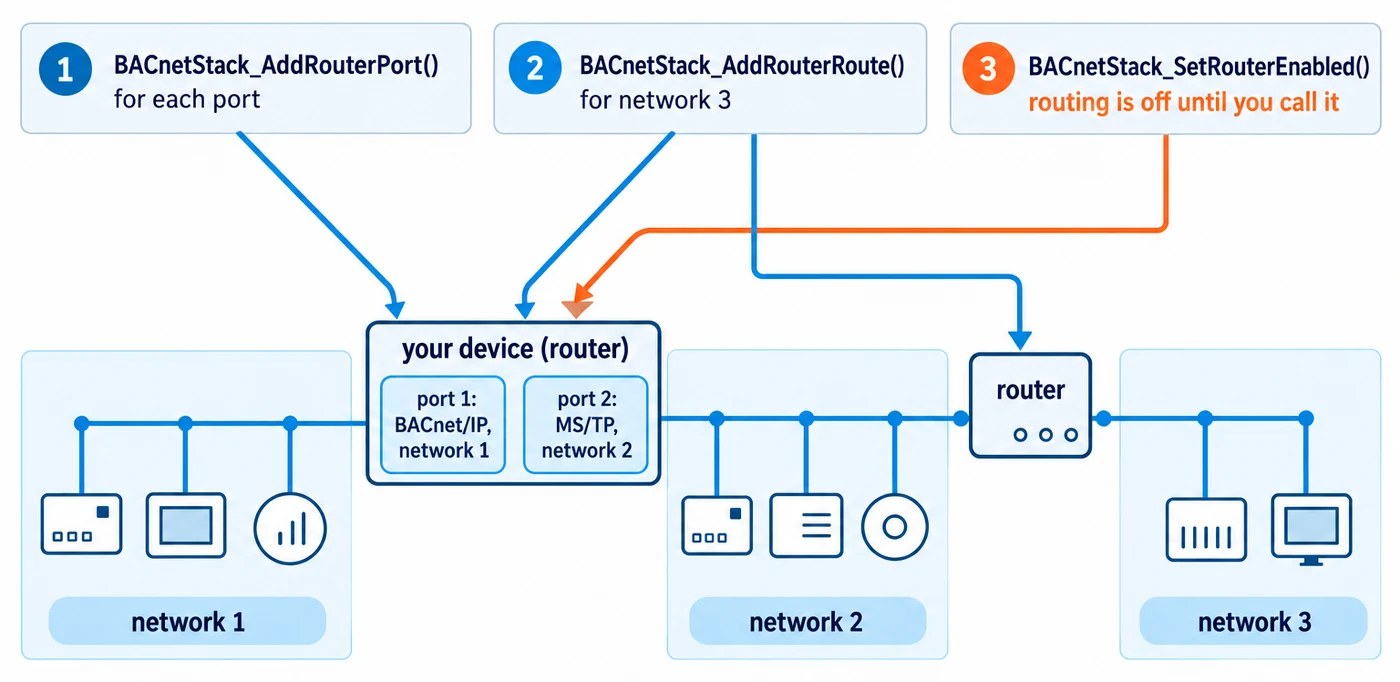
A device with two or more data links can route between them. This needs
STACK_OPTION_ROUTER_PHYSICAL; STACK_OPTION_TARGET_FULL turns it on unless you define
STACK_OPTION_DISABLE_ROUTER_PHYSICAL.
BACnetStack_AddRouterPort()once per port, each with a unique network number. Two or more ports make the device a router.BACnetStack_AddRouterRoute()for a network that is one or more hops away.BACnetStack_SetRouterEnabled()to start forwarding. Routing is off until you call it, and no function reads the state back.
A network number cannot be both a virtual network and a router port; the second one added is rejected.
When nothing arrives
Section titled “When nothing arrives”- Build with
STACK_OPTION_API_DEBUG_LOGGING(on in the prebuilt libraries and the npm package) and registerBACnetStack_RegisterCallbackLogDebugMessage()first. A false return from any function is explained only there. It is also the one callback that survivesBACnetStack_Reset(). - After
BACnetStack_Reset(), the stack neither sends nor receives until you register the send and receive callbacks again and re-add the device. Your sockets and serial ports are untouched. - Make every call, including those from your transport code, on the thread that calls
BACnetStack_Tick(). By default the stack is single-threaded;BACnetStack_LoopMSTP()and a build withSTACK_OPTION_THREAD_SAFEare the exceptions (see Stack lifecycle).
Example projects
Section titled “Example projects”Complete working code is on Chipkin’s GitHub:
- BACnetProfileExample-B-SS-CPP: BACnet/IP.
- BACnetProfileExample-B-BC-CPP: MS/TP, and BACnet/IP, BACnet/IPv6 or BACnet/SC, chosen with
--datalink. - BACnetVirtualDevicesServerExampleCPP: virtual networks and devices. Its function names and signatures differ from the stack’s; use the ones in Virtual devices and gateways.