
Virtual devices and gateways
- Example project: BACnetVirtualDevicesServerExampleCPP. See the note after Setting up a gateway before you copy from it.
How it works
Section titled “How it works”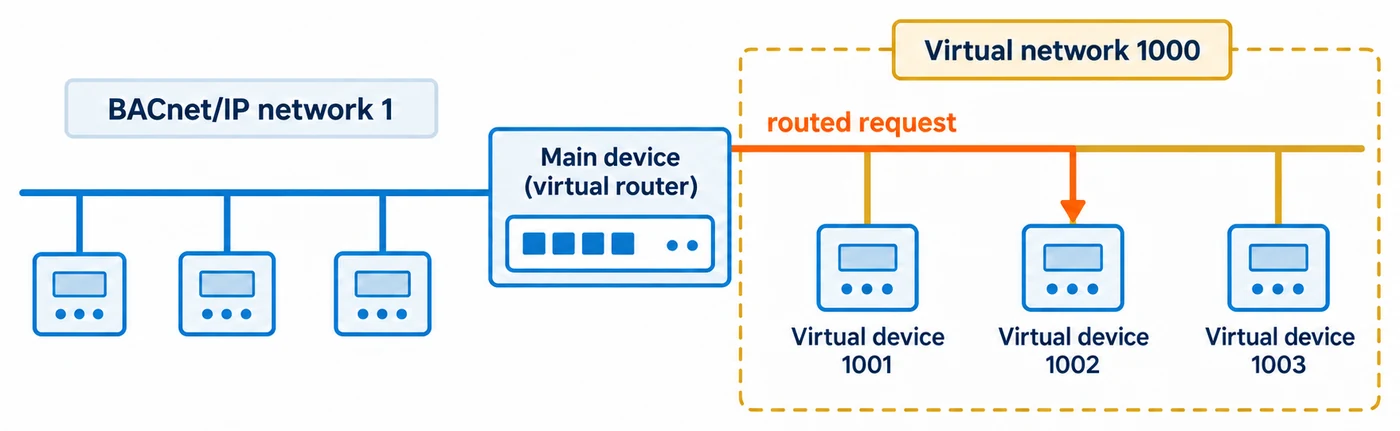
A gateway often has to present many field devices (Modbus meters, say) as separate BACnet devices, each with its own device instance and object list. BACnet allows this through routing. The application’s own BACnet device sits on the real network and acts as a router. Behind it are one or more networks that exist only inside the application: these are virtual networks. The devices on those networks are virtual devices.
| Part | Added with | Where it appears to BACnet clients |
|---|---|---|
| Main device (the virtual router) | BACnetStack_AddDevice(), once |
On the real network, at the application’s own IP address and port |
| Virtual network | BACnetStack_AddVirtualNetwork() |
A remote network reached through the main device |
| Virtual device | BACnetStack_AddDeviceToVirtualNetwork() |
A device on that virtual network. Its MAC address is its device instance |
Each virtual device is a complete device in the stack’s database. You add objects to it, enable services on it and enable properties on it by passing its device instance, the same way you do for the main device.
Network numbers
Section titled “Network numbers”A virtual router needs these network numbers:
- One per virtual network. Each must be unique on the whole BACnet internetwork, which is usually the site’s decision. 0 (local) and 65535 (broadcast) are rejected. A number that one of the device’s Network Port objects already carries (active or pending) is rejected. In a build with physical routing, a number already used for a router port or a static route is also rejected.
- Optionally, the real network. The
networkNumberyou pass toBACnetStack_AddNetworkPortObject()for the BACnet/IP port. Pass0, 0(number unknown) if the site has not assigned one. Once the device is a virtual router,Network_Numberbecomes writable on all of its Network Port objects, so a site integrator can set it over BACnet.
What the stack creates for you
Section titled “What the stack creates for you”BACnetStack_AddVirtualNetwork()creates a Network Port object in the main device, with the instance you pass asvirtualNetworkPortInstance. It has network type virtual,Network_Numberset to the virtual network andNetwork_Number_Qualityset to configured. That instance must not already exist in the main device.BACnetStack_AddDeviceToVirtualNetwork()creates a Network Port object in the virtual device, always with instance 1. It has network type virtual, protocol level BACnet application andNetwork_Numberset to the virtual network, with quality learned. Do not add another Network Port with instance 1 to a virtual device.
Neither Network Port has IP properties, so your callbacks do not need to answer IP-address reads for them.
Build options
Section titled “Build options”Build with STACK_OPTION_GW_VN_B. It defines STACK_OPTION_VIRTUAL_ROUTER and STACK_OPTION_ROUTER. Without it, BACnetStack_AddVirtualNetwork() and BACnetStack_AddDeviceToVirtualNetwork() return false and the debug log says that the virtual router was not compiled in. BACnetStack_SendIAmRouterToNetwork() needs STACK_OPTION_ROUTER, which STACK_OPTION_GW_VN_B turns on.
Routing between physical data links (STACK_OPTION_ROUTER_PHYSICAL) is a separate feature and is not needed for virtual devices. A device can be both a virtual router and a physical router.
Setting up a gateway
Section titled “Setting up a gateway”Do the steps in this order. Each one depends on the one before.
- Register the callbacks.
- Add the main device with
BACnetStack_AddDevice(), enable its services and properties, and add its BACnet/IP Network Port object. - For each virtual network, call
BACnetStack_AddVirtualNetwork(). - For each device on that network, call
BACnetStack_AddDeviceToVirtualNetwork(), then enable its services and add its objects. - Announce: an I-Am for the main device and each virtual device, then one I-Am-Router-To-Network.
- Call
BACnetStack_Tick()in your main loop, as for any device.
The example below sets up one virtual network (1000) with two virtual devices, each holding one Analog Input. The signatures are copied from source/CASBACnetStackDLL.h. Your transport functions (CallbackReceiveMessage, CallbackSendMessage) and CallbackGetSystemTime are the same as for a single device, so they are not shown.
#include "CASBACnetStackDLL.h"
#define MAIN_DEVICE_INSTANCE           389001#define IP_NETWORK_PORT_INSTANCE       50#define VIRTUAL_NETWORK_NUMBER         1000#define VIRTUAL_NETWORK_PORT_INSTANCE  51     /* Network Port in the main device for network 1000 */#define VIRTUAL_DEVICE_COUNT           2
/* Values from CASBACnetStack enumerations, written as literals for C. */#define NETWORK_TYPE_IPV4              5      /* BACnetNetworkType::ipv4 */#define PROTOCOL_LEVEL_BACNET_APP      2      /* BACnetProtocolLevel::bacnetApplication */#define LOWEST_PROTOCOL_LAYER          4194303#define SERVICE_READ_PROPERTY_MULTIPLE 14     /* BACnetServicesSupported bit number */#define OBJECT_TYPE_ANALOG_INPUT       0
static const uint32_t virtualDeviceInstances[VIRTUAL_DEVICE_COUNT] = { 1000001, 1000002 };
bool SetUpGateway(void){  /* 1. Callbacks */  BACnetStack_RegisterCallbackReceiveMessageForPort(CallbackReceiveMessage);  BACnetStack_RegisterCallbackSendMessageForPort(CallbackSendMessage);  BACnetStack_RegisterCallbackGetSystemTime(CallbackGetSystemTime);  BACnetStack_RegisterCallbackGetPropertyCharacterString(CallbackGetPropertyCharacterString);  BACnetStack_RegisterCallbackGetPropertyReal(CallbackGetPropertyReal);
  /* 2. The main device, which becomes the virtual router */  if (!BACnetStack_AddDevice(MAIN_DEVICE_INSTANCE)) {    return false;  }  if (!BACnetStack_SetServiceEnabled(MAIN_DEVICE_INSTANCE, SERVICE_READ_PROPERTY_MULTIPLE, true)) {    return false;  }  /* Network number 0, quality 0 (unknown): pass the site's IP network number and 3 (configured) if it has one. */  if (!BACnetStack_AddNetworkPortObject(MAIN_DEVICE_INSTANCE, IP_NETWORK_PORT_INSTANCE, NETWORK_TYPE_IPV4,      PROTOCOL_LEVEL_BACNET_APP, 0, 0, LOWEST_PROTOCOL_LAYER)) {    return false;  }
  /* 3. The virtual network */  if (!BACnetStack_AddVirtualNetwork(MAIN_DEVICE_INSTANCE, VIRTUAL_NETWORK_NUMBER, VIRTUAL_NETWORK_PORT_INSTANCE)) {    return false;   /* not atomic: call BACnetStack_Reset() and configure again */  }
  /* 4. The virtual devices and their objects */  for (int deviceIndex = 0; deviceIndex < VIRTUAL_DEVICE_COUNT; deviceIndex++) {    const uint32_t virtualDeviceInstance = virtualDeviceInstances[deviceIndex];    if (!BACnetStack_AddDeviceToVirtualNetwork(virtualDeviceInstance, VIRTUAL_NETWORK_NUMBER)) {      return false;    }    if (!BACnetStack_SetServiceEnabled(virtualDeviceInstance, SERVICE_READ_PROPERTY_MULTIPLE, true)) {      return false;    }    if (!BACnetStack_AddObject(virtualDeviceInstance, OBJECT_TYPE_ANALOG_INPUT, 1)) {      return false;    }  }  return true;}
bool AnnounceGateway(const uint8_t ipBroadcastAddress[6])   /* e.g. 192.168.1.255:47808 = C0 A8 01 FF BA C0 */{  /* 5. I-Am for the router, then for each virtual device (global broadcast) */  if (!BACnetStack_SendIAm(MAIN_DEVICE_INSTANCE, ipBroadcastAddress, 6, IP_NETWORK_PORT_INSTANCE, true, 65535, NULL, 0)) {    return false;  }  for (int deviceIndex = 0; deviceIndex < VIRTUAL_DEVICE_COUNT; deviceIndex++) {    if (!BACnetStack_SendIAm(virtualDeviceInstances[deviceIndex], ipBroadcastAddress, 6, IP_NETWORK_PORT_INSTANCE, true, 65535, NULL, 0)) {      return false;    }  }  /* NULL, 0 announces every virtual network. Destination network 0 = local broadcast only. */  return BACnetStack_SendIAmRouterToNetwork(NULL, 0, ipBroadcastAddress, 6, IP_NETWORK_PORT_INSTANCE, true, 0, NULL, 0);}
BACnetStack_SendIAm() reads the device’s Max_APDU_Length_Accepted, Vendor_Identifier and Segmentation_Supported before it sends. It asks your get-property callbacks for those properties first, for each virtual device as well as the main one. Register the callbacks before you announce.
If the gateway has many virtual devices, spread the I-Am messages out over time instead of sending them all in one burst.
The example project BACnetVirtualDevicesServerExampleCPP has the same structure as the code above, but its function names and signatures differ from the stack’s; use the signatures given in this chapter.
Callbacks: telling the devices apart
Section titled “Callbacks: telling the devices apart”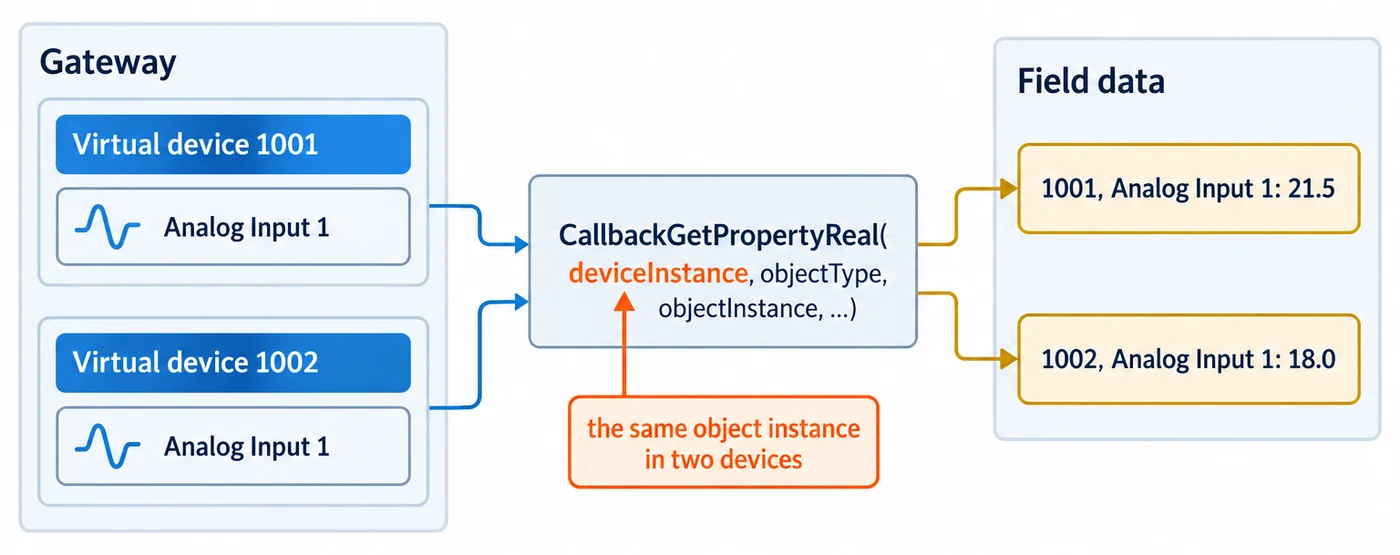
Callbacks work the same way for virtual devices as for a single device. Every get-property and set-property callback receives deviceInstance as its first argument. Use it, together with objectType and objectInstance, to find the right value in your own data. An object instance only identifies an object within one device: in the example above, both virtual devices have an Analog Input 1.
bool CallbackGetPropertyReal(const uint32_t deviceInstance, const uint16_t objectType, const uint32_t objectInstance, const uint32_t propertyIdentifier, float* value, const bool useArrayIndex, const uint32_t propertyArrayIndex, uint32_t* errorCode){ const uint32_t PROPERTY_IDENTIFIER_PRESENT_VALUE = 85; if (objectType == OBJECT_TYPE_ANALOG_INPUT && propertyIdentifier == PROPERTY_IDENTIFIER_PRESENT_VALUE) { /* Look up by device AND object: each virtual device has its own Analog Input 1. */ const struct FieldPoint* point = FindFieldPoint(deviceInstance, objectInstance); if (point != NULL) { *value = point->presentValue; return true; } } return false; /* errorCode left at success: the stack uses its stored value or default */}The same applies to CallbackGetPropertyCharacterString (each device and object needs its own Object_Name), and to enumerated properties such as the Device object’s System_Status. When the callback is asked about the Device object itself, objectInstance equals deviceInstance.
For what a false return and *errorCode mean, see the FPCallbackGetProperty* documentation in the API Reference. The rules are the same for virtual devices.
How the stack routes requests
Section titled “How the stack routes requests”The stack answers for every virtual device. You do not handle routing in your own code. This is what the code does with an incoming request:
| Request arrives with | Which devices answer |
|---|---|
| No destination network (local request or local broadcast) | The main device only |
| Destination network 65535 (global broadcast) | The main device and every virtual device |
| Destination network = a virtual network, no destination address (remote broadcast) | Every virtual device on that network |
| Destination network = a virtual network, destination address = a device instance | That virtual device |
| Destination network that is neither virtual nor routed by this device | Rejected with Reject-Message-To-Network (not connected), unless the request was a broadcast |
Practical consequences:
- Who-Is. A Who-Is sent as a local broadcast reaches only the main device. A client discovers the virtual devices with a global-broadcast Who-Is, or a Who-Is sent to the virtual network. Most BACnet workstations send the global form.
- Addressing. A virtual device’s MAC address is its device instance in big-endian order, 1 to 4 bytes with leading zero bytes dropped. Instance 1000001 (0x0F4241) is the 3-byte address
0F 42 41. Replies from a virtual device carry the virtual network and this address as their source, so the client sees the device behind the router. - Who-Is-Router-To-Network. The stack answers on its own. A query for a specific virtual network gets an I-Am-Router-To-Network for that network. A query without a network number gets one that lists every virtual network, plus any networks the physical router reaches.
- Routing tables. In a build with physical routing, if another router announces one of this device’s virtual network numbers, the stack does not learn that network against a real port. The virtual network stays local.
Changing the configuration at run time
Section titled “Changing the configuration at run time”| Task | Function | Notes |
|---|---|---|
| Renumber a virtual network | BACnetStack_UpdateVirtualNetworkNumber() |
Changes the routing map and the Network_Number of every virtual Network Port object on that network: the main device’s and each virtual device’s. The new number is the ports’ active value. A pending Network_Number a client wrote is kept, and its activation moves the routing map from the new number. A CallbackGetPropertyUnsignedInteger is not asked for Network_Number: the stack serves that property itself. |
| Renumber a virtual network from BACnet | A client writes Network_Number on the virtual network’s Network Port |
The write is pending until ReinitializeDevice ACTIVATE_CHANGES or WARMSTART, or until you call BACnetStack_ActivateNetworkPortPendingChanges(). On activation the routing map moves to the new number. |
| Change a device instance | BACnetStack_UpdateDeviceInstance() |
For a virtual device this updates the database and the routing map. The new instance is range-checked (0 to 4194302) and the routing map is checked before the database is renamed, so a refused call changes neither. |
| Remove a virtual device | BACnetStack_RemoveDevice() |
Removes the device, its objects and its routing-map entry, so BACnetStack_AddDeviceToVirtualNetwork() accepts the instance again. Any data link bound to one of its Network Port objects is released and reset (BACnet/SC connections are closed before the call returns). Never remove the main device: the functions that take no device instance act on the first device still registered, so a virtual device would take over its role. |
| Remove a virtual network | None | There is no function for this. Call BACnetStack_Reset() and configure again. |
Limits and failure modes
Section titled “Limits and failure modes”- One main device.
BACnetStack_AddDevice()returnsfalseon a second call. - The main device cannot also be a virtual device.
BACnetStack_AddDeviceToVirtualNetwork()rejects the main device’s instance. It also rejects an instance that is already on a virtual network, and a network that has not been added. - Device instances must be between 0 and 4194302, for virtual devices as for the main device.
- No fixed count limit. The code sets no maximum on the number of virtual networks or devices. Memory, and how long the application takes to answer a global Who-Is, are the practical limits.
BACnetStack_AddVirtualNetwork()is not atomic. It checks its arguments before it changes anything. If a later step fails (creating the Network Port object or setting its network number), it returnsfalsewith the network already registered and the device already a virtual router. Recover withBACnetStack_Reset()and configure again.- A network number is a virtual network or a router port, not both. With physical routing
(
BACnetStack_AddRouterPort(), in the Data links overview), the second of the two to claim a network number is rejected. BACnetStack_AddDeviceToVirtualNetwork()rolls back on failure. If it returnsfalse, it has not left a half-added device behind, and you can retry it.- Why a call failed is reported only through the debug-message callback (
BACnetStack_RegisterCallbackLogDebugMessage()) in a build withSTACK_OPTION_API_DEBUG_LOGGING.
Adding BBMD to the virtual router
Section titled “Adding BBMD to the virtual router”The main device can also be the site’s BBMD. Configure the main device and its BACnet/IP Network Port object, and add the virtual networks and devices, as above. Then:
- Make the main device’s BACnet/IP Network Port a BBMD exactly as
BBMD and foreign devices describes: add this device’s own entry and
one per peer BBMD with
BACnetStack_AddBDTEntry(), then callBACnetStack_SetBBMD(), which also enables the port’s BBMD properties. The virtual networks change nothing in those steps. - Send the I-Am and I-Am-Router-To-Network messages and start the main loop.
These functions need STACK_OPTION_NM_BBMDC.