
COV, alarms and events, and trend logs
This guide shows how change of value (COV), alarms and events, and trend logs work with the CAS BACnet Stack: what the stack does on its own, and what your application must supply. It assumes you have already added a device and its objects, as in Quick Start. For complete, working programs, see the example projects on Chipkin’s GitHub, such as BACnetServerExampleCPP.
What the stack does, and what you provide
Section titled “What the stack does, and what you provide”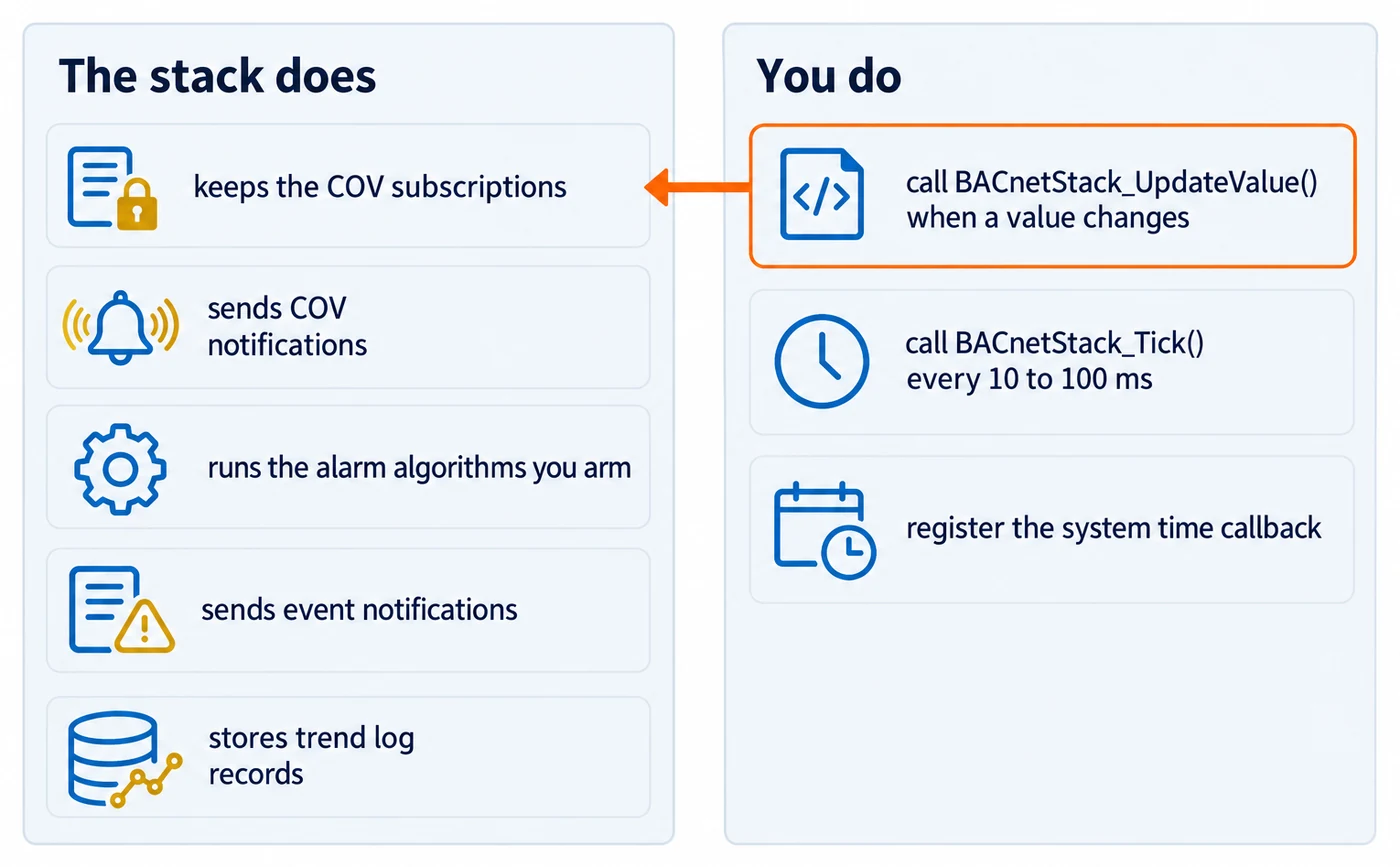
The stack keeps the COV subscription tables, sends COV notifications, runs the alarm algorithms you arm, sends event notifications to recipients, and stores trend log records. Your application owns the data, and has three jobs:
- Tell the stack when a value changes. Call
BACnetStack_UpdateValue()with the object and property that changed. This one call runs everything attached to that value: COV notifications, COV-driven trend logging and the alarm algorithms. The alarm algorithms do nothing until you call it, so an application that never calls it never generates an event notification. - Call
BACnetStack_Tick()regularly. Tick receives the requests from other devices, including COV subscriptions, and runs everything driven by time: polled trend logging, COV subscription lifetimes, alarm transitions that wait for a time delay, and confirmed-request retries and timeouts. A slow tick delays all of them. Aim for every 10 to 100 ms. - Register the system time callback with
BACnetStack_RegisterCallbackGetSystemTime(). The stack uses it to timestamp events and log records.FPCallbackGetSystemTimereturns seconds since the Unix epoch.
BACnetStack_UpdateValue() returns false if the object type or instance is out of range, the
device does not exist, or the property is not enabled on that object.
Serving COV subscriptions
Section titled “Serving COV subscriptions”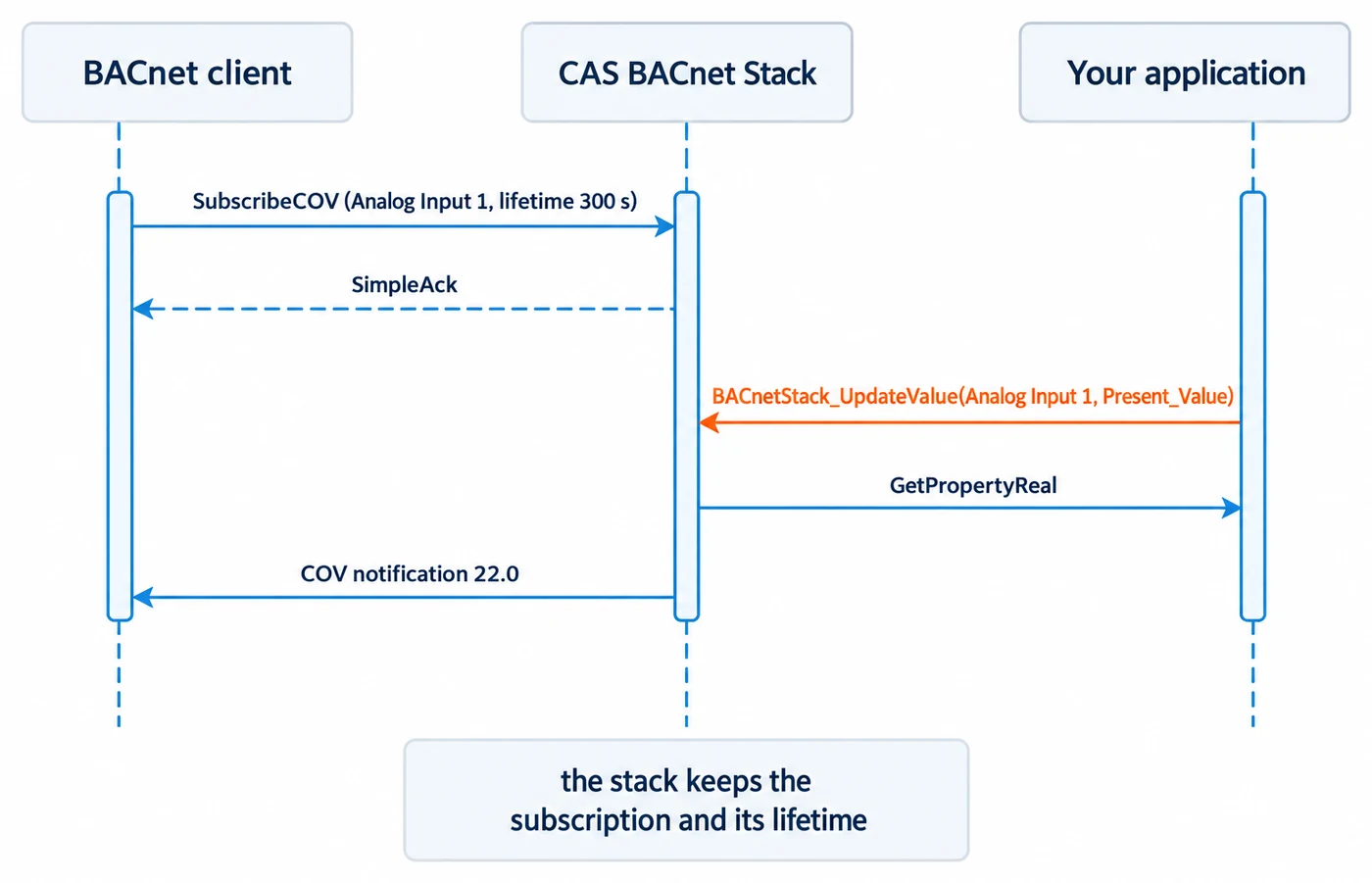
To let other devices subscribe to your objects:
- Enable the services with
BACnetStack_SetServiceEnabled(). Theserviceargument is a bit number fromBACnetServicesSupported, not a service choice: 5 is SubscribeCOV, 38 is SubscribeCOVProperty and 41 is SubscribeCOVPropertyMultiple. - Mark properties as subscribable where needed, with
BACnetStack_SetPropertySubscribable()(one object) orBACnetStack_SetPropertyByObjectTypeSubscribable()(an object type’s default). The standard COV object types already accept a plain SubscribeCOV without it. You need it for SubscribeCOVProperty on any property, and for Present_Value COV on any other object type. The property must already be enabled before you call it. - Call
BACnetStack_UpdateValue()whenever a subscribed value changes.
You can limit the subscription tables:
BACnetStack_SetMaxActiveCOVSubscriptions()sets the SubscribeCOV and SubscribeCOVProperty table size, and the SubscribeCOVPropertyMultiple table size too. 0 means no limit.BACnetStack_SetCOVMultipleSettings()sets the SubscribeCOVPropertyMultiple table size alone. 0 means no limit. Call it afterBACnetStack_SetMaxActiveCOVSubscriptions()orBACnetStack_SetCOVSettings(), which would otherwise replace it.BACnetStack_SetMaxSupportedCOVLifetime()sets the longest lifetime the device accepts, in seconds, for all three services. The default is 28800 (8 hours), and 0 also selects that default. A request for a longer lifetime is refused with an error, not shortened.
BACnetStack_SetCOVSettings() sets the table size and the lifetime in one call, but it is not
atomic: if the second setting fails, the first has already taken effect. Prefer the two
single-purpose functions.
Subscribing as a client
Section titled “Subscribing as a client”To subscribe to another device, use BACnetStack_SendSubscribeCOV(),
BACnetStack_SendSubscribeCOVProperty() or BACnetStack_SendSubscribeCOVPropertyMultiple(). Cancel
with BACnetStack_SendCancelSubscribeCOV() or BACnetStack_SendCancelSubscribeCOVProperty().
BACnetStack_SendSubscribeCOVPropertyMultiple() needs at least one reference, so it cannot send a
cancellation.
These are confirmed requests. They follow the pattern in Acting as a client: each returns an invoke id, and the subscription’s acknowledgement or error arrives through the hooks.
There is no hook for incoming COV notifications, by design. They arrive as ordinary frames through
your receive message callback. Decode them with BACnetStack_DecodeAs().
To announce values without a subscription, use
BACnetStack_SendUnsubscribedUnconfirmedCOVNotification(). It reads the values from your own local
device, exactly as a ReadProperty would, rather than taking them as arguments.
Alarms and events
Section titled “Alarms and events”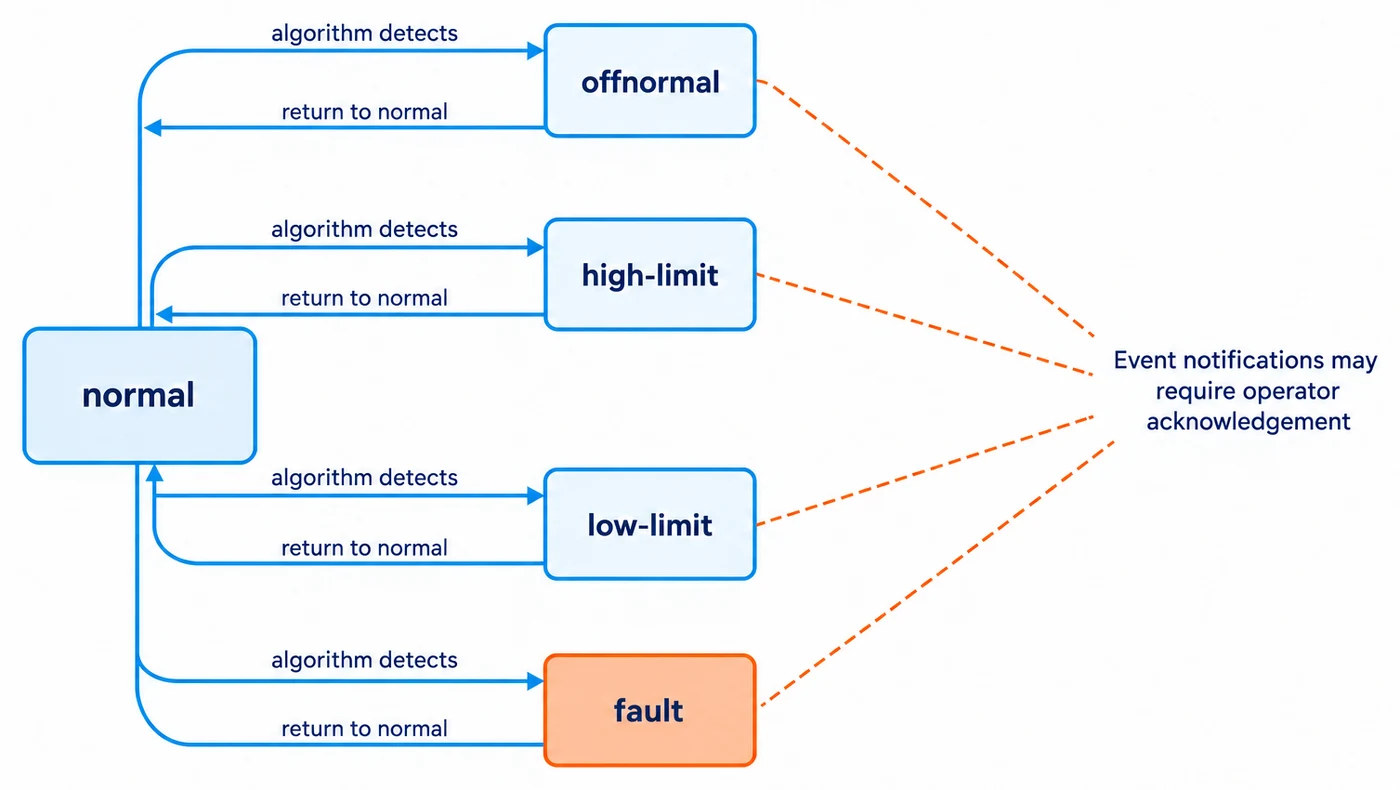
The stack generates alarms from the algorithms you arm on each object. Set them up in this order.
Each step needs the stack to be built with STACK_OPTION_ALARMS_AND_EVENTS.
- Add a notification class with
BACnetStack_AddNotificationClassObject(), giving the priority and acknowledgement requirement for each kind of transition. Use this function, notBACnetStack_AddObject(): a Notification Class added withBACnetStack_AddObject()is not usable. - Add recipients with
BACnetStack_AddRecipientToNotificationClass(). Set exactly one ofuseRecipientDeviceChoiceanduseRecipientAddressChoice, or the call fails. The list has no size limit, and no function removes a recipient once added. - Enable alarms and events on the object with
BACnetStack_SetAlarmsAndEventsForObjectEnabled(), naming the notification class.notifyTypeis 0 for alarms and 1 for events. Passingenabledasfalseis destructive: it discards the object’s alarm state and every algorithm armed on it. - Arm an algorithm with one of the
BACnetStack_SetIntrinsic*orBACnetStack_SetFault*functions, such asBACnetStack_SetIntrinsicOutOfRangeAlgorithm(),BACnetStack_SetIntrinsicChangeOfStateAlgorithmBool()orBACnetStack_SetFaultOutOfRangeAlgorithmReal(). Theirenableargument does not remove an algorithm.falseleaves it armed but inhibited. - Call
BACnetStack_UpdateValue()for the monitored property, usually Present_Value. Each algorithm’s documentation names the property it monitors.
BACnetStack_SetAlarmsAndEventsForObjectEnabled() makes the object’s Event_Algorithm_Inhibit and
Reliability_Evaluation_Inhibit properties writable, so a remote client can inhibit the algorithms you
armed.
For an object with intrinsic alarming, the stack asks your enumerated property callback for the
object’s Reliability. Any value other than NO_FAULT_DETECTED is treated as a fault. The change to the
fault state happens when the algorithms next run, so call BACnetStack_UpdateValue() with
Reliability when your fault state changes.
Acknowledging alarms
Section titled “Acknowledging alarms”To accept acknowledgements from other devices, enable the AcknowledgeAlarm service (bit 0) with
BACnetStack_SetServiceEnabled(), and register BACnetStack_RegisterCallbackAcknowledgeAlarm().
The stack calls your FPCallbackAcknowledgeAlarm when an AcknowledgeAlarm request arrives, so you
can check whether the source is allowed to acknowledge, and log it. To refuse, set errorCode
(usually SERVICE_REQUEST_DENIED, 29). This callback needs STACK_OPTION_AE_ACKNOWLEDGE_ALARMS.
To acknowledge an alarm in another device, use the function that matches the form of the event’s
timestamp: BACnetStack_SendAcknowledgeAlarmDateTime(), BACnetStack_SendAcknowledgeAlarmUnsigned()
(sequence number) or BACnetStack_SendAcknowledgeAlarmTime(). To list a device’s active events, use
BACnetStack_SendGetEventInformation(), which is paged.
Receiving event notifications
Section titled “Receiving event notifications”To receive event notifications sent to your device, register
BACnetStack_RegisterCallbackEventNotificationReceived(). Enable the services first with
BACnetStack_SetServiceEnabled(): bit 2 for ConfirmedEventNotification and bit 29 for
UnconfirmedEventNotification. The callback gets the decoded notification, so you do not decode the
frame yourself. It is called only for a valid notification addressed to a device your stack hosts.
A confirmed notification is acknowledged whether or not the callback is registered.
Trend logs
Section titled “Trend logs”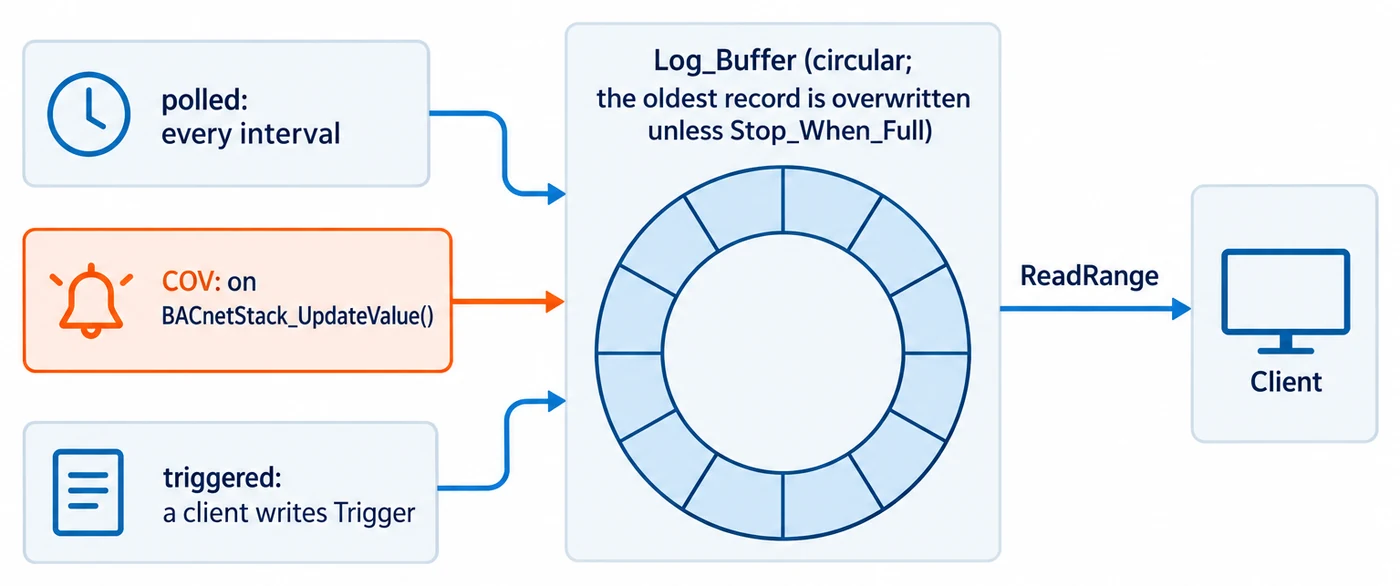
Add a Trend Log with BACnetStack_AddTrendLogObject(), naming the object and property to log and
the buffer size in records. The buffer is circular: once full, the oldest record is overwritten
unless Stop_When_Full is set. Only local properties can be logged: isLoggedObjectInRemoteDevice
must be false. Then choose how it logs:
BACnetStack_SetTrendLogTypeToPolled()logs on an interval.logIntervalis in hundredths of a second, but the stack’s clock counts whole seconds, so the interval is in effect rounded up to a whole number of seconds. 1 to 99 log at most once a second. 0 logs on everyBACnetStack_Tick()when Align_Intervals is false, and never when it is true.BACnetStack_SetTrendLogTypeToCOV()logs when the value changes. This logging runs fromBACnetStack_UpdateValue().BACnetStack_SetTrendLogTypeToTriggered()logs when a client writestrueto the Trigger property.
BACnetStack_SetTrendLogStartStopTime() limits logging to a time window. The stack compares the
window to UTC time from your system time callback, shifted by the Device object’s UTC_Offset if you
serve that property. Build both values from that same clock, not from local time.
Do not re-add a Trend Log to change its buffer size. BACnetStack_AddTrendLogObject() follows
the usual rule for repeated Add* calls: calling it again for an existing Trend Log returns true
and applies none of its arguments, maxBufferSize included. To resize the buffer, remove the object
with BACnetStack_RemoveObject() and add it again.
The stack stores the Trend Log’s own properties, including Log_Buffer, and a Get property callback cannot override them. A WriteProperty to any Trend Log property is aborted unless you have registered the system time callback. Clients read Log_Buffer with ReadRange only.
To log several properties in one object, use BACnetStack_AddTrendLogMultipleObject(), then call
BACnetStack_AddLoggedObjectToTrendLogMultiple() once for each property. Each call appends, with no
duplicate check. A Trend Log Multiple supports polled and triggered logging, not COV.
To back up and restore records from your application, use BACnetStack_ReadTrendLogRecord() and
BACnetStack_InsertTrendLogRecord(), or BACnetStack_ReadTrendLogMultipleRecord() and
BACnetStack_InsertTrendLogMultipleRecord(). A record read out with either read function can be
written back with its insert function and keeps its value, whatever datatype was logged. Timestamps
are UTC epoch seconds in both directions: the stack stores a record’s time as the Device’s local
time, using the UTC_Offset your application serves for the Device, and converts it back with the
offset served at the time of the read. A backup and restore therefore keeps each timestamp, but a
record stored under the other Daylight_Savings_Status reads out one hour off. A Null value reads
out as "null", so a successful read never returns 0.
To notify a recipient when a log has collected new records, arm
BACnetStack_SetIntrinsicBufferReadyAlgorithm() on the Trend Log, after the alarm setup steps
above. A notificationThreshold of 0 disables it.