
Serving property values
When a client reads or writes a property on your device, the stack either answers from its own stored state or calls one of your callbacks. This guide explains how that split works, how your Get and Set property callbacks are called, and what their return values and error codes mean. It assumes you have already configured the stack as described in Stack lifecycle. For complete, working programs, see the example projects on Chipkin’s GitHub.
Who serves what
Section titled “Who serves what”Each object type has a page under Objects and properties that says how to add it, which callbacks
serve its values and which properties the stack holds itself. For an object created with BACnetStack_AddObject(),
the stack stores and serves only:
- ObjectIdentifier, ObjectType and PropertyList;
- StatusFlags, which the stack assembles by reading EventState, Reliability and OutOfService back through your callbacks;
- PriorityArray and CurrentCommandPriority of a commandable object, which the stack also assembles from your callbacks (see Commandable objects below).
Your callbacks serve everything else. ObjectName is the one every object needs: if no
BACnetStack_RegisterCallbackGetPropertyCharacterString() callback supplies it, the stack answers
Object <type>,<instance> with the numeric object type, for example Object 2,1 for Analog
Value 1.
Object types that have their own constructor serve more from the stack. Their documentation has
its own table of which properties come from where. See, for example,
BACnetStack_AddNetworkPortObject() and BACnetStack_AddChannelObject().
If a callback is never registered, or is registered as NULL, the stack does not call it and falls
back to its own handling. Some properties are then served from the stack’s stored state. Others
have no source in the stack, and the request fails. If your application owns a property, register
the matching callback.
How a Get callback is called
Section titled “How a Get callback is called”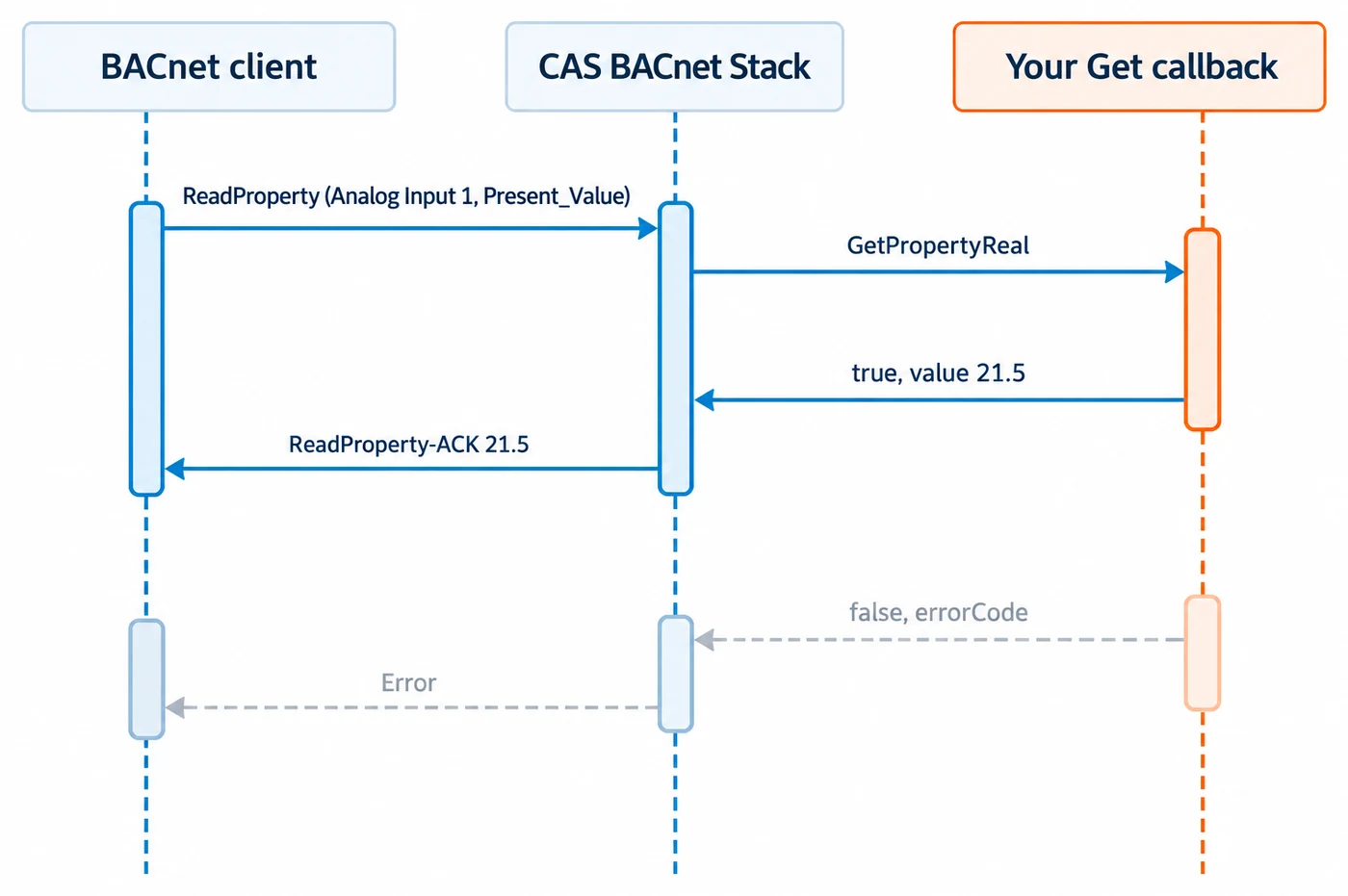
The stack calls a Get callback, such as FPCallbackGetPropertyReal, when it needs the value of a
property your application serves. That happens in response to a ReadProperty or
ReadPropertyMultiple request. It can also happen while the stack builds an outgoing message:
BACnetStack_SendIAm() is one function that calls Get callbacks. Do not assume a callback can only
arrive during BACnetStack_Tick().
The first four arguments, deviceInstance, objectType, objectInstance and
propertyIdentifier, identify what is being read. If your application models several devices, use
deviceInstance to tell them apart; callbacks carry no user-data pointer.
Write the value through the out-parameter and return true. Return false when you are not
supplying a value. What the stack does next depends on errorCode (see
The errorCode out-parameter below):
- If you set
errorCode, the stack answers the read with that error straight away. - If you leave it unset, the stack falls back to the value it stores for the property, or to its default. The exceptions are properties whose value the stack must not make up, including PresentValue, NumberOfStates, RelinquishDefault, LocalDate and LocalTime, the car position, direction, door and passenger alarm properties of Lift and Escalator objects, and a File object’s File_Type, File_Size, Modification_Date, Archive, Read_Only and Record_Count. For those, a declined read is answered with read-access-denied rather than a made-up value. (If no callback is registered at all, they answer value-not-initialized.)
bool GetPropertyReal(const uint32_t deviceInstance, const uint16_t objectType, const uint32_t objectInstance, const uint32_t propertyIdentifier, float* value, const bool useArrayIndex, const uint32_t propertyArrayIndex, uint32_t* errorCode){ if (objectType == 2 /* analogValue */ && propertyIdentifier == BACnetPropertyIdentifier_presentValue) { *value = MyLookUpValue(objectInstance); return true; } return false; /* Not a value this application serves. */}For the variable-length types (CharacterString, OctetString and BitString), the callback receives
a buffer and a maxElementCount. Write at most maxElementCount elements, and set
valueElementCount to the number you wrote. The CharacterString callback also sets
encodingType; 0 means UTF-8, and FPCallbackGetPropertyCharacterString lists the other values.
Pointer arguments are only valid for the duration of the call. Copy anything you need to keep. Do not call back into the stack from inside a callback.
How a Set callback is called
Section titled “How a Set callback is called”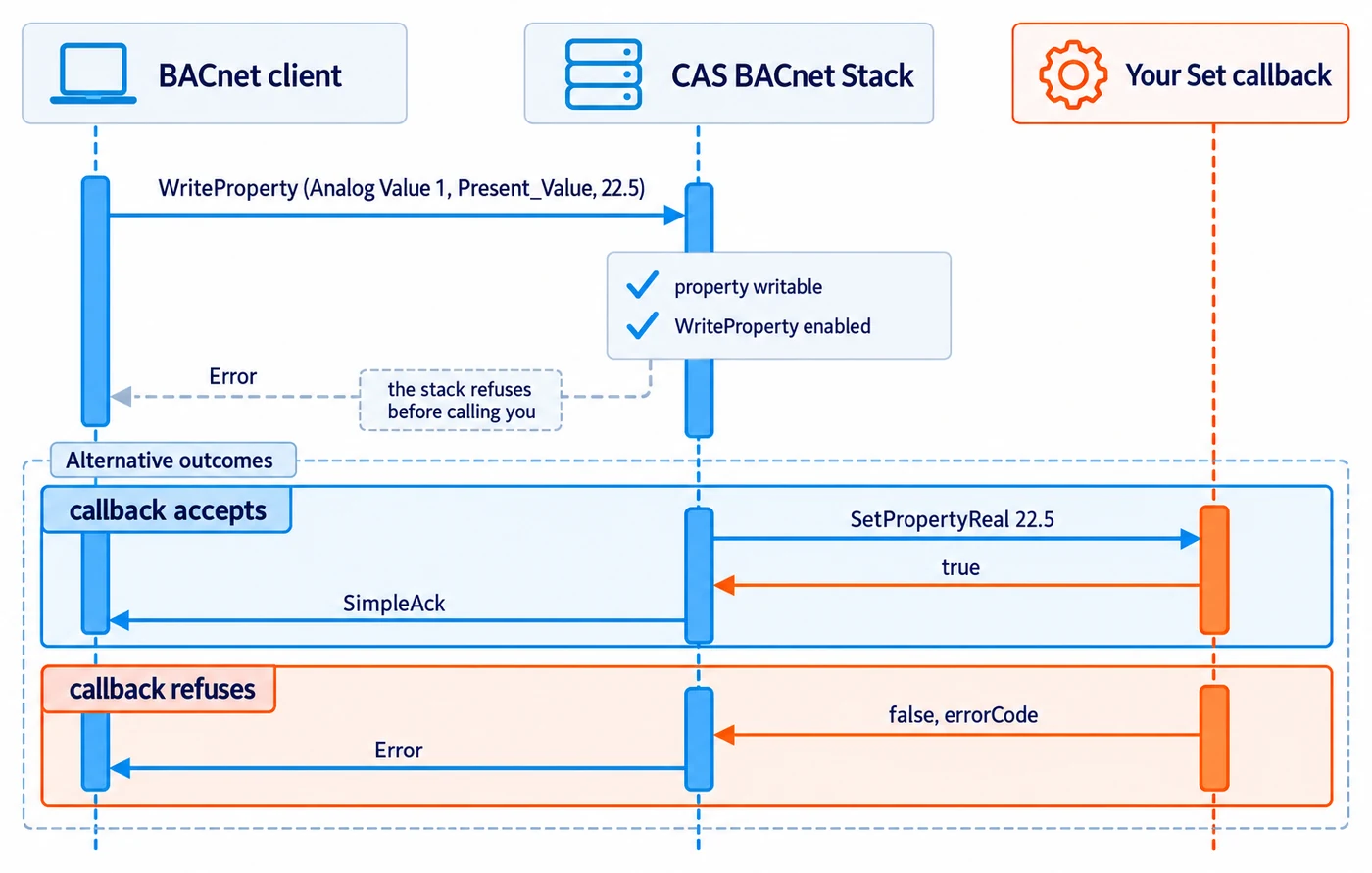
The stack calls a Set callback, such as FPCallbackSetPropertyReal, in response to a WriteProperty
or WritePropertyMultiple request. For a client to write a property, two things must be true:
- the property is writable, set with
BACnetStack_SetPropertyWritable(). The exception is a property that becomes writable when its object is out of service, such as Present_Value and Reliability of an input or value object: it accepts a write while Out_Of_Service is true, without this call; - the write service is enabled with
BACnetStack_SetServiceEnabled(). ReadProperty is enabled automatically, but WriteProperty and WritePropertyMultiple are not.
The callback receives the new value as an input. Store it and return true. Return false if you
did not store it, and set errorCode to say why.
The priority argument is only used when the property is commandable. See
Commandable objects below.
The errorCode out-parameter
Section titled “The errorCode out-parameter”Every Get and Set property callback ends in uint32_t* errorCode. That value is a BACnet error
code. The stack encodes it into the BACnet-Error response it sends back to the client that made
the request. It is not a channel for host or system errors that have no BACnet meaning.
- Write a bare error code. The stack works out the error class from the code, using the class clause 18 lists for it: device for device-busy and operational-problem, object for unknown-object, resources for the no-space and out-of-memory codes, security for password-failure and access-denied, services for service-request-denied and parameter-out-of-range, and property for any code clause 18 does not place elsewhere.
- The error code abort-other (56) makes the stack answer with an Abort instead of an Error.
- Set
errorCodeonly when you are rejecting the request. Leaving it untouched on success is correct. - For a Get callback, the stack presets
errorCodeto success before the call. Afalsereturn that leaves it at success means “no value from me”, and the fallback described in How a Get callback is called applies.
The error code values are listed on the Enumerations page.
bool SetPropertyReal(const uint32_t deviceInstance, const uint16_t objectType, const uint32_t objectInstance, const uint32_t propertyIdentifier, const float value, const bool useArrayIndex, const uint32_t propertyArrayIndex, const uint8_t priority, uint32_t* errorCode){ if (value < 0.0f || value > 100.0f) { *errorCode = 37; /* valueOutOfRange */ return false; } MyStoreValue(objectInstance, value); return true;}Arrays
Section titled “Arrays”Each Get and Set property callback has two array arguments:
useArrayIndexisfalsewhen the request is for the whole property, andtruewhen it is for a single element.propertyArrayIndexis the element’s index whenuseArrayIndexistrue. Elements start at 1.
A request for index 0 asks for the array’s length. The stack does not send that to the typed
callback. It calls your FPCallbackGetPropertyUnsignedInteger callback, with useArrayIndex
true and propertyArrayIndex 0, and you return the element count. The stack then calls the typed
callback once per element. So for any array property you serve, answer index 0 in your
UnsignedInteger callback and each element in the callback for the element’s datatype.
A few properties document an exception to this convention. Check the documentation of the function that creates the object.
Commandable objects and priority
Section titled “Commandable objects and priority”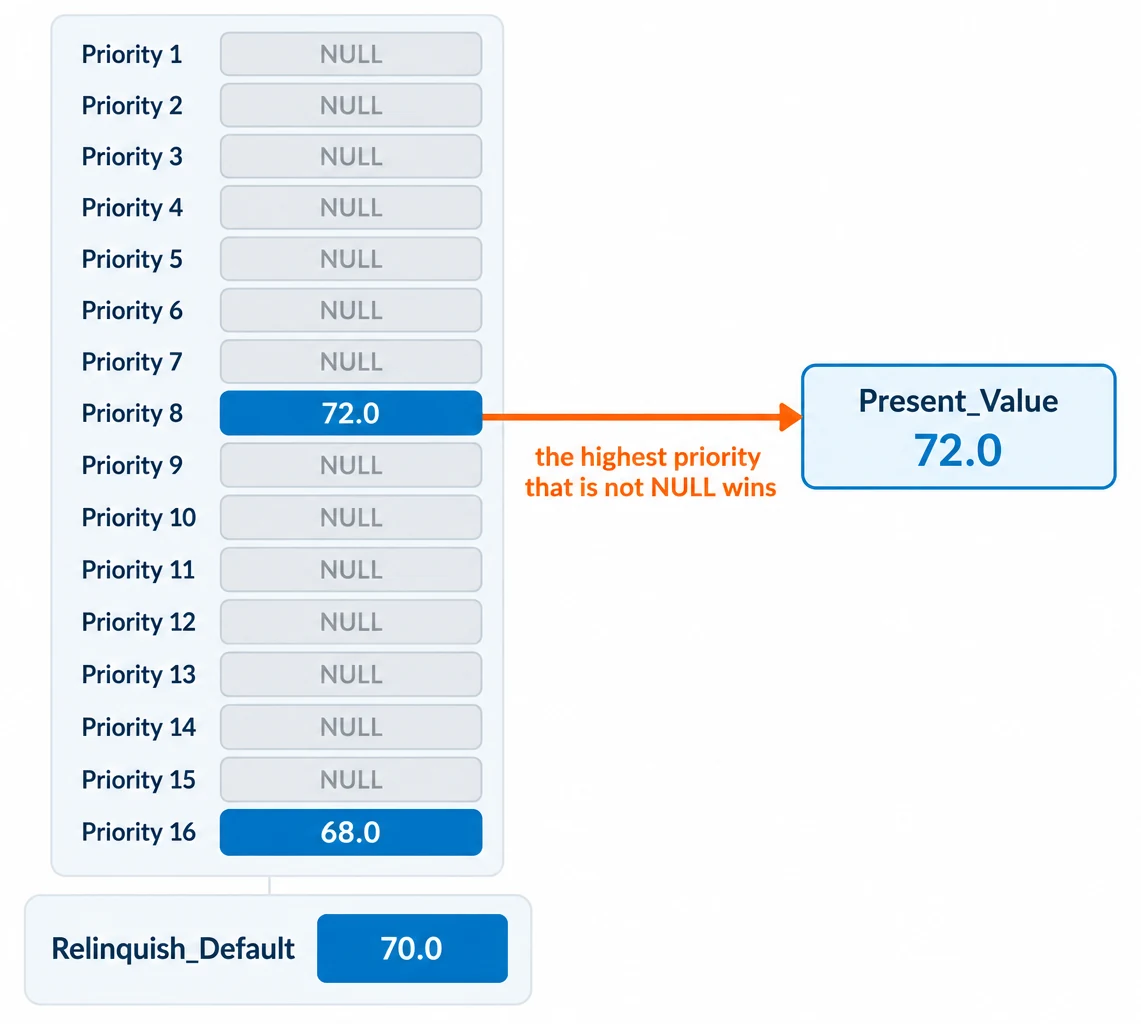
Analog Output, Binary Output, Multi-state Output, Access Door, Lighting Output and Binary Lighting
Output objects are always commandable. The Value object types become commandable once you enable
both PriorityArray and RelinquishDefault on the object with BACnetStack_SetPropertyEnabled().
For a commandable object, the stack never calls your PresentValue callback. It reads the
priority array instead, and reports the highest-priority slot that is not NULL, falling back to
RelinquishDefault. For each slot it calls two callbacks, both with
propertyIdentifier = BACnetPropertyIdentifier_priorityArray, useArrayIndex = true and a
propertyArrayIndex from 1 to 16:
FPCallbackGetPropertyBool, for the “is this slot NULL” flag. Set*valuetotruewhen the slot is empty.- The typed Get callback for the object’s datatype, for the slot’s value.
if (propertyIdentifier == BACnetPropertyIdentifier_priorityArray && useArrayIndex) { *value = !MySlotHasValue(objectType, objectInstance, propertyArrayIndex); /* true = NULL */ return true;}Your typed Get callback must also serve RelinquishDefault, which the stack reads when every slot is NULL.
When a client commands the object, your typed Set callback receives the write with its priority.
When a client relinquishes a slot by writing NULL, the stack calls your
FPCallbackSetPropertyNull callback, registered with
BACnetStack_RegisterCallbackSetPropertyNull().
Which callback serves which datatype
Section titled “Which callback serves which datatype”The stack picks the callback by the property’s datatype. Register a Get callback for each datatype you serve, and the matching Set callback for each one clients can write.
Each type is registered with the BACnetStack_RegisterCallback* function of the same name, for
example BACnetStack_RegisterCallbackGetPropertyReal().
PresentValue follows the object type’s datatype. For example, Analog Input, Analog Output and
Analog Value objects use Real; Binary Input, Binary Output and Binary Value objects use
Enumerated; and Multi-state Input, Multi-state Output and Multi-state Value objects use Unsigned.
BACnetStack_AddObject() has the full table.